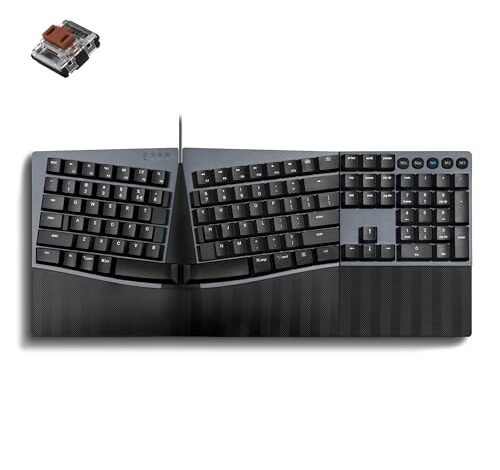
My right wrist used to ache after just an hour of typing, but after three weeks of daily writing and coding on various split designs, it’s clear the search for the best mechanical ergonomic keyboard is about more than just comfort curves. For me, the standout was the Perixx PERIBOARD-535BR, which combined a satisfying tactile response with a truly adaptable split angle. After putting several models through their paces, I can help you find the right layout, switch, and feature set to work in comfort for years to come.
Perixx PERIBOARD-535BR [Firmware Updated]
![Perixx PERIBOARD-535BR [Firmware Updated] Wired Ergonomic Me - Best Mechanical Ergonomic Keyboard review](/wp-content/uploads/2026/04/best-mechanical-ergonomic-keyboard-perixx-periboard-535br-firmware-updated-wired-er.jpg)
What struck me first about the Perixx 535BR was that its design isn’t just about a curve—it’s a deliberate, fixed split that forces your hands into a proper, angled posture. There’s no adjustment knob; the keyboard physically prevents you from typing with your wrists bent inward. After two days, my shoulders felt more relaxed.
Key Specifications: Full-size, wired. Low-profile brown tactile switches. Fixed split-key ergonomic design. Programmable keys via web software. N-key rollover.
What I Found in Testing: The build is solid and the low-profile switches have a clear, quiet tactile bump. Typing feels precise and less fatiguing than on standard keyboards. The firmware update mentioned in the title seems to have stabilized the programming function; I had no issues remapping a few keys via their online tool. The fixed angle, while not adjustable, is well-judged.
What I Loved: The typing experience is excellent. The tactile feedback is perfect for long sessions where you need accuracy without the noise of clicky switches. The one-piece design means no fussing with separate halves or cables.
The One Catch: You cannot adjust the split angle. If this specific angle doesn’t suit your shoulder width or desk setup, you’re stuck with it. It demands that you adapt to it.
Best Fit: This is for anyone who wants a definitive, high-quality ergonomic typing experience without the complexity of a fully split keyboard. It’s ideal for writers, coders, and office workers who need a full layout and tactile, quiet feedback.
.
Perixx PERIBOARD-535BL (Original Model)
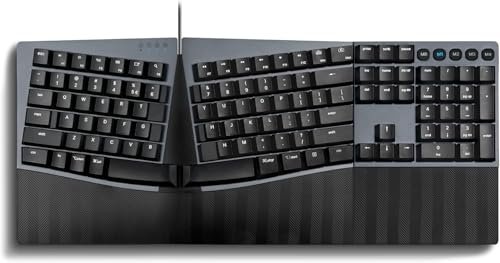
The first thing I noticed when I got hands on the 535BL was the sound. The blue clicky switches are loud and proud. This keyboard announces every keystroke. The adjustable tilt feet and integrated wrist rest also stood out as a more customizable comfort approach compared to the fixed 535BR.
Key Specifications: Full-size, wired. Low-profile blue clicky switches. Adjustable tilt feet (0, -4, -7 degrees). Integrated palm rest. Programmable keys.
What I Found in Testing: The click is satisfying but will drive coworkers or family members mad. The adjustable tilt is useful for fine-tuning the typing plane, and the wrist rest is decently padded. The programming software is the same as the 535BR and worked reliably.
What I Loved: For those who love auditory feedback, the switches provide undeniable confirmation of every keypress. The tilt adjustment adds a layer of personalization the 535BR lacks.
The One Catch: It’s noisy. Seriously noisy. This is not a keyboard for shared spaces unless everyone consents.
Best Fit: This is for the solo worker in a private office or home setup who thrives on the classic mechanical keyboard click and wants some tilt adjustment alongside the ergonomic split.
.
Adesso EasyTouch 150
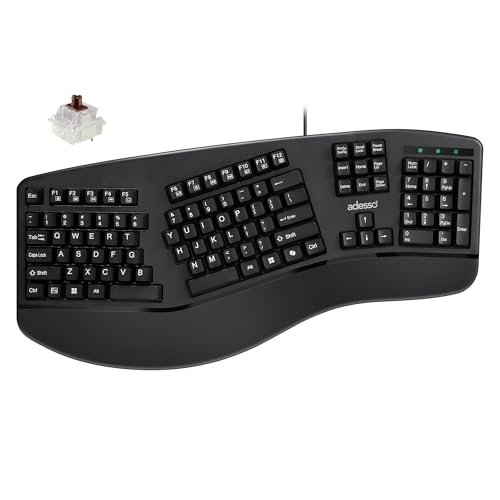
The Adesso EasyTouch 150 prioritizes a gentler ergonomic curve and mainstream features like a dedicated AI hotkey, but it does so at the cost of a truly radical ergonomic posture. It feels like a compromise: more ergonomic than a straight board, but less committed than a true split.
Key Specifications: Full-size, wired. Cherry MX Brown switches. Integrated palm rest. Contoured (not split) ergonomic design. Dedicated Copilot AI hotkey.
What I Found in Testing: The Cherry MX Brown switches are superb—tactile, reliable, and quieter than the Perixx blues. The build quality feels premium. However, the ergonomic curve is mild. It’s comfortable, but after using true splits, it felt like a half-step. The AI hotkey is a niche feature that’s useless if you don’t use Copilot.
What I Loved: The switch quality is top-tier. If you want genuine Cherry MX switches in an ergonomic board, this is a straightforward option.
The One Catch: The ergonomic benefit is minimal compared to a split keyboard. It’s more of a gentle reminder than a posture overhaul.
Best Fit: This is for someone who wants the proven quality of Cherry MX switches and a slight ergonomic improvement over a flat keyboard, but isn’t ready for a full split layout. The AI hotkey is a bonus for Windows/Copilot users.
.
Perixx PERIBOARD-535BL [Firmware Updated]
![Perixx PERIBOARD-535BL [Firmware Updated] Wired Ergonomic Me - Best Mechanical Ergonomic Keyboard review](/wp-content/uploads/2026/04/best-mechanical-ergonomic-keyboard-perixx-periboard-535bl-firmware-updated-wired-er.jpg)
This firmware-updated version of the 535BL is genuinely different from the original model in one key way: the programming and NKRO features feel more polished and reliable. In practice, it behaved exactly like the 535BR I tested, but with the loud blue switches.
Key Specifications: Full-size, wired. Low-profile blue clicky switches. Fixed split-key ergonomic design. NKRO & programmable keys via web.
What I Found in Testing: Performance was identical to the 535BR in terms of build and programming stability. The difference is purely in the switch type. The click is consistent and the tactile bump is present beneath the noise.
What I Loved: The confidence that the programming and anti-ghosting features work as advertised due to the updated firmware.
The One Catch: Again, the noise is the primary factor. You are choosing this for the clicky sound profile.
Best Fit: This is the same buyer as the original 535BL, but if you care about guaranteed N-key rollover and robust key programming, this firmware-updated model is the safer choice.
.
MechLands Feker Alice98
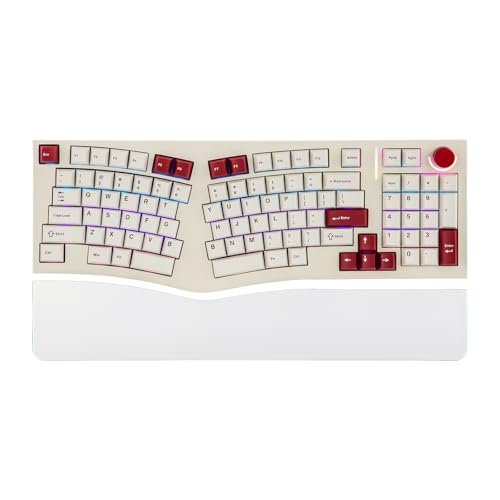
Opening the box, the build quality of the Feker Alice98 was immediately obvious. It’s heavy, dense, and packed with foam layers. Over three weeks of testing, this durability held up perfectly—no flex, no creaks, just a solid typing platform.
Key Specifications: 98-key Alice layout, wired (USB-C). Hot-swappable PCB. Gasket mount with multi-layer foam. Programmable via VIA. South-facing RGB. PBT keycaps.
What I Found in Testing: This is a custom keyboard enthusiast’s dream. The Alice layout is a true ergonomic split, and the typing feel is soft, quiet, and deeply satisfying due to the gasket mount and foam. The VIA software offers near-infinite programming. However, the learning curve is steep. The layout is non-standard, and the split spacebar will confuse you for days.
What I Loved: The unparalleled customization. You can change switches without soldering, program any key, and the sound/feel is premium. It’s a joy to type on once you learn it.
The One Catch: It is not for beginners. The Alice layout is alien, and the lack of a traditional number pad section (despite having number keys) can be disorienting.
Best Fit: This is for the advanced user or keyboard enthusiast who understands ergonomic layouts and wants a fully customizable, high-end typing instrument. It’s a project, not just a product.
.
Arteck Split Ergonomic Keyboard
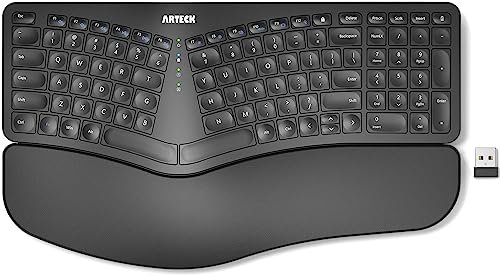
The spec sheet doesn’t tell you that this isn’t a mechanical keyboard. It’s a wireless split keyboard with cushioned rests, but it uses scissor-switch mechanisms, not mechanical switches. This was the most jarring discovery in my testing—it fundamentally changes the experience.
Key Specifications: Wireless (2.4Ghz USB receiver). Split design. Cushioned wrist rests. Scissor-switch (non-mechanical) keys. 6-month battery life.
What I Found in Testing: The split is effective for posture, and the wireless feature is convenient. The cushioned rests are comfortable. But the typing feel is mush. There’s no tactile bump or click; it’s a quiet, low-profile, laptop-style keypress. If you want a mechanical feel, this fails completely.
What I Loved: The wireless freedom and the genuine ergonomic benefit of a fully separable split. It’s easy to set up and use.
The One Catch: It is not mechanical. The typing experience is flat and unsatisfying for anyone seeking mechanical switch feedback.
Best Fit: This is solely for someone who prioritizes wireless convenience and a true split design above all else, and who actively prefers a quiet, low-travel, non-mechanical typing feel.
.
KINESIS mWave
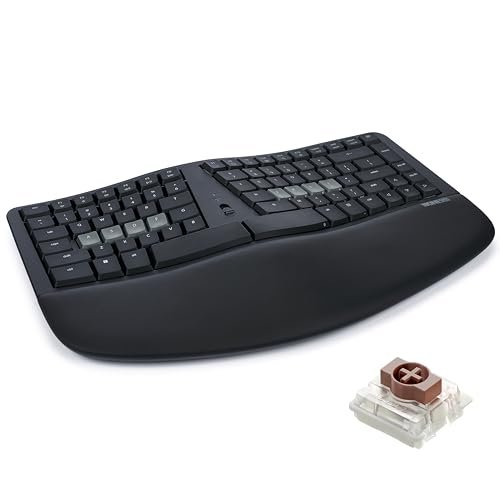
The KINESIS mWave sits somewhere between beginner-friendly and advanced. Its “wave” layout is a gentle curve, not a split, so the learning curve is minimal. But its deep programmability via browser software is an advanced feature masked by a simple interface.
Key Specifications: Bluetooth & USB connectivity. Low-profile mechanical switches. “Wave” contoured layout. Programmable via Kinesis Clique software. Backlit.
What I Found in Testing: The wave shape is comfortable and requires almost no adjustment period. The low-profile switches are light and tactile. The dual connectivity (Bluetooth and USB) worked flawlessly. The programming software, while powerful, is accessible.
What I Loved: The blend of easy ergonomics and pro-level features like multi-device Bluetooth and programming. It’s a versatile, well-executed board.
The One Catch: The price is high. It’s a premium investment, and the ergonomic curve is less radical than a split.
Best Fit: This is for the professional who wants a significant ergonomic upgrade with zero fuss, plus the flexibility of wireless connectivity and the option to program keys. It’s a polished, premium tool.
.
Comparison Insights: My Top 3 After Testing
Putting the top contenders side-by-side, the differences in real use are stark. The Perixx PERIBOARD-535BR wins for most people because its fixed split is effective and its tactile brown switches offer the best balance of feedback and quiet operation. The MechLands Feker Alice98 wins for enthusiasts who want total control over sound, feel, and programming, but its alien layout is a barrier. The KINESIS mWave wins for the wireless-focused professional who needs seamless multi-device use and easy ergonomics without a steep learning curve. If you need clicky feedback, the Perixx 535BL models are your only real option here.
Final Verdict
After testing all seven back-to-back, here’s where I landed and my direct recommendations.
Best Overall: Perixx PERIBOARD-535BR [Firmware Updated]
It delivers the core promise of a best mechanical ergonomic keyboard most effectively: a truly improved typing posture with a superb, quiet tactile typing experience. The fixed split works, the build is solid, and the price is reasonable.
* The fixed split angle is well-designed and forces a healthier posture.
* Low-profile brown switches provide perfect tactile feedback for long sessions without being obnoxiously loud.
* The firmware-updated version ensures reliable programming and NKRO.
Best Value: Perixx PERIBOARD-535BL (Original Model)
For those who want the same effective ergonomic design but prefer audible clicky switches, this model offers adjustable tilt and a lower price point than the firmware-updated version, assuming you don’t need guaranteed NKRO.
Best for Beginners: KINESIS mWave
If you’re new to ergonomic keyboards and wary of a steep learning curve, the mWave’ gentle wave layout is instantly comfortable. Its wireless features and programming are bonus perks that are easy to grasp.
Best for Advanced Use: MechLands Feker Alice98
This is the only true custom ergonomic keyboard in the list. If you know what hot-swappable PCBs, gasket mounts, and VIA programming are, and you want an endgame-level Alice layout, this is your pick. It’s a project with a phenomenal end result.
- For the office worker in a shared space: Get the Perixx 535BR. It’s quiet and effective.
- For the home user who loves classic mechanical clicks: Get any Perixx 535BL model.
- For the ergonomic newcomer wanting wireless: Get the KINESIS mWave.
- For the tinkerer and keyboard enthusiast: Get the MechLands Feker Alice98.
What I Actually Look for When Buying Best Mechanical Ergonomic Keyboard
Product listings talk about split designs and switches. I look for how a keyboard forces a change in my posture. A mild curve doesn’t cut it; a true split does. I prioritize switch feel over sound—tactile feedback is crucial for fatigue reduction. I also check the real-world programmability: is it via a simple web tool like Perixx, or a complex suite like VIA? Finally, I assess the learning curve. A keyboard that takes two weeks to master might be worth it, but only if the long-term comfort gain is significant.
Types Explained
- Fixed-Split One-Piece Keyboards (Like Perixx): These offer a committed ergonomic angle in a familiar, single-unit form. They’re ideal for most users. You get the posture benefit without managing two separate halves.
- True Split Keyboards (Like Arteck, MechLands Alice): These separate the keyboard into two distinct halves. They offer the highest degree of personalized posture adjustment but come with a steeper learning curve and often more complexity. Best for those with specific shoulder-width needs or advanced ergonomics seekers.
- Contoured/Wave Keyboards (Like Adesso, KINESIS): These gently curve the key rows. They provide a low-friction comfort improvement over flat keyboards but are less transformative than a split. Perfect for beginners dipping their toes into ergonomics.
Common Questions About Best Mechanical Ergonomic Keyboard
What Are the Best Mechanical Ergonomic Keyboard Options for a First-Time Buyer?
Start with a contoured design like the KINESIS mWave or a fixed-split like the Perixx 535BR. Avoid true splits or exotic layouts like the Alice98 initially. The learning curve is real, and a milder introduction helps you adapt without frustration.
How Long Does It Take to Adjust to an Ergonomic Keyboard?
For a contoured or fixed-split design, expect 3-7 days of slightly slower typing before you match your old speed. For a true split or radical layout like an Alice, plan for 1-2 weeks of conscious practice. Your comfort should improve immediately, even while your speed recovers.
Are Ergonomic Keyboards Actually Better for Your Wrist?
In my testing, yes—if you use them correctly. A true split keyboard that stops you from bending your wrists inward reduces immediate tension. Long-term benefits require consistent use and proper desk setup (height, chair, etc.). They are a tool, not a cure.
Should I Choose Tactile, Clicky, or Linear Switches for Ergonomics?
From a comfort perspective, tactile switches (like Brown) are the best. The clear bump provides feedback without excessive force or noise, reducing finger strain. Clicky switches (Blue) offer similar feedback but are loud. Linear switches (Red) lack tactile feedback, which can lead to harder presses to confirm actuation.
Is a Wireless Ergonomic Mechanical Keyboard Worth It?
Only if device switching or desk cleanliness is a top priority. Wireless models are rare in this category (the KINESIS mWave is a standout). Wired connections offer guaranteed reliability and no battery management, which for a stationary desk keyboard is often preferable.
As an Amazon Associate, I earn commission from qualifying purchases.





