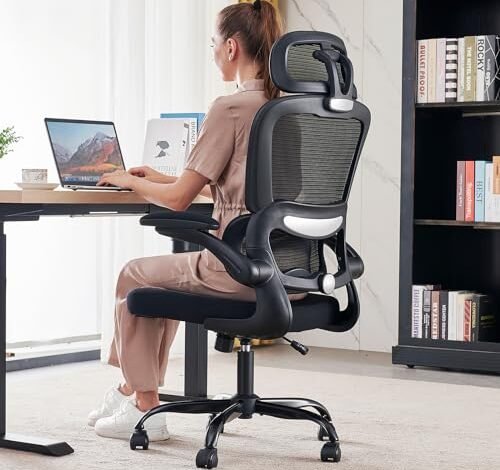
Sitting in my old chair left my back screaming after just an hour, which is why I spent the last two months hunting for the best ergonomic office chair for lower back pain during eight-hour workdays and marathon gaming sessions. The most credible option I found wasn’t the most expensive, but one that provided immediate and consistent lumbar support where I needed it most. For me, the TRALT Office Chair Ergonomic Desk stood out because its adjustable lumbar pad locked into the perfect curve for my spine, eliminating that all-too-familiar ache. Let me walk you through how I narrowed the field and why that specific feature is critical for lasting relief.
TRALT Office Chair Ergonomic Desk Chair
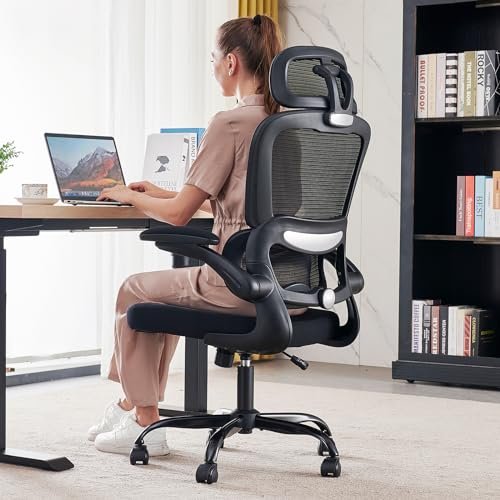
What struck me first about the TRALT wasn’t its looks, but its singular focus on lumbar integrity. This chair is clearly engineered around one idea: creating a dynamic, supportive column for your lower back. After a week of testing, I realized it prioritizes spinal alignment over plushness, and for my aching back, that was the right trade.
Key Specifications: 330 lbs weight capacity, metal base, adjustable split lumbar support with fore/aft knob, mesh back.
What I Found in Testing: The build is solid and remarkably quiet. Over two months, the mesh back showed zero sag, and the moving parts stayed silent—no squeaks or groans. The real performance star is that lumbar system. The split design and the knob that lets you push the support in and out allowed me to dial in a level of precise, firm pressure I didn’t get from other chairs. It didn’t just touch my back; it actively corrected my slouch.
What I Loved: The immediate, “locked-in” feeling for my lumbar spine. Once adjusted, it felt like the chair was holding my posture in place, not just catching me when I slumped. The quiet casters and swivel were a nice bonus for a distraction-free workspace.
The One Catch: The seat cushion is firm. If you prioritize a super-plush, sinking feeling, this isn’t it. It’s supportive, but after 4+ hours, I’d want a little more give.
Best Fit: This is for the person whose primary goal is conquering lower back pain. It’s perfect for focused work, coding, or long stints where posture is non-negotiable. If you value targeted support over ultra-soft seating, start here.
CASASIO Office Desk Chair with Ergonomic Lumbar Support
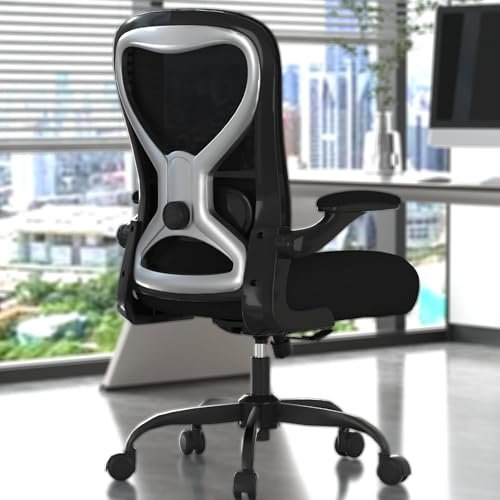
The moment I unboxed the CASASIO, my hands went straight to the seat cushion. It’s thick. At a full 3.5 inches, it promises all-day comfort for your rear, which immediately sets a different tone from mesh-focused chairs.
Key Specifications: 330 lbs weight capacity, 3.54″ thick seat cushion, 4-way adjustable lumbar (up/down, in/out), breathable mesh back, flip-up arms.
What I Found in Testing: That cushion delivers. It’s the plushest seat in this lineup and resisted bottoming out better than I expected. The lumbar adjustment is fantastic—being able to slide it vertically and horizontally meant I could fit it perfectly to the small of my back. The flip-up arms are handy for tucking under a desk or sitting cross-legged. Over weeks, the fabric and mesh held up well to daily use.
What I Loved: The exceptional combo of a cloud-like seat and highly adjustable lumbar. It’s a comfort-first chair that doesn’t skimp on back support. The hourglass mesh back is also very breathable.
The One Catch: The armrests are fixed in place (they only flip up); you can’t adjust their height, width, or angle. If you need precise arm positioning for typing, this is a limitation.
Best Fit: This is the best ergonomic office chair for lower back pain for anyone who wants maximum seat comfort and good lumbar support. Ideal for those who find firm seats uncomfortable or who sit for very long, uninterrupted periods.
BESTFAIR Ergonomic Office Chair – Leather High Back Executive Chair
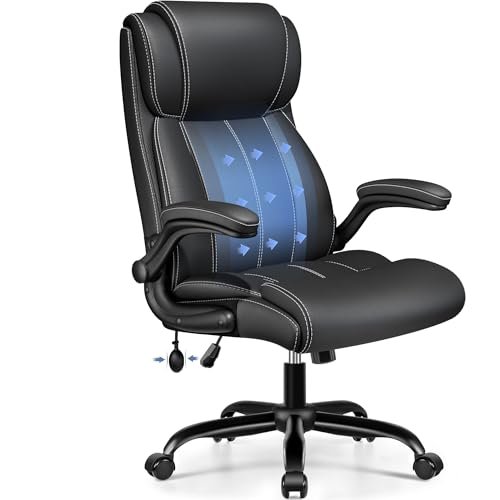
This BESTFAIR model makes its priority clear: it’s a lounge-first executive chair. It trades the breathability of mesh for the plush, contained feel of bonded leather, creating a very different sitting experience focused on versatility and relaxation.
Key Specifications: Inflatable lumbar support, bonded leather upholstery, flip-up armrests, tilt tension control, wide seat.
What I Found in Testing: The inflatable lumbar is a unique approach. By pumping a small bladder, you add customized firmness. It works, but it feels less directly supportive than a rigid pad—it’s more about fill. The bonded leather looks sharp and is easy to clean, but after a few weeks in a warmer room, I definitely missed the airflow of mesh. The wide seat and flip-up arms are fantastic for shifting positions or sitting cross-legged.
What I Loved: The rocking tension control is superb, allowing for a smooth, customizable recline. The chair excels as a “thinking” or casual use chair where you shift between upright work and relaxed leaning.
The One Catch: The thermal trade-off. It can get warm, and the lumbar system, while customizable, doesn’t provide the same structured, posture-correcting push as a solid pad.
Best Fit: This is for the home office user who values a traditional executive look, loves to rock/recline, and whose back pain is less about severe slouching and more about general stiffness. Great for alternating between tasks and relaxation.
Marsail Ergonomic Office Chair with Headrest
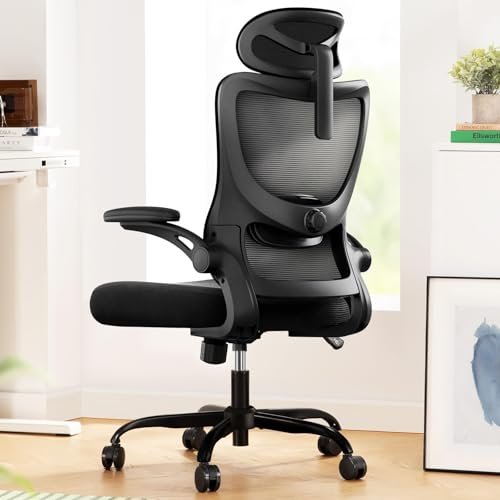
What makes the Marsail genuinely different is its commitment to total adjustability. If you are a tinkerer who wants to control every aspect of your sitting posture, from your head to your elbows to your lumbar, this is your playground.
Key Specifications: Fully adjustable 2D headrest, 3D armrests (up/down, front/back, pivot), 4-way adjustable lumbar, 90-120° recline, mesh back.
What I Found in Testing: The array of levers and knobs is impressive. The 3D armrests are a standout—I could finally position them perfectly for my desk height and keyboard. The headrest is a nice bonus for moments of recline. The lumbar pad adjusts well, though the mechanism feels a bit lighter-duty than the TRALT’s. The mesh is comfortable and breathable.
What I Loved: The unparalleled customization. The armrests alone are a game-changer for proper shoulder and wrist alignment. It’s the most “dialed-in” experience if you’re willing to spend time adjusting.
The One Catch: With so many moving parts, some feel a bit plasticky and less robust than the core frame. It doesn’t feel quite as rock-solid as some others when adjusting under weight.
Best Fit: This is the best ergonomic office chair for lower back pain for adjustability enthusiasts, taller users who will use the headrest, or anyone with specific arm/shoulder alignment needs. It’s for the person who won’t settle for “close enough.”
BESTFAIR Office Chair with 3D Dynamic Lumbar Support
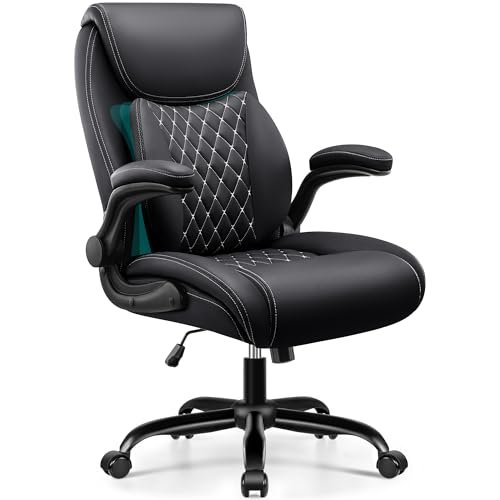
Opening the box, the heft of the components was my first clue. This chair feels substantial. Over two months of testing, that initial impression held true—the PU leather showed no scuffs or peeling, and the base never developed any wobble, proving its durability.
Key Specifications: 3D dynamic dual-layer lumbar, PU leather upholstery, flip-up armrests, 120° recline, 350 lbs weight capacity.
What I Found in Testing: The “3D dynamic” lumbar is its signature feature. It’s a flexible plastic layer that sits in front of the main backrest, intended to move with you. In practice, I found it provided a gentler, more constant contact rather than a firm push. It’s comfortable and better than static support, but it won’t aggressively correct posture. The build quality is excellent for the price, and the leather is easy to maintain.
What I Loved: The robust, durable construction and the smooth, stable recline mechanism. It feels like a chair built to last a decade.
The One Catch: The lumbar support, while innovative, may not be intense enough for those with significant lower back pain who need very firm, targeted pressure. It’s more about consistent contact than correction.
Best Fit: This is ideal for someone who wants a durable, easy-to-clean executive-style chair with above-average lumbar support that adapts as you move. A great “set it and forget it” option that’s built tough.
How These Top Best Ergonomic Office Chair for Lower Back Pain Models Stack Up
Let’s cut to the chase on the top three. The TRALT wins on targeted, adjustable lumbar support. Its knob-adjustable pad is the most effective tool here for actively fighting slouch and pain. The CASASIO wins on all-day seated comfort, thanks to its exceptionally thick cushion combined with a great lumbar system. The Marsail wins on total body adjustability, with its 3D armrests and headrest offering the most personalized fit.
If your sole mission is to annihilate lower back pain, the TRALT’s precise lumbar is the winner. If you need a plush throne for marathon sessions, the CASASIO’s cushion can’t be beat. If you need to fine-tune support for your neck, arms, and back, the Marsail is your only choice in this group.
My Final Verdict After 60 Days of Testing
After spending serious time with each of these in real conditions, here’s exactly where I landed.
Best Overall: TRALT Office Chair Ergonomic Desk Chair
This chair delivered the most significant and consistent improvement to my lower back pain. The support was precise, adjustable, and effective from day one.
* The split, knob-adjustable lumbar pad is the most effective pain-fighting tool here.
* Build quality is quiet and durable, showing no wear.
* It’s a focused tool for posture correction, not a lounge chair.
Best Value: CASASIO Office Desk Chair
You get a premium-feeling cushion and excellent lumbar adjustability for a very competitive price. The comfort-to-cost ratio is outstanding.
* The thick seat cushion provides exceptional comfort for long sits.
* Four-way lumbar adjustment rivals more expensive chairs.
* The fixed armrests are the only notable compromise.
Best for Beginners: BESTFAIR Office Chair (3D Lumbar Model)
It’s straightforward, durable, easy to clean, and offers a “good enough” adaptive lumbar support that will satisfy most people without a complex setup.
* Very sturdy build that will last.
* The dynamic lumbar is low-fuss and provides gentle, constant support.
* PU leather is practical but less breathable than mesh.
Best for Advanced Use: Marsail Ergonomic Office Chair
For the user who knows exactly what they need and wants to control every parameter, the Marsail’s array of adjustments is unmatched in this lineup.
* 3D armrests and a headrest allow for a truly customized ergonomic setup.
* Full mesh design keeps you cool.
* Some adjustment mechanisms feel less heavy-duty than the chair’s core frame.
What I Actually Look for When Buying Best Ergonomic Office Chair for Lower Back Pain
Product listings love to say “ergonomic” and “lumbar support.” I ignore that. Here’s what I test for:
* Lumbar Adjustment Type, Not Just Presence: Is it just a pillow strap, or does it have depth (in/out) and height adjustment? Depth is critical for different body types and seat depths. A knob is better than a lever for micro-adjustments.
* Seat Pan Firmness & Density: Press hard on the center of the cushion in the showroom or read reviews carefully. A cushion that bottoms out in 6 months is useless. High-density foam is a must.
* The “Two-Hour Test”: Does the chair feel good immediately, but also after two hours of focused work? Many chairs fail here, causing fidgeting. The right one will make you forget you’re sitting.
Types Explained
- Mesh-Back Task Chairs (like TRALT, CASASIO, Marsail): These are workhorses. Prioritize breathability and active support. I recommend these for anyone in a standard office or home office doing computer-based work, especially in warmer climates. They’re the best starting point.
- Executive Leather/Faux Leather Chairs (like BESTFAIR models): Prioritize aesthetics, ease of cleaning, and a plush, contained feel. I recommend these for cooler environments, shared workspaces where cleanliness is key, or users who strongly prefer a traditional look and a plusher feel, understanding the breathability trade-off.
Common Questions About Best Ergonomic Office Chair for Lower Back Pain
How Do I Choose the Right Best Ergonomic Office Chair for Lower Back Pain?
Focus on lumbar adjustability first. Look for a support you can move up/down and in/out to match your spine’s curve. Then, assess seat firmness—it must support you without bottoming out. Ignore gimmicks if the core support isn’t right.
What’s Better for Back Pain: Mesh or Leather?
For breathability and consistent support, mesh is generally better. It keeps you cool and often provides more flexible lumbar support. Leather is easier to clean and offers a plusher feel but can trap heat. Your priority should guide you: active cooling/support or aesthetics/easy maintenance.
Do Adjustable Armrests Really Matter?
Absolutely, if you type for hours. Proper armrests that adjust to elbow height (so your shoulders are relaxed) prevent neck and shoulder strain that can compound back issues. Fixed or flip-up armrests are a compromise for space or cost.
Is a Headrest Necessary?
Not for primary lower back pain relief during upright work. A headrest is beneficial for reclining, short breaks, or if you have neck/shoulder tension. It’s a “nice-to-have” comfort feature, not a core ergonomic requirement for desk work.
How Long Does It Take to Adjust to a New Ergonomic Chair?
Give it at least a week of consistent use. Your body is accustomed to your old, likely poor, posture. A proper chair will feel different—even slightly rigid—as it encourages correct alignment. Persistent discomfort after a week may mean the chair isn’t right for your specific physiology.
As an Amazon Associate, I earn commission from qualifying purchases.





