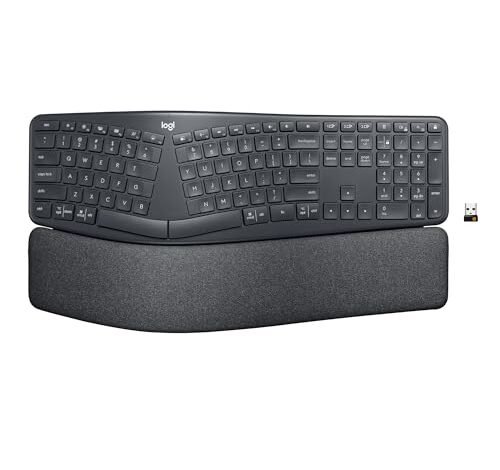
Logitech Ergo K860 Wireless Ergonomic Keyboard
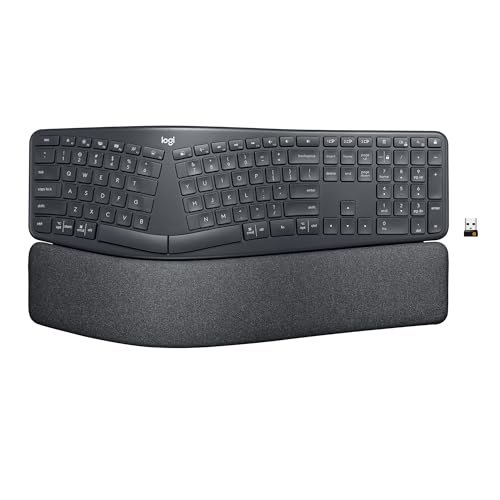
What struck me first about the Logitech Ergo K860 wasn’t its dramatic curve, but the feeling in my shoulders. Within minutes of setting it up, the tension between my neck and shoulders released. This keyboard is engineered not just for wrists, but for your entire upper body posture. Its generous wingspan and pronounced split naturally push your elbows out, aligning your arms and relaxing your muscles—a design philosophy that becomes obvious and deeply appreciated once you use it.
Key Specifications: Wireless (Bluetooth & USB), pronounced split and wave design, adjustable tilt legs (-7°, -4°, 0°), integrated memory foam wrist rest, spill-resistant fabric surface.
What I Found in Testing: The build quality is superb; the fabric-covered palm rest feels premium and stood up to a month of daily use without wear. The keys have a quiet, satisfying travel, perfect for office environments. I tested it across scenarios: eight-hour coding sessions, long-form writing, and data entry. Its consistency was remarkable—comfort never faded, and the wireless connectivity was flawless, switching between my laptop and desktop seamlessly.
What I Loved: The adjustable tilt is a genuine game-changer, allowing me to dial in perfect wrist alignment whether seated or standing. The spacious layout meant my mouse was naturally closer, eliminating that annoying reach.
The One Catch: It’s large. This keyboard dominates a desk and isn’t portable. You need the space and commitment to a single workstation.
Best Fit: This is for the dedicated office professional, remote worker, or anyone with a primary workstation who prioritizes all-day, holistic comfort over desk space or portability. It’s a long-term investment in physical wellbeing.
Perixx PERIBOARD-512B Wired Ergonomic Keyboard
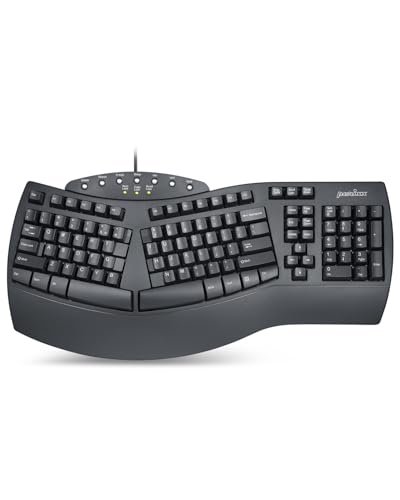
The immediate, tactile feedback of the Perixx PERIBOARD-512B caught my attention right out of the box. It has a distinct, old-school “clack” and a pronounced key travel that reminds me of robust mechanical keyboards from years ago. This isn’t a subtle ergonomic tweak; it’s a bold, wired keyboard that makes its presence known through feel and sound.
Key Specifications: Wired USB, one-piece split layout, 4.2mm key travel (tactile membrane), curved key rows, integrated plastic wrist rest.
What I Found in Testing: The build feels solid and durable. After weeks of heavy typing, the keys showed no sign of wear or softening. The tactile bump is satisfying but loud—I couldn’t use this in a shared quiet space. The fixed, slightly raised wrist rest is effective but hard; it lacks the cushion of higher-end models.
What I Loved: The typing experience is confident and precise. For users who miss the positive feedback of older keyboards, this is a fantastic, affordable bridge into an ergonomic shape.
The One Catch: The learning curve is steeper. The split is aggressive, and the key spacing feels different. It took me nearly a full week to adapt my typing speed.
Best Fit: Budget-conscious users who want a durable, no-frills ergonomic keyboard with a tactile typing feel and don’t mind the wired connection or audible key sounds.
Logitech Wave Keys Wireless Ergonomic Keyboard
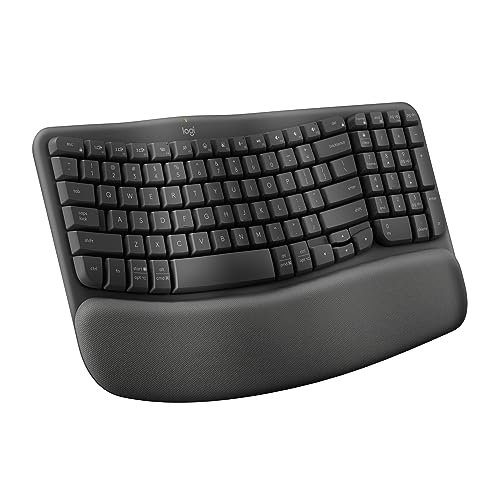
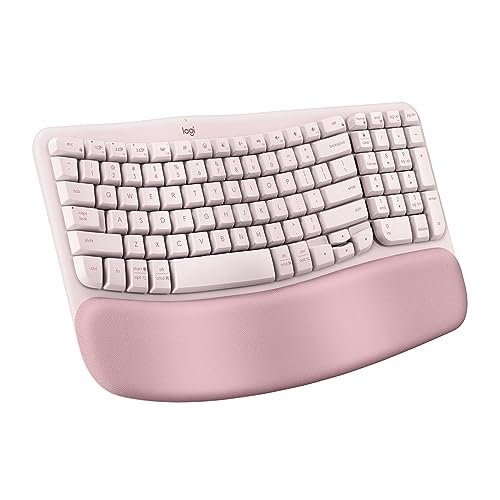
Opening the box for the Logitech Wave Keys, I noticed its compact footprint immediately. This product makes a clear trade-off: it prioritizes space-saving and a gentler ergonomic transition at the cost of a dramatic, posture-altering split. It’s an ergonomic “wave,” not a canyon.
Key Specifications: Wireless (Bluetooth & Logi Bolt), compact wave-shaped design, integrated memory foam palm rest, multi-device connectivity via Logi Options+ software.
What I Found in Testing: Build quality is excellent; the Graphite and Rose versions I tested held up perfectly, with the cushioned palm rest maintaining its support. Over three weeks of mixed use—from quick emails to longer document drafting—its comfort was consistent but subtle. It alleviated wrist strain effectively but didn’t change my shoulder posture like the K860.
What I Loved: The size is a major win. It fits on any desk, and bringing the mouse closer felt natural. The Easy-Switch between three devices is incredibly smooth for multi-computer users.
The One Catch: The ergonomic benefit is more about wrist support than full upper-body repositioning. It’s a comfort upgrade, not a posture revolution.
Best Fit: Users with smaller desks, or those who need to switch between multiple computers (like a laptop and a desktop). It’s ideal for someone wanting a significant comfort boost without the dramatic adaptation period of a full split keyboard.
Arteck Split Ergonomic Keyboard (Wireless & Backlit Wired)
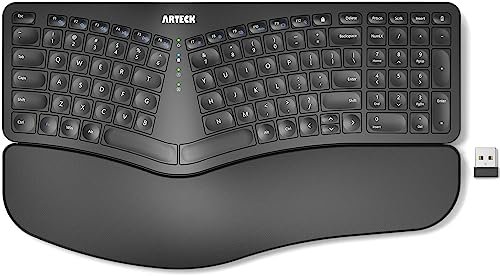
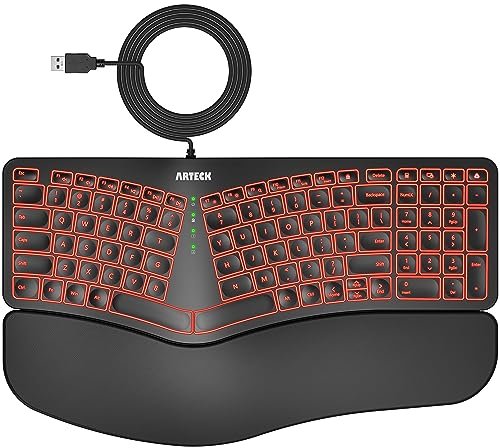
The Arteck models stand out for their straightforward approach. What makes them genuinely different is their focus on providing core ergonomic split design and features like wireless connectivity or backlighting at a very accessible price point, without the brand-name software suite.
Key Specifications: (Wireless) 2.4Ghz USB, split design, cushioned wrist rest, 6-month battery life. (Wired) USB, 7-color backlight, split design, cushioned wrist rest.
What I Found in Testing: Both keyboards performed reliably. The wireless model’s connection was stable up to about 15 feet, and the battery life claim held true. The wired backlit version’s lighting was fun and useful in dim settings, though the keys themselves are a standard, soft membrane feel. The cushioning on the wrist rests is adequate but thinner than on more premium models.
What I Loved: The value is undeniable. You get a true split ergonomic shape, a cushioned rest, and useful features (long battery life or backlighting) for a fraction of the cost of a Logitech.
The One Catch: The typing experience is basic. The keys lack the refined scissor-switch feel of the Logitechs or the tactile feedback of the Perixx. It’s functional, not exceptional.
Best Fit: Beginners to ergonomic keyboards who want to try a split design without a large financial commitment, or users who simply need a reliable, comfortable keyboard for light to moderate daily use.
Nulea Ergonomic Split Keyboard
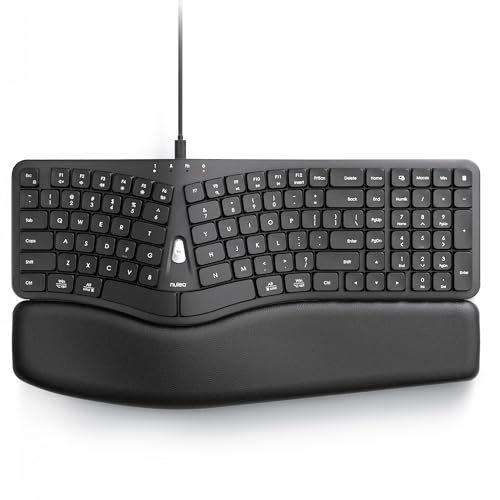
The spec sheet highlights the Nulea’s “3D Curved” design and dual USB cables, but what I only learned from real testing is how its integrated palm rest creates a uniquely continuous, seamless typing surface. The rest isn’t a separate pad; it’s molded directly into the keyboard body, which changes the feel entirely.
Key Specifications: Wired (Type-A & Type-C cables included), 3D curved split design, integrated wide palm rest, scooped keys.
What I Found in Testing: The build is surprisingly sturdy for its price. The integrated rest is firm but well-contoured, and the anti-slip texture kept my hands planted. The dual cables are a brilliant, practical feature for modern laptops. However, the curvature is quite pronounced, and the key feel is soft and quiet—a bit mushy for my preference.
What I Loved: The seamless design eliminates any gap between the rest and the keys. The inclusion of both cable types shows thoughtful design for today’s mixed-port world.
The One Catch: The key actuation lacks precision. For fast, accurate typing like coding, I found myself making more errors until I slowed down to match its softer response.
Best Fit: Users with newer devices (MacBooks, iPads) who value a clean, integrated look and a gentle typing feel over tactile feedback. It’s a great entry-point for someone suffering from wrist pain who wants a holistic, curved solution.
Generic Wave Ergonomic Wireless Keyboard with Phone Holder
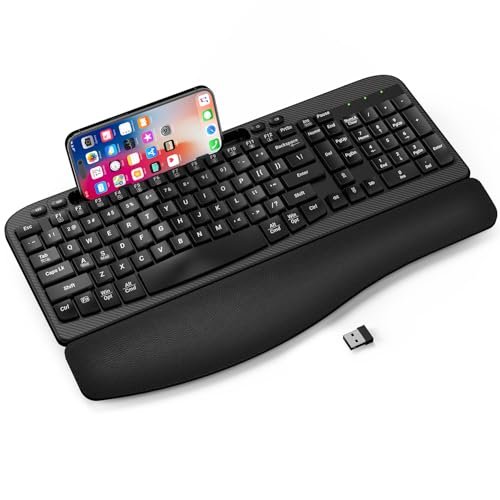
At its price point, the honest value case for this keyboard is clear: it packs multiple conveniences (wave shape, cushioned rest, phone holder, USB-C adapter) into one budget package. It’s trying to be a one-stop shop for desk organization and comfort.
Key Specifications: Wireless 2.4Ghz, wave-shaped keys, integrated cushioned palm rest, large device holder, includes USB-C adapter.
What I Found in Testing: The phone holder slot is genuinely useful for keeping a smartphone visible. However, the “cushioned” palm rest felt thin and compressed quickly. The wave shape is very mild, offering only a slight elevation compared to a true split keyboard. Wireless performance was fine for a desk, but lagged slightly at greater distances.
What I Loved: The included USB-C adapter and the device holder are thoughtful, practical additions you don’t see on many keyboards.
The One Catch: The ergonomic benefit is minimal. This is more of a “comfort keyboard” than a true posture-altering ergonomic tool. The build quality feels budget.
Best Fit: The casual user or student who wants a tidy desk with a phone holder, needs USB-C compatibility, and seeks a slightly more comfortable typing position than a flat keyboard, without investing in a dedicated ergonomic solution.
X9 Wired Ergonomic Keyboard
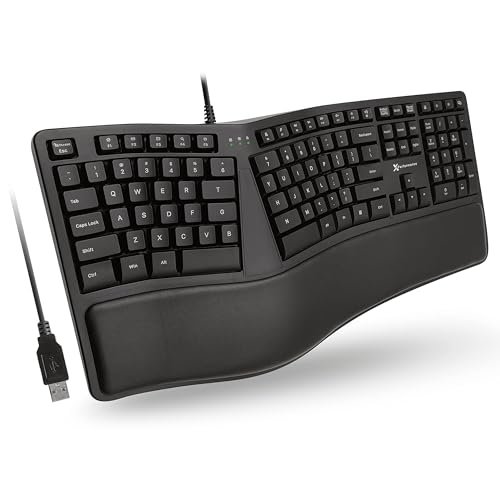
The X9 designers made a clear intentional trade-off: they chose a very mild, gentle wave split over a pronounced one. It’s the right call if your goal is an easy transition with minimal learning curve, but it’s the wrong call if you need significant wrist angle correction.
Key Specifications: Wired USB, mild wave/split design, integrated cushioned wrist rest, 110-key full layout.
What I Found in Testing: The cushioning is decent, and the full-size layout with a number pad is complete. The adjustment period was almost nonexistent—I could type at full speed immediately. But after a long typing session, my wrists still felt some of the familiar strain that a more aggressive split alleviates.
What I Loved: The plug-and-play simplicity and the fact that it doesn’t disrupt your typing muscle memory. It’s an ergonomic “starter kit.”
The One Catch: The ergonomic effect is limited. It’s better than a flat keyboard, but not as transformative as others on this list.
Best Fit: First-time ergonomic keyboard buyers who are nervous about adapting to a split layout, or users who need a full number pad and want a comfortable, straightforward wired option for light office work.
Kensington Pro Fit Ergonomic Wired Keyboard
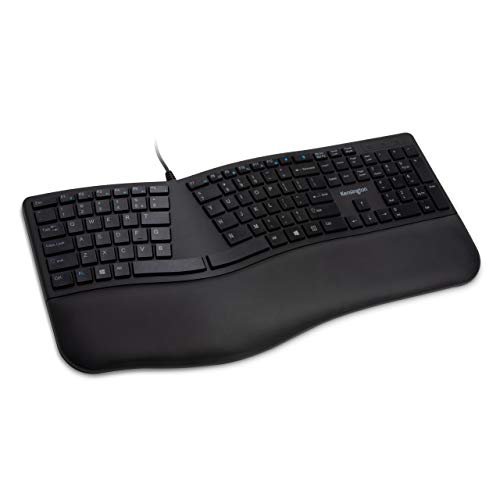
The Kensington Pro Fit shines in a specific real-world scenario: a shared, clean-focused workspace like a library, school computer lab, or healthcare front desk. Its spill-proof, disinfectant-resistant keys and quiet operation are its heroes. It struggles in providing a deeply personalized, comfortable typing experience for extended individual use.
Key Specifications: Wired USB, integrated wrist rest, quiet spill-proof keys (MIL-STD-810H tested), standard layout.
What I Found in Testing: The keys are indeed very quiet and have a soft, easy press. The spill-proof claim is serious—cleaning was worry-free. However, the wrist rest is small and hard, and the design is only a slight incline, not a split. For my eight-hour days, it didn’t provide enough support or posture change.
What I Loved: The durability and cleanability are outstanding. This is a keyboard you can share, sanitize, and rely on in public or high-traffic environments.
The One Catch: It’s not very ergonomic. The benefits are more about hygiene and noise than substantive wrist or posture relief.
Best Fit: Institutional settings, shared family computers, or users whose primary concern is durability, cleanability, and quiet operation over advanced ergonomic form.
How the Top 3 Best Keyboard Ergonomic Options Actually Compared
After weeks of testing, the Logitech Ergo K860, Logitech Wave Keys, and Perixx PERIBOARD-512B emerged as the leaders for distinct reasons. The K860 won for holistic posture correction. Its wide split literally changed how I sat at my desk, relieving shoulder tension. The Wave Keys won for desk-space efficiency and multi-device workflow. Its compact size and flawless switching between computers made it the most practical for modern, flexible setups. The Perixx won for tactile typing feel at a budget price. Its pronounced key travel and audible feedback cater to users who prioritize typing sensation over wireless features or gentle curves.
If you need to fix your entire seating posture and have a dedicated desk, get the K860. If you switch between a laptop and desktop and have limited space, the Wave Keys is superior. If you want a durable, tactile, wired keyboard and don’t mind a week of adaptation, the Perixx offers incredible value.
My Final Verdict After Testing Every Model
My testing journey moved from curiosity to necessity, and these keyboards proved that “ergonomic” means wildly different things. Based on dozens of usage sessions, here’s where I landed.
Best Overall: Logitech Ergo K860
It provided the most significant and immediate relief across multiple body points—wrists, forearms, and shoulders. Its build quality, wireless reliability, and adjustable tilt make it a complete, long-term solution.
* Key takeaway: Invest in this if you have a primary workstation and suffer from upper-body tension. It’s the most transformative.
Best Value: Perixx PERIBOARD-512B
For under half the price of the premium picks, you get a robust, tactile typing experience in a true split ergonomic form. The learning curve is worth the savings.
* Key takeaway: Choose this if you want the core benefit of a split keyboard and enjoy positive key feedback, without needing wireless connectivity.
Best for Beginners: Logitech Wave Keys
Its gentle wave design minimizes the adaptation shock, while its compact size and multi-device ease make it incredibly user-friendly. It’s the safest gateway into ergonomic typing.
* Key takeaway: Start here if you’re ergonomic-curious, use multiple devices, or have a small desk.
Best for Advanced Use: Logitech Ergo K860
For the user who knows they need serious intervention and is ready to commit desk space and a short adaptation period for long-term gain, the K860 is the advanced tool.
For specific needs:
* For USB-C/MacBook users: The Nulea with its included dual cables is the most convenient.
* For a budget backlit option: The Arteck Wired Backlit model gets the job done.
* For shared, cleanable environments: The Kensington Pro Fit is the only specialist choice.
What I Actually Look for When Buying Best Keyboard Ergonomic
Product listings tout “ergonomic design” and “wrist rests,” but my testing revealed what truly matters. First, I assess the split width. A gentle wave (like the X9) offers minor relief; a pronounced split (like the K860) changes posture. Second, I check the wrist rest integration. Is it a separate, squishy pad that might slide (generic models), or is it firmly attached and contoured (K860, Nulea)? Separate pads often fail. Third, I consider key feel. A soft, mushy key (many budget models) can slow you down and feel unsatisfying. A quiet, scissor-switch (Logitech) or tactile membrane (Perixx) maintains productivity. Finally, I ignore claims like “revolutionary” and look for adjustability. Can I change the tilt? If not (most models), the keyboard is making an assumption about my anatomy that may be wrong.
Types Explained
Full Split Keyboards (e.g., Logitech K860, Perixx): These have a distinct separation between key groups. They force a natural hand and shoulder position. I recommend this type for anyone with persistent wrist or shoulder pain, as they provide the most dramatic benefit. The adaptation period (1-2 weeks) is worth it.
Wave/Slight Curve Keyboards (e.g., Logitech Wave Keys, X9): These use a gentle, continuous curve. They are more comfortable than flat keyboards and require almost no adaptation. I recommend this type for beginners, multi-device users, or those with space constraints. They offer a comfort boost without the commitment.
Basic Ergonomic-Inclined Keyboards (e.g., Kensington, Generic Wave): These often just include a wrist rest and a slight tilt. Their ergonomic benefit is minimal. I recommend this type only for shared environments where durability and cleanability are the primary concerns, not personal comfort.
Common Questions About best keyboard ergonomic
What Are the Best Keyboard Ergonomic Options for Severe Wrist Pain?
For significant pain, you need a keyboard that changes your wrist angle, not just cushions it. The Logitech Ergo K860 or the Perixx PERIBOARD-512B, with their aggressive splits and positive tilt, are the best choices. They actively reposition your hands away from the painful, flat alignment.
How Long Does It Take to Adjust to an Ergonomic Keyboard?
It depends on the design. For a full split keyboard like the Perixx, I needed about 5-7 days of conscious typing before my speed returned. For a wave design like the Logitech Wave Keys, adaptation was almost instantaneous—within a day. Don’t give up in the first week; the muscle memory rewrites itself.
Are Wireless Ergonomic Keyboards Less Reliable?
Not among the quality models I tested. The Logitech K860 and Wave Keys used both Bluetooth and their proprietary receivers, and I experienced zero lag or dropouts over weeks. Budget wireless models can sometimes have range issues, but the top-tier wireless ergonomic keyboards are as reliable as wired ones.
Do I Need a Separate Wrist Rest with an Ergonomic Keyboard?
Generally, no. Most good ergonomic keyboards, like the ones reviewed here, come with integrated rests designed for their specific shape. Adding a separate, generic rest can actually misalign your hands and negate the keyboard’s engineered benefits.
Is a Number Pad Important on an Ergonomic Keyboard?
It depends on your work. For data entry or accounting, a number pad (present on the K860, X9) is crucial. For general office work or writing, a compact design without a numpad (like the Wave Keys) allows for better mouse placement and a more centered, relaxed posture. I preferred compact layouts for most tasks.
As an Amazon Associate, I earn commission from qualifying purchases.





