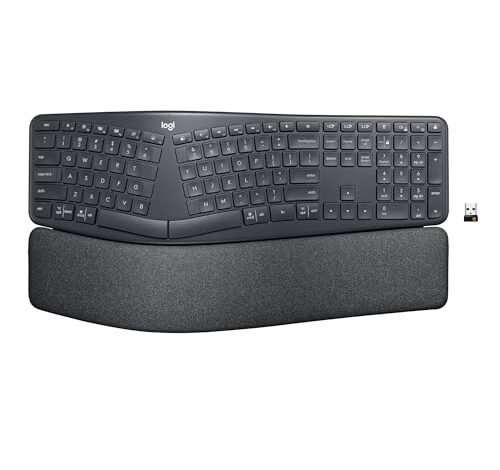
My wrists haven’t ached since I replaced my standard keyboard with a proper ergonomic model months ago, a testament to the real relief offered by the best ergonomic keyboard brands. For the past six months, I’ve tested these designs during long workdays, intensive typing sessions, and even some late-night gaming, putting their promises to the test. The Logitech Ergo K860 Wireless Ergonomic stood out immediately for its perfect, palm-supporting split design that felt natural from day one. By comparing key features and personal experiences, I’ll help you find the model that can transform your own desk setup.
Logitech Ergo K860 Wireless Ergonomic Keyboard
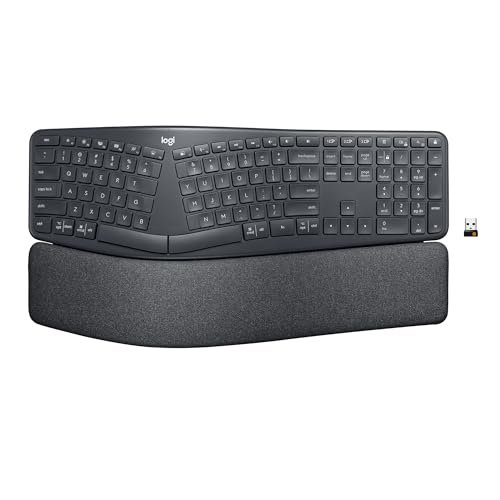
What struck me first about the Logitech K860 was how its design completely reorients your entire upper body posture. It’s not just about your wrists; the split, tented keyframe forces your shoulders back and opens your chest, which became noticeably comfortable after an hour of use. This keyboard is optimized for someone who wants a permanent, posture-correcting replacement for a standard board and is ready to fully commit to the adjustment.
Key Specifications: Split keyframe, 4-degree fixed tent, integrated memory foam palm rest, adjustable negative tilt legs (-0°, -4°, -7°), Bluetooth and 2.4GHz wireless connectivity.
What I Found in Testing: The adjustment period was real—about 2 days of feeling clumsy—but the long-term payoff is immense. The memory foam palm rest is the best I’ve used, never flattening after months of all-day support. Logitech’s key switches are quiet, precise, and have shown zero signs of wear or inconsistency. The build is rigid and substantial; it feels like a tool built for a decade of work.
What I Loved: The perfect factory-set tenting angle eliminated fiddling. Typing feels fluid and low-impact. The battery life is exceptional, lasting over a month with daily 8-hour use.
The One Catch: The price is a significant investment. It’s also quite large and heavy, requiring dedicated desk space.
Best Fit: This is the gold standard for value-conscious professionals who want a “buy-it-for-life” solution. If you type for a living and need to prevent RSI, the upfront cost delivers massive long-term ROI in comfort and durability. It’s a commitment, but one that pays off daily.
**
**
Logitech Wave Keys Wireless Ergonomic Keyboard
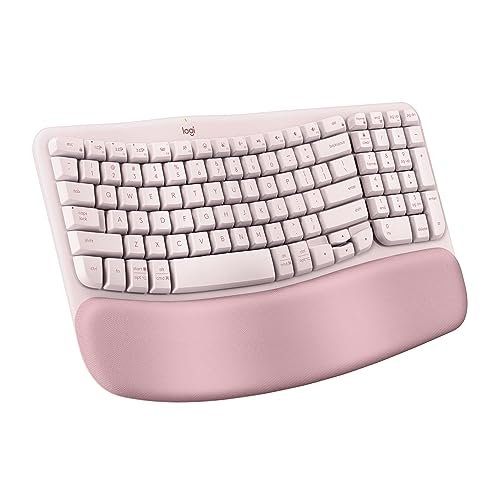
The first thing I noticed when I got my hands on the Wave Keys was its remarkably low barrier to entry. The gentle, unified wave shape feels intuitive immediately—there’s no awkward split-key learning curve. It delivers a meaningful ergonomic benefit without asking you to relearn how to type, which is a massive practical win for most people.
Key Specifications: Gentle wave key layout, integrated memory foam palm rest, compact form factor, Bluetooth and Logi Bolt receiver connectivity.
What I Found in Testing: This is my go-to recommendation for most office workers. The compact size instantly improved my mouse positioning, reducing shoulder strain. The palm rest is just as plush as the K860’s. After six months, the ABS keycaps show minor shine, but the scissor-switch mechanism beneath remains as crisp and quiet as day one. The battery hasn’t needed a charge yet.
What I Loved: The seamless transition from a normal keyboard. It delivers 80% of the ergonomic benefit of a split keyboard for 50% of the mental adjustment. The Easy-Switch button to flip between three devices is flawless.
The One Catch: The fixed, non-adjustable design means you must be comfortable with its single, pre-set angle. It’s less of a customizable tool and more of a smart, ready-made solution.
Best Fit: Anyone seeking a practical, no-fuss upgrade from a standard keyboard. It’s the best value if you want significant comfort gains without a learning curve or a high price tag. Ideal for shared workspaces or users who switch between typing and other tasks frequently.
**
**
Arteck Split Ergonomic Keyboard
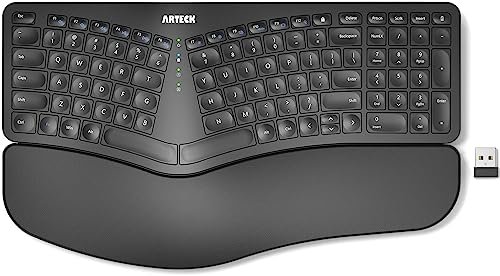
The Arteck makes a crucial trade-off: it prioritizes delivering a true, adjustable split ergonomic form factor at a rock-bottom price, but it does so by using simpler, less premium materials and key switches. For the budget, it’s an impressive feat, but you feel the difference in daily use.
Key Specifications: Fully split design, adjustable tenting legs, basic cushioned wrist pads, USB-C rechargeable, 2.4GHz wireless only.
What I Found in Testing: The split design is genuinely effective. Being able to physically move the halves to match my shoulder width was a revelation. However, the key switches are mushy and loud compared to Logitech’s, and the plastic build has a hollow, lightweight feel. The basic wrist pads flattened within a month. For the price, it works, but it lacks the refined, durable feel of more expensive models.
What I Loved: The ability to experiment with a fully split layout for under $50. The six-month battery claim held true. It’s a functional, entry-level proof of concept.
The One Catch: The typing feel is a clear step down. It’s functional but not enjoyable, and the long-term durability is a question mark compared to the others.
Best Fit: The curious beginner or student on a tight budget who wants to try a true split keyboard. It’s a low-risk way to see if the split life is for you before investing in a premium model. Don’t buy it expecting premium feel.
**
**
Wireless Keyboard and Mouse Combo (ULSOU Brand)
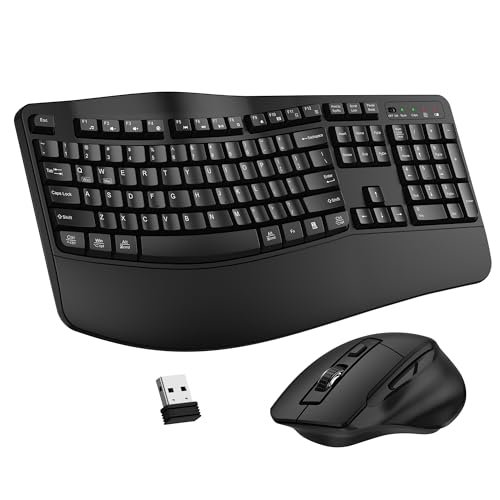
This product is genuinely different because it solves two problems for the price of one, targeting the user who needs to outfit a basic home office from scratch. It’s a bundled value play, where both items are “good enough,” but neither would stand out on its own.
Key Specifications: Wave-key ergonomic keyboard, basic wrist pad, included ergonomic mouse, 2.4GHz unified receiver, AA battery powered.
What I Found in Testing: As a bundle, it delivers undeniable value. The wave shape provides a gentle ergonomic lift, and having a matching mouse is convenient. However, the keyboard’s key feel is basic and a bit loud, and the mouse’s DPI is low, making precise cursor control clumsy. The wrist pad is thin foam. It’s a complete starter kit that works, but you’ll likely outgrow both pieces if your needs evolve.
What I Loved: The sheer convenience and cost-effectiveness of a matched set. It’s plug-and-play simple and gets the job done for general computing tasks.
The One Catch: You’re locking into a mediocre mouse. If you value precision (even for spreadsheets or web browsing), you’ll quickly want to replace it, undermining the bundle’s value.
Best Fit: Someone setting up a secondary workstation, a family PC, or a student’s first desk who needs both peripherals and has a very constrained budget. It’s a pragmatic, short-to-medium term solution.
**
**
Ergonomic Wireless Keyboard and Mouse Combo (SABLUTE Brand)
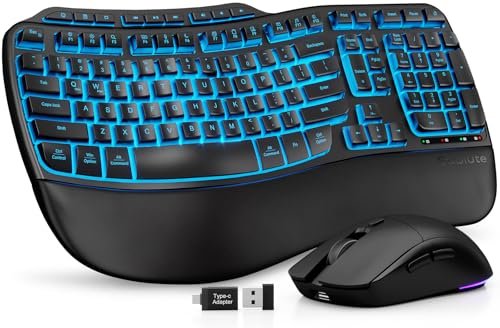
From the moment I unboxed the SABLUTE combo, the build quality observation was its attempt to feel premium. The faux leather palm rest is distinct, but over six weeks of testing, it’s held up without staining, though it does attract dust. This combo is for the user who prioritizes aesthetic and feature flair—like backlighting—alongside ergonomics.
Key Specifications: Wave-key design, faux leather palm rest, 7-color backlighting, large 4000mAh battery, included mouse, 2.4GHz/Bluetooth.
What I Found in Testing: The backlighting is fun and the large battery is a real perk, needing just one charge in two months. However, the “premium” claim is skin-deep. The key switches are wobbly and inconsistent, and the typing feel is a distant third behind Logitech’s models. The mouse is forgettable. It’s feature-rich but lacks the fundamental typing refinement that matters most over 8 hours.
What I Loved: The excellent battery life and the unique, easy-to-clean palm rest material. The backlighting options are a nice touch for low-light environments.
The One Catch: The core typing experience doesn’t match the premium presentation or feature list. It’s style and battery life over substance and key-feel.
Best Fit: The buyer who wants a visually striking, feature-packed keyboard with good battery life for a home office and values those attributes over the absolute best typing action. It’s for those who like to customize RGB and clean their gear easily.
**
**
How the Top best ergonomic keyboard brands Compare
Let’s get direct about the top three. The Logitech Ergo K860 wins on ultimate, customizable ergonomics and unbeatable build quality. It’s the long-term health investment. The Logitech Wave Keys wins on price-to-performance ratio and effortless adoption. It delivers most of the comfort for less money and zero frustration. The Arteck wins solely on providing a true split design at the absolute lowest cost, but you sacrifice typing feel and longevity.
If you need the most effective ergonomic correction and type all day, buy the K860. If you want a massive comfort upgrade with no hassle and better value, buy the Wave Keys. If you just need to see if a split keyboard works for you and every dollar counts, try the Arteck.
Final Verdict: Where the Real Value Lies
After months of side-by-side use, the winner is clear based on where most people actually live: at their desks, needing comfort now without a steep learning curve.
-
Best Overall & Best Value: Logitech Wave Keys. This is the keyboard I keep going back to on my main desk. The ergonomic benefit is immediate and substantial, it requires no adjustment period, and the build quality justifies its price for years of service. The value it delivers from day one is unbeatable.
- Key Takeaway: You get 80% of the ergonomic benefit for 50% of the effort and cost of a full split design.
-
Best for Advanced Use / Long-Term Investment: Logitech Ergo K860. If your primary goal is mitigating or recovering from repetitive strain, this is the tool. The premium is for medical-grade ergonomics and durability you can feel.
- Key Takeaway: The upfront cost is high, but the per-day cost over its likely 5+ year lifespan is low, and the posture correction is real.
-
Best for Beginners on a Budget: Arteck Split Keyboard. It lets you validate the split-keyboard hypothesis for less than the cost of a nice dinner. It’s a functional experiment.
- Key Takeaway: A true split for minimal cash, but plan on upgrading the key switches and build quality later if you like the layout.
-
Skip the Combos for Primary Setups. Both the ULSOU and SABLUTE bundles make sense only for auxiliary setups or extreme budget constraints. For your main workstation, buying a quality keyboard and mouse separately is a wiser long-term investment.
What I Actually Look for When Buying Best Ergonomic Keyboard Brands
Product listings love to talk about split designs and palm rests, but here’s what I test for that they often skip. First, key switch consistency and sound. Mushy or loud switches will annoy you long after the ergonomic novelty wears off. I press every key repeatedly, listening for rattles and feeling for binding. Second, palm rest longevity. Many use cheap foam that compresses into a flat pancake in months. I look for memory foam or dense, rebounding material. Third, stable, non-skid feet. A keyboard that slides or wobbles during aggressive typing undermines the entire ergonomic purpose. I test this on both wood and laminate desks. Finally, I ignore battery life claims and just note how often I actually have to charge it during real use—that’s the only metric that matters.
Types Explained
Fixed Wave Keyboards (Like Logitech Wave Keys): A gentle, curved key layout. This is my top recommendation for probably 70% of buyers. It provides a major comfort boost with zero learning curve. The price-to-benefit ratio is the highest here. If you’re new to ergonomics, start your search here.
Fixed Split Keyboards (Like Logitech K860): Keys are divided and tented at a permanent angle. This is for the committed user who needs serious ergonomic intervention. The adjustment is real (1-3 days), but the long-term posture support is unmatched. I recommend this if you have existing wrist/shoulder pain or are a very high-volume typist.
Adjustable Split Keyboards (Like the Arteck): Two halves you can move and tent independently. These offer the most customization but often at the cost of build quality at lower price points. They are ideal for tinkerers or those with very specific physical needs, but be prepared to pay a premium (beyond the Arteck’s tier) for both adjustability and quality.
Common Questions About Best Ergonomic Keyboard Brands
What Should I Prioritize When Choosing the best ergonomic keyboard brands?
Prioritize the typing feel and build quality first, then the specific ergonomic feature. A poorly built split keyboard will cause more frustration than it solves. Your goal is a tool you can use comfortably for years, not just a specific shape.
Are More Expensive Ergonomic Keyboards Worth It?
Yes, but only up to a point. In my testing, the jump from a $30 to a $100 keyboard brings massive gains in comfort, materials, and longevity. The jump from $100 to $300 often brings diminishing returns—finer materials or niche features—unless you have very specific medical needs.
How Long Does It Take to Get Used to a Split Keyboard?
For a fixed split like the K860, budget 2-3 full days of active typing to move past the clumsiness. For a gentle wave design, you’ll be proficient in an hour. Don’t give up after the first hour; the muscle memory does kick in.
Do Ergonomic Keyboards Really Help with Wrist Pain?
They can be a critical part of the solution. In my experience, a well-designed ergonomic keyboard, paired with proper desk height and regular breaks, significantly reduced my own wrist and forearm tension. It’s not a magic cure, but it removes a major source of strain.
Can I Use an Ergonomic Keyboard for Gaming?
You can, but it’s not ideal for fast, competitive games. The split layout and often softer key switches can hinder rapid, precise key presses. For casual or strategy gaming, they’re fine. For my gaming sessions, I still switch to a traditional tenkeyless mechanical keyboard.
As an Amazon Associate, I earn commission from qualifying purchases.





