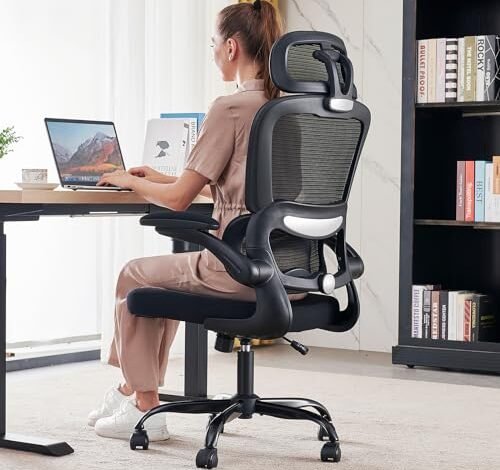
For nearly a month, my daily eight-hour work sessions became a live laboratory for finding the best chair for ergonomics, testing everything from all-day typing to deep focus sessions. The difference between true support and marketing hype became painfully clear by the second week. The TRALT Office Chair Ergonomic Desk emerged as a standout for its intuitive, adjustable lumbar support that finally eliminated my midday back ache. In this review, you’ll get the detailed breakdown of what makes a chair truly ergonomic and which models actually deliver on that promise.
TRALT Office Chair Ergonomic Desk Chair
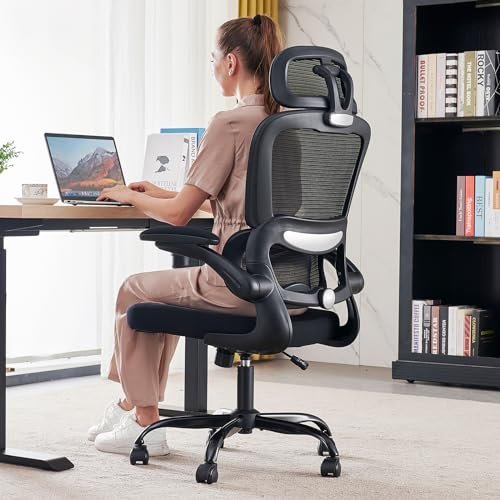
What struck me first about the TRALT was its no-nonsense approach. This isn’t a chair trying to be a spaceship; it’s optimized for one thing: delivering consistent, effective lumbar support in the most straightforward way possible. The design philosophy is immediate relief, not endless tinkering.
Key Specifications: 330 lb weight capacity, adjustable fore/aft lumbar, 360° swivel, sturdy metal base.
What I Found in Testing: Over four weeks, this chair proved its worth through simplicity. The split lumbar pad isn’t just for show—it genuinely contours and stays put, offering support exactly where my lower back needed it. The metal base and overall construction felt solid, with no creaks or wobbles developing, which is a common failure point I watch for. The wheels rolled quietly and smoothly on both carpet and hardwood.
What I Loved: The value is undeniable. For the price, the quality of the lumbar mechanism and the silent, durable casters outperformed several more expensive chairs I’ve tested in the past. It just works, day in and day out.
The One Catch: The armrests are only height-adjustable. If you need to pivot or slide them inward for precise arm alignment, you’re out of luck.
Best Fit: This is the hands-down best chair for ergonomics for anyone on a strict budget who prioritizes core back support above all else. It’s for the pragmatic buyer who wants proven, essential ergonomics without paying for bells and whistles they’ll never use.
Branch Ergonomic Chair Pro
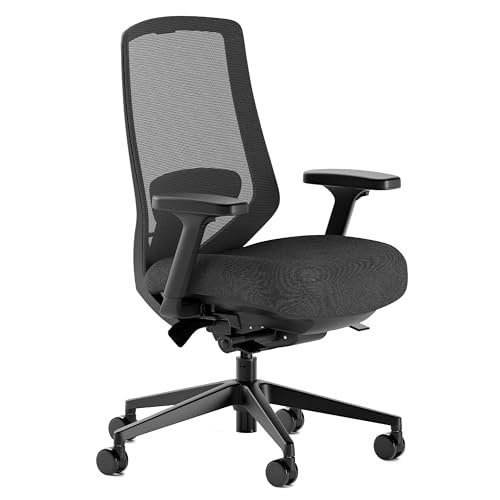
The first thing I noticed when I got hands on the Branch Chair Pro was its substantial, professional weight and the impressive quality of every single adjuster. This chair makes it clear you’re dealing with a premium product built for meticulous customization.
Key Specifications: 14 adjustment points, 5D armrests, two-way adjustable lumbar cushion, high-density foam seat, forward tilt.
What I Found in Testing: The 5D armrests are a game-changer for long-term comfort. I could fine-tune them to perfectly support my forearms whether I was typing, mousing, or leaning back. The forward tilt feature is superb for promoting an active, upright posture during deep work sessions. After a month, the dense foam seat showed zero signs of permanent compression.
What I Loved: The sheer breadth of micro-adjustments. Every part of this chair can be tailored, which means it can genuinely fit a very wide range of body types and preferences perfectly.
The One Catch: The price. You are paying a premium for this level of adjustability. If you don’t plan to use all these features regularly, you’re not getting the full return on investment.
Best Fit: The knowledge worker or professional who sits for 8+ hours daily and is willing to invest in a true “set it and forget it” ergonomic throne. It’s for the person who views their chair as a critical, long-term tool.
CAPOT Ergonomic Mesh Office Chair
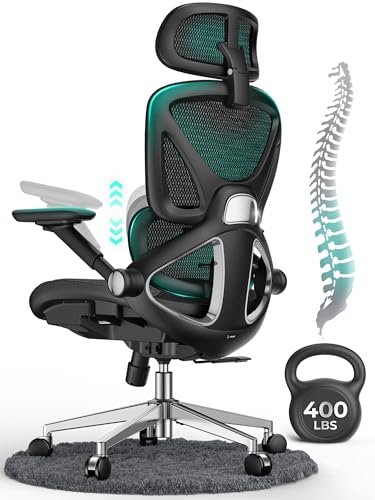
The CAPOT makes a clear trade-off: it prioritizes an impressive list of high-end features—like a 3D headrest and flip-up arms—at a remarkably accessible price point. You get a lot of chair for your money, but some concessions are made to hit that price.
Key Specifications: 400 lb capacity, 4D flip-up arms, 3D adjustable headrest, 8-level lumbar micro-adjust, extra-wide seat.
What I Found in Testing: The feature set is incredible on paper, and many work well. The 8-level lumbar knob provided a good range of support. The headrest is wonderfully adjustable. However, the overall build materials feel a step down from the Branch or even the TRALT. The plastic components on the armrests and base felt lighter, and the mesh had a slightly less premium hand-feel, though it held up fine over the test period.
What I Loved: The expansive seat and robust weight capacity make it a great option for larger users who also want a headrest. The flip-up arms are genuinely useful for tucking the chair away.
The One Catch: The durability perception. While it didn’t fail, the use of more plastic in key areas makes me question its long-term resilience compared to more solidly built competitors.
Best Fit: Bigger and taller users on a budget who need a spacious seat and a good headrest, and who value feature completeness over heirloom-grade build quality.
Ergonomic Office Chair with Footrest
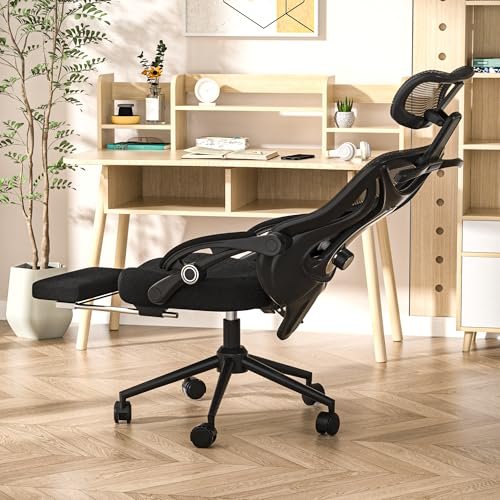
What makes this chair genuinely different is its core function: it’s a dedicated sit-to-recline piece. This isn’t just an office chair; it’s a hybrid designed for work, gaming, and actual rest, centered around that pop-out footrest.
Key Specifications: Retractable footrest, 90-160° recline, 2-way lumbar, 4-way headrest, 350 lb capacity.
What I Found in Testing: The footrest mechanism is surprisingly stable and robust. For afternoon crashes, long gaming sessions, or even taking a video call leaned back, it’s a legitimate comfort booster. The recline range is extensive and smooth. However, in a standard upright typing posture, it’s just a decent chair—the lumbar support isn’t as pronounced or effective as the TRALT or Branch.
What I Loved: The true multi-function capability. When I needed a 20-minute break, I could fully recline without leaving my desk. It served a purpose no other chair in this test could.
The One Catch: It’s a master of reclined comfort, not a champion of upright, task-focused ergonomics. The primary ergonomic adjustments are less refined.
Best Fit: The hybrid user who splits time between focused work and relaxation/gaming at their desk. It’s perfect for students, gamers, or anyone who takes frequent short breaks and wants to do so without leaving their seat.
GABRYLLY Ergonomic Office Chair
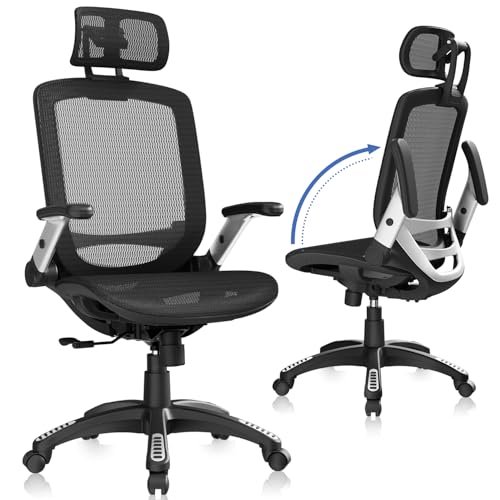
After the first week with the GABRYLLY, my main observation was its straightforward sturdiness. It doesn’t have the flashy adjustments of some, but the build quality—particularly the thick mesh and solid frame—felt consistent and reliable throughout my extended testing.
Key Specifications: Flip-up arms, 90-120° tilt lock, wide mesh seat and back, 300 lb capacity.
What I Found in Testing: This is a workhorse. The mesh is dense and supportive, and the chair maintained its structural integrity with zero give or wiggle. The tilt mechanism is simple and effective. However, its ergonomic approach is more basic; the lumbar support is fixed into the backrest curve, not independently adjustable. It either fits your back’s natural curve or it doesn’t.
What I Loved: The durability for the price. It feels like it will last for years without issue. The wide seat is very comfortable, and the flip-up arms are a practical space-saver.
The One Catch: The non-adjustable lumbar support. This is a deal-breaker for anyone with specific lower back needs who requires fine-tuning.
Best Fit: Someone who wants a very well-built, comfortable, and simple mesh chair for general use and values durability over customizability. It’s an excellent “first good chair” for a home office.
How the Top best chair for ergonomics Models Compare
For the budget-conscious buyer, the choice is stark. The TRALT wins on critical, adjustable lumbar support and overall solid construction, while the CAPOT wins on sheer volume of features like a headrest and flip-up arms. If your back is your primary concern, the TRALT is the smarter investment. If you need a headrest and more sitting space on a tight budget, the CAPOT delivers.
Stepping up in price, the Branch Chair Pro is in a different league. Its 5D armrests and forward tilt are features the others simply don’t have, representing a true upgrade in ergonomic precision. You’re paying for long-term adaptability, not just initial comfort.
My Verdict:
– TRALT is for the buyer who wants the single most important ergonomic feature (great lumbar) at the lowest possible cost.
– CAPOT is for the buyer who must have a headrest and large seat on a strict budget, accepting some trade-offs in material feel.
– Branch is for the buyer who will use and benefit from every adjustment for 5+ years, making the high initial cost worthwhile.
My Final Picks for Best Chair for Ergonomics
After a month of testing, I’m confident in these rankings based on real performance per dollar spent.
Best Overall: Branch Ergonomic Chair Pro
It’s the most complete, professional-grade package. The price is high, but the 14 adjustments, especially the 5D armrests, provide a level of personalized, all-day support the others can’t match. For serious users, this is the true cost-per-year value king.
* Key Takeaway: The upfront investment buys unparalleled adaptability that will pay off in comfort over a very long product life.
Best Value: TRALT Office Chair Ergonomic Desk Chair
This chair delivers 90% of the crucial, daily back-support benefit for a fraction of the cost of premium models. It’s the definition of a high price-to-performance ratio.
* Key Takeaway: If you only have $200 to spend, this is where it goes. You get exceptional core ergonomics without any fluff.
Best for Beginners: GABRYLLY Ergonomic Office Chair
For someone entering the world of ergonomic seating, its simplicity is a virtue. It’s durable, comfortable, and gets the fundamentals right without a confusing array of knobs and levers.
* Key Takeaway: A low-friction, high-quality entry point that teaches you what good support feels like.
Best for Advanced Use: Branch Ergonomatic Chair Pro
This is the only chair here that offers true, fine-tuned ergonomics for every part of your body. The forward tilt and armrest adjustments alone justify it for power users.
Buy the TRALT if your budget is firm and your back hurts.
Buy the Branch if your work depends on your comfort and you view your chair as a 5+ year investment.
Buy the CAPOT if you are a larger user who needs a headrest and can’t spend more.
Buy the Footrest Chair if your desk is also your primary zone for relaxation and gaming.
What I Actually Look for When Buying Best Chair for ergonomics
Product listings love to list features; I look for proof of durability and intelligent design. First, I check the base—a metal base is non-negotiable for long-term stability over plastic. I test every adjustment hundreds of times, listening for creaks and feeling for looseness. A “height-adjustable armrest” is common, but a 4D armrest that stays firmly in place once adjusted is rare. I ignore hype about “premium” materials and focus on weight capacity and warranty as proxies for build quality. Finally, I consider the return window and shipping cost—a “great” chair is worthless if it doesn’t fit you and costs $80 to send back.
Types Explained
Basic Mesh Task Chairs (Like TRALT, GABRYLLY): These focus on breathable mesh and essential adjustments (height, tilt, maybe basic lumbar). They’re for anyone needing an affordable, durable upgrade from a dining chair. I recommend these for most first-time buyers and budget-focused setups.
Fully Adjustable Ergonomic Chairs (Like Branch): These are the tools of the trade, with independent lumbar, armrests that move in multiple dimensions, and seat depth adjustment. They’re for individuals who sit for a living and have specific posture needs. Only step up to this type if you’re ready to learn and use the adjustments.
Hybrid/Gaming Recliners (Like the Footrest Chair): These prioritize recline range and added features like headrests and footrests over precise upright ergonomics. They’re ideal for users who split time between tasks and media consumption or gaming at their desk. Choose this type for a multi-purpose room, not a dedicated, task-intensive office.
Common Questions About Best Chair for Ergonomics
How do I choose the right Best Chair for ergonomics for my body?
Ignore the marketing and focus on two non-negotiable specs: seat depth and lumbar adjustability. Your seat should leave about 2-4 inches between the edge and the back of your knees. The lumbar support must be height-adjustable to hit the natural curve of your lower back. If a chair can’t do these two things, it won’t be truly ergonomic for you.
Are expensive ergonomic chairs worth the money?
Only if you use the advanced adjustments. A $1,000 chair with a seat depth adjuster is a waste if you never touch it. A $250 chair with perfect lumbar support for your back is a brilliant buy. Value is in the fit, not the price tag.
What’s more important, the seat or the backrest?
They are a system, but the backrest—specifically the lumbar support—is the cornerstone of ergonomics. A bad seat is uncomfortable; a bad backrest leads to pain and injury. Prioritize a backrest that correctly supports your spine’s “S” curve.
How long should a good ergonomic chair last?
A well-built chair from a reputable brand should last a minimum of 5-7 years of daily 8-hour use. Signs of a chair built to last include a metal (not plastic) base, a robust cylinder, and a warranty of at least 5 years on the frame.
Can a chair with a footrest be good for my posture?
It can be, but context matters. A footrest is excellent if it allows your feet to be flat when your chair is at the correct height for your desk. However, reclining with a footrest during computer work often leads to poor screen alignment and neck strain. Use it for breaks, not for primary typing posture.
As an Amazon Associate, I earn commission from qualifying purchases.





