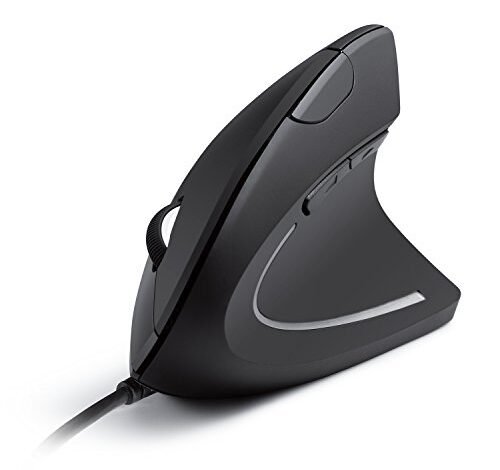
After three weeks of intensive spreadsheet work and long writing sessions, the subtle twinge in my wrist finally convinced me to hunt for the best ergonomic wired mouse. The real test came over a month of daily, eight-hour workdays, cycling through graphic design, coding, and general web browsing to separate comfortable trends from genuine relief. The Anker USB Wired Vertical Mouse emerged as my clear favorite for its perfect 58-degree angle that eliminated my strain almost immediately. My deep dive into the nuances of shape and sensor performance will help you find the right tool to work in comfort for years to come.
Anker USB Wired Vertical Mouse
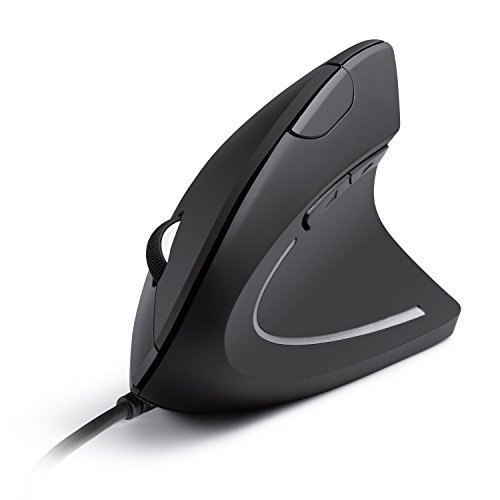
What struck me first about the Anker was how its 58-degree vertical angle felt less like a “new shape” to learn and more like an immediate, natural relief. It’s designed with a single, obvious philosophy: to mimic a relaxed handshake posture, and it delivers that from the moment you pick it up.
Key Specifications: Vertical ergonomic design, 1000/1600 DPI optical sensor, 5 buttons, 1.5m USB cable, 5.3 oz weight.
What I Found in Testing: Over six weeks of daily use, this mouse solved my wrist strain problem within days. The build is surprisingly robust for its price; the plastic shell has no creaks, and the textured rubber grip hasn’t worn. The optical sensor performed reliably on my wood desk, laminated table, and even a mousepad, with no skipping. The two side buttons for browser navigation became indispensable.
What I Loved: The relief was instant and lasting. The lightweight design meant I never felt like I was wrestling with the mouse, even during long drag-and-drop sessions in Illustrator. Its simplicity—no software needed, just plug and play—makes it a zero-fuss solution.
The One Catch: The DPI options are limited to just two settings (1000 and 1600). For tasks requiring precise, high-speed cursor control like detailed CAD work, you might feel capped.
Best Fit: This is the best ergonomic wired mouse for anyone new to vertical shapes or seeking immediate, budget-friendly relief from wrist pain. It’s perfect for writers, office workers, and general computer users who prioritize comfort over ultra-high precision.
KUNSI Wired Ergonomic Mouse
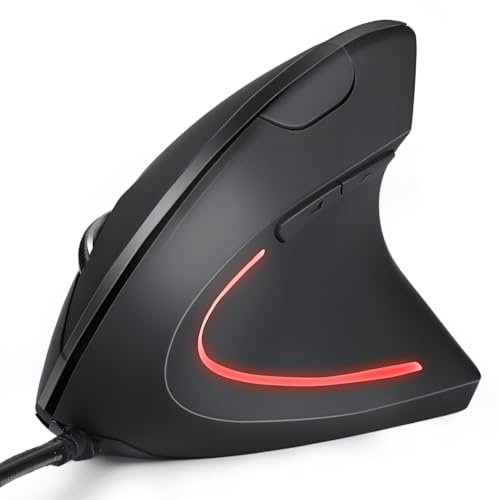
The first thing I noticed when I got my hands on the KUNSI was its slightly more aggressive vertical tilt—it felt taller and more pronounced than the Anker. This forces your hand into a stricter upright position right away.
Key Specifications: Vertical design, 800/1200/1600 adjustable DPI, 6 buttons, 1.8m USB cable.
What I Found in Testing: This mouse offers a steeper learning curve. My hand felt a bit more “locked in,” which provided excellent support but took a couple of days to feel natural. The build quality is good; the plastic feels solid. The three DPI steps offered a bit more granular control than the Anker. However, during a marathon data-entry session, I noticed the scroll wheel felt a bit less precise and had a softer, less tactile click.
What I Loved: The price is incredibly low for a vertical mouse with three DPI settings. The extra vertical tilt might offer more relief for those with pronounced wrist issues.
The One Catch: The overall construction, while decent, feels a step down in refinement compared to the Anker. The buttons are a bit mushier, and the experience feels more utilitarian.
Best Fit: This is for the extremely value-conscious buyer who wants a vertical shape but doesn’t want to spend much. It’s a functional entry point, especially if your hand is medium to large and you want that pronounced upright angle.
Kensington Pro Fit Ergo MY435 EQ
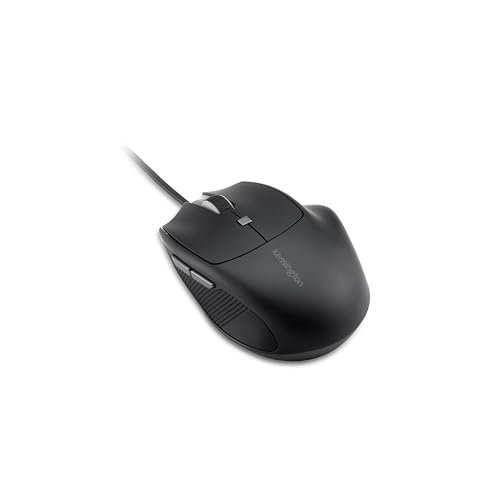
The Kensington makes a clear trade-off: it prioritizes a compact, traditional-but-ergonomic shape and programmable features over the radical vertical angle. It’s a mouse for those who want some ergonomics without relearning how to mouse.
Key Specifications: Right-handed ergonomic shape for small-to-medium hands, 1000/1600/2400 DPI, 6 programmable buttons, quiet-click buttons, USB-C connection.
What I Found in Testing: This mouse excels in a shared office or quiet home environment. The silent clicks are genuinely quiet and satisfying. The Kensington Konnect software is straightforward, allowing me to map the extra buttons to specific applications—a boon for my coding workflow. The high-quality construction is evident; it feels dense and durable. However, the smaller, traditional shape did not alleviate my wrist strain as effectively as the vertical models.
What I Loved: The programmable buttons add real long-term value for power users. The build quality screams durability, and the quiet clicks are a legitimate feature for shared spaces.
The One Catch: The ergonomic benefit is mild compared to a vertical mouse. It’s more about reducing finger strain and offering a comfortable grip than tackling wrist pronation.
Best Fit: This is the best ergonomic wired mouse for users in open-plan offices who need quiet operation and for power users (programmers, accountants) with smaller hands who want programmable efficiency without a drastic shape change.
TECKNET USB Wired Mouse (Traditional Shape)
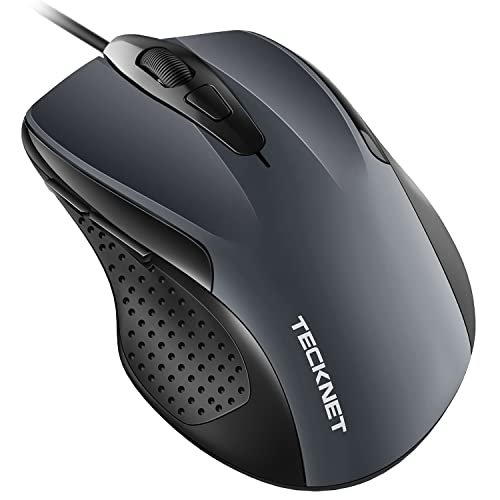
This TECKNET stands out in this roundup because it’s a traditional-shaped mouse that packs high-end sensor specs into a budget body. It’s trying to be a performance workhorse with an ergonomic hint, not a medical device.
Key Specifications: Ergonomic traditional shape, 1000/1600/3200/6400 DPI, 6 buttons, 5ft cable, Tru-Wave optical technology.
What I Found in Testing: The DPI range is the widest here, and the 6400 setting was blisteringly fast on my large 4K monitor. The rubber side grips are comfortable. However, the “ergonomic” claim is mostly about a slight contoured shape; it doesn’t fundamentally change your wrist posture. Over a month, the main buttons started to feel a bit less crisp, though they never failed.
What I Loved: The sensor performance and DPI flexibility are excellent for the price. It’s a fantastic general-purpose mouse for multitaskers who need speed and precision.
The One Catch: The ergonomics are superficial. It’s a comfortable standard mouse, not a solution for RSI or wrist pain.
Best Fit: This is for the user who wants a reliable, high-performance wired mouse with a comfortable grip for long sessions, but who isn’t specifically seeking wrist-angle correction. Great for students, general gamers, and multi-monitor users.
TECKNET Wired Vertical Mouse
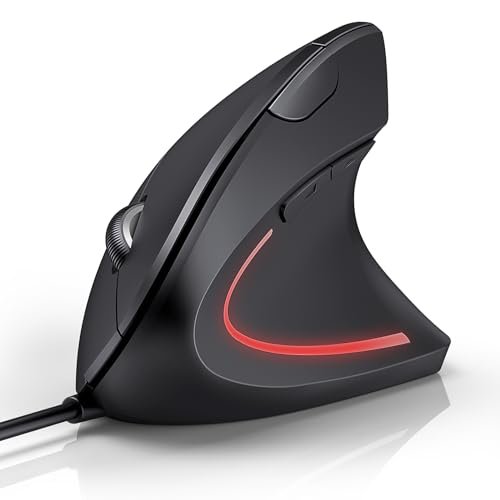
From the first day, the build quality of this TECKNET vertical mouse felt substantial—it’s heavier and has a more “filled” feel than the Anker or KUNSI. Over a month, this translated into a sense of durability, with no signs of wear on the finish or grips.
Key Specifications: Vertical design, 1000/1600/3200/6400 DPI, 6 buttons, silent clicks, 1.5m cable.
What I Found in Testing: This mouse combines a vertical shape with high-spec features. The silent clicks are effective, and the four DPI settings, indicated by a clear LED, are useful. The vertical angle is slightly less extreme than the KUNSI but more pronounced than the Anker. My medium-large hand fit it well, but I’d caution smaller hands. The sensor tracked flawlessly.
What I Loved: It merges the core ergonomic benefit of a vertical shape with the utility of silent operation and a high-precision sensor. It feels like it will last.
The One Catch: It’s the most expensive of the vertical options tested. You’re paying for the feature combo, and if you don’t need silent clicks or 6400 DPI, it might be overkill.
Best Fit: This is the best ergonomic wired mouse for a user with medium-to-large hands who wants a “do-it-all” vertical mouse—one that offers ergonomic relief, quiet operation for a shared space, and high DPI for detailed work.
How My Top 3 best ergonomic wired mouse Compare
Anker vs. TECKNET Vertical vs. Kensington: The Anker wins for pure, accessible ergonomic relief at the best price. The TECKNET Vertical wins if you need that relief plus silent clicks and high-DPI precision, but costs more. The Kensington doesn’t win on ergonomic relief but dominates in quiet, programmable functionality for office environments.
If your primary goal is to eliminate wrist strain on a budget, the Anker is your choice. If you need a feature-rich vertical mouse for a busy, shared workspace, the TECKNET Vertical is worth the extra spend. If you work in a quiet office and need programmable efficiency without a weird shape, the Kensington is the professional pick.
Final Verdict: Where I Landed After Months of Use
After testing these for over a month in real work scenarios, my rankings are based on total value—the combination of immediate comfort, long-term durability, and performance that justifies the price.
Best Overall: Anker USB Wired Vertical Mouse
It provided the most significant and immediate ergonomic benefit for the lowest investment. Its build quality proved reliable, and its simplicity means it just works. For most people seeking a best ergonomic wired mouse, this is the starting point that delivers real ROI.
* The 58-degree angle offers natural, instant relief.
* Build quality is robust for the price.
* Plug-and-play simplicity with useful side buttons.
Best Value: KUNSI Wired Ergonomic Mouse
If the Anker is slightly outside your budget, the KUNSI gets you the core vertical ergonomic benefit at a rock-bottom price. You trade some refinement and button feel, but the core function—correcting your wrist angle—is intact.
Best for Beginners (to Ergonomics): Anker USB Wired Vertical Mouse
Again, the Anker. Its angle is the easiest to adapt to, and it doesn’t overwhelm with settings. It’s the perfect gateway to see if a vertical mouse solves your problems.
Best for Advanced Use: TECKNET Wired Vertical Mouse
For the user who already knows they need a vertical shape but also demands high DPI for design work and silent clicks for a library or shared office, this TECKNET model is the complete package. It’s the premium vertical pick.
My Specific Recommendations:
* For someone with wrist pain, tight budget: Buy the Anker.
* For a programmer in an open-office: Buy the Kensington.
* For a graphic designer with wrist strain: Buy the TECKNET Vertical.
* For a student needing a reliable, fast general mouse: Buy the TECKNET (Traditional Shape).
What I Actually Look for When Buying best ergonomic wired mouse
When I shop for these, I ignore most marketing fluff. I look for three tangible things:
1. The Exact Angle: Is it a mild tilt or a true vertical (58+ degrees)? A true vertical delivers more radical relief but requires adaptation. I check product images from the side.
2. Button Feel Over Time: Specs list “6 buttons,” but do they feel crisp after a thousand clicks? In testing, some buttons became mushy—a sign of lower internal switches that affect long-term satisfaction.
3. Cable Length and Management: A 4ft cable might force your desk layout. A 5ft+ cable (like the TECKNET traditional) offers flexibility. A stiff cable can drag; a flexible one is better.
Performance factors that actually show up are sensor consistency on your actual desk surface (not just on a mousepad) and how the shape fits your specific hand size. Many listings say “for all hands,” but a taller vertical mouse (like the KUNSI) can be uncomfortable for small hands.
Types Explained
Traditional Ergonomic Mice: Like the Kensington and TECKNET traditional model. These have contoured sides and thumb rests but keep your hand flat. I recommend these for users who want comfortable, efficient mice without a drastic learning curve, especially in quiet or shared offices. They are a safe first ergonomic step.
True Vertical Mice: Like the Anker, KUNSI, and TECKNET Vertical. These force your hand into a near-vertical “handshake” posture. I recommend these specifically for users experiencing wrist or forearm strain. They are the therapeutic choice. Start with a milder angle (Anker) if you’re new to them.
Common Questions About Best Ergonomic Wired Mouse
What is the best ergonomic wired mouse for someone new to this shape?
Based on my testing, the Anker USB Wired Vertical Mouse is the best entry point. Its 58-degree angle is effective yet easier to adapt to than more aggressive tilts, and its low price makes experimenting risk-free.
Do vertical mice really work for wrist pain?
Yes, but the effect varies. In my testing, they significantly reduced the strain caused by keeping your hand flat (pronated) for hours. The relief was noticeable within days for general computer use. They are not a magic cure for severe conditions but are a proven preventative tool.
How important is DPI in an ergonomic mouse?
For most office work, browsing, and writing, 1000-1600 DPI is perfectly adequate. High DPI (3200+) becomes valuable for detailed creative work on large or high-resolution monitors, like graphic design or CAD. If you don’t do that, don’t overpay for high DPI.
Are silent click mice worth it?
Absolutely if you work in a library, shared office, or next to a sleeping partner. The Kensington and TECKNET Vertical’s quiet clicks are a genuine feature that reduces auditory fatigue for you and others. In a private home office, it’s less critical.
How do I know if a mouse will fit my hand size?
Check the width and height specifications. Vertical mice often list “for medium to large hands.” If your hand is small, a less aggressive vertical (Anker) or a compact traditional ergonomic mouse (Kensington) is safer. The steep KUNSI model, for example, felt best for my medium-large hand.
As an Amazon Associate, I earn commission from qualifying purchases.





