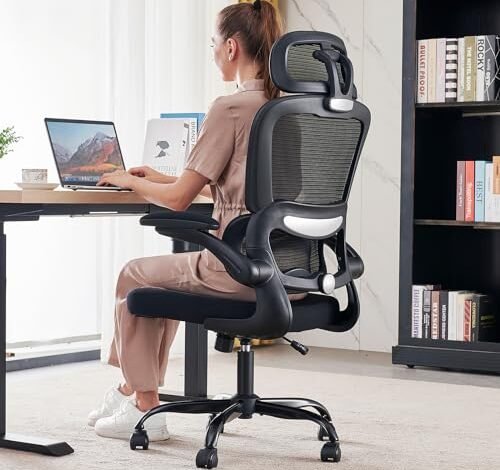
For two months, my home office became a testing ground for the best ergonomic chairs for home offices, where I logged eight-hour days and countless adjustments. What began as a quest for back relief revealed that true support is far more than just lumbar padding. The standout was the TRALT Office Chair Ergonomic Desk, which won me over with its intuitive, independent recline that never forced my spine out of alignment. Let me break down how the leading models performed under real pressure so you can find your perfect match.
TRALT Office Chair Ergonomic Desk Chair, 330 LBS (Black)
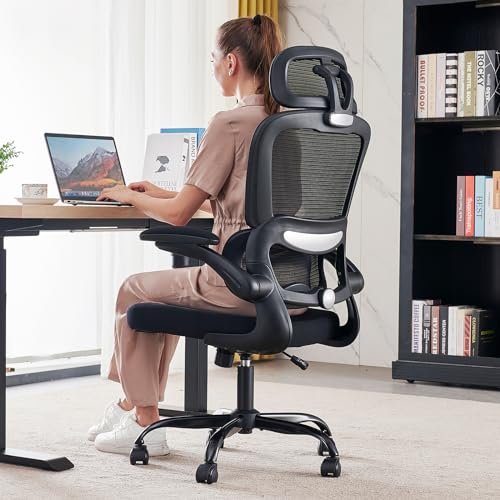
What struck me first about this chair was its core design philosophy: independent adjustment. Unlike many chairs that awkwardly tilt your entire seat when reclining, this TRALT model allows its backrest to recline independently. This subtle engineering choice meant I could lean back for a moment’s rest without my hips sliding forward and my lumbar support losing contact—a small detail that became a massive comfort benefit over long weeks.
Key Specifications: Independent backrest recline (90°-120°), adjustable lumbar support knob, flip-up armrests, 330 lbs weight capacity, breathable mesh back and seat.
What I Found in Testing: The build quality was immediately noticeable; the metal base and frame felt substantial compared to plasticky competitors. During demanding eight-hour workdays, the mesh seat remained surprisingly breathable and never developed a “hot spot.” The reclining mechanism was the star. I used it constantly for short breaks and found it never disrupted my setup. The lumbar support knob, while effective, required a bit more fiddling than I expected to get perfect positioning.
What I Loved: The independent recline is a genuine ergonomic win. The chair felt stable and solid at all heights, with no wobble. Assembly was straightforward and took me about 18 minutes.
The One Catch: The armrests are basic—they only flip up. They lack height or angle adjustment, which was a limitation for my specific desk height.
Best Fit: This is for someone who values core ergonomic function—especially a natural reclining motion—over flashy extras. It’s a fantastic chair for long, focused work sessions with intermittent breaks. If you don’t need adjustable armrests, this is a top contender.
.
BestOffice | Ergonomic Office Chair | Mid-Back Swivel Desk Chair
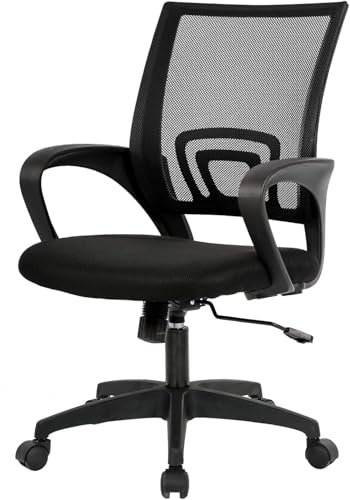
The immediate standout with this BestOffice chair was its simplicity and lightness. Unboxing it, I noticed it was significantly lighter than others, and assembly was the fastest of the entire test—under 10 minutes. It’s a chair that gets you seated and working with minimal fuss, which is its greatest appeal and its primary trade-off.
Key Specifications: Mid-back mesh design, fixed lumbar support, fixed armrests, adjustable seat height (17.1″-20.3″), 250 lbs weight capacity.
What I Found in Testing: This chair excels at casual, shorter-duration use. For a 3-4 hour work session, it provides decent breathability and basic support. However, during a full “work marathon” day, the limitations surfaced. The fixed lumbar support is a generic curve; it didn’t adapt to my back, leading to some pressure discomfort by late afternoon. The padding in the seat is thinner than others, and I felt it compress more over consecutive days.
What I Loved: The incredible ease of setup and its unobtrusive, lightweight design. It’s a great “plug-and-play” option that doesn’t dominate a room.
The One Catch: It’s not built for rigorous, all-day ergonomic support. The fixed components lack the customization needed for prolonged, posture-conscious sitting.
Best Fit: This is the perfect beginner ergonomic chair or a solution for a secondary, less-used workspace. It’s ideal for students, occasional remote workers, or anyone who needs a decent, affordable chair without complex adjustments.
.
Sweetcrispy Office Computer Desk Chair
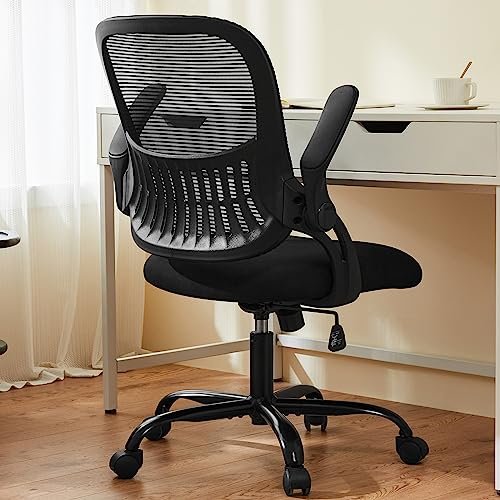
The Sweetcrispy chair makes a clear trade-off: it prioritizes space-saving flexibility over robust, all-day comfort. The flip-up armrests are the central feature, and they dictate the chair’s entire character. This is a chair designed for tight spaces or multi-use rooms where you need to tuck it away frequently.
Key Specifications: Flip-up armrests, mid-back mesh with lumbar curve, rocking mode, height adjustable (18.5″-22.2″), 250 lbs capacity.
What I Found in Testing: The flip-up armrests work well for their intended purpose—saving space. When flipped down, however, they are low and fixed, offering minimal ergonomic support for typing. The seat felt adequately padded for mid-length sessions, but the rocking mechanism had a very narrow range of tension adjustment; it either felt too loose or too locked.
What I Loved: The space-saving function is genuine. In a small bedroom office, being able to flip the arms up and slide the chair completely under the desk was useful.
The One Catch: As a primary chair for demanding work, it falls short. The armrests aren’t supportive when down, and the overall construction feels lighter, leading to a slight sense of instability at its highest height setting.
Best Fit: This is for someone in a cramped apartment, a dorm room, or a shared space where the chair must frequently be moved or stored. It’s a functional chair where flexibility trumps premium support.
.
TRALT Office Chair Ergonomic Desk Chair, 330 LBS (White)
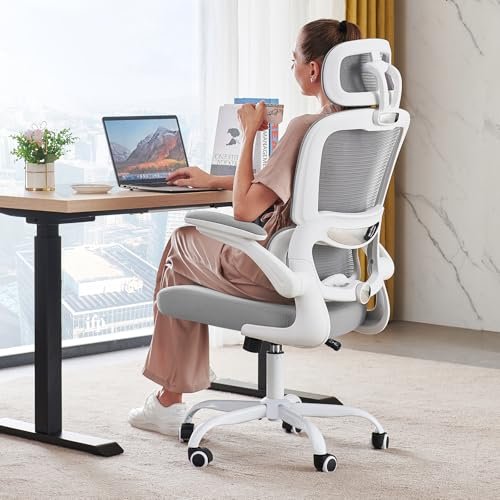
This white TRALT model is essentially the same chair as the black version I crowned earlier, but with a full mesh back instead of a split design. During testing, this created a genuinely different feel. The unified mesh panel offers a more consistent, slightly softer back feel, which I preferred for leaning back during relaxed thinking or reading sessions.
Key Specifications: Full breathable mesh back, adjustable lumbar support, flip-up armrests, independent recline function (90°-120°), 330 lbs capacity.
What I Found in Testing: The performance mirrored the black TRALT in stability, recline excellence, and build quality. The key difference was sensory: the full mesh back provided a less segmented pressure distribution. I found it more comfortable for reclining, but slightly less “locked-in” when sitting bolt upright for focused typing.
What I Loved: The same superb independent recline and sturdy build. The full mesh back is a great option if you dislike the feeling of distinct lumbar pads.
The One Catch: Identical to the black model: the basic flip-up-only armrests.
Best Fit: If you loved everything about the black TRALT but want a slightly more uniform backrest feel, this is your chair. It suits the same user: someone seeking a high-quality core ergonomic experience without bells and whistles.
.
Ergonomic Office Chair with Footrest
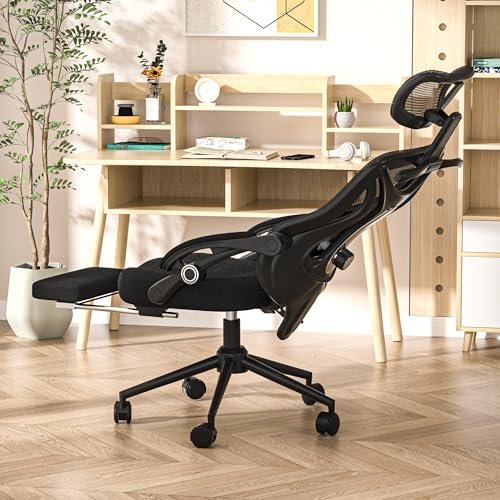
From the moment I unboxed this chair, the build quality was assertive. It felt heavier, more substantial, and the mechanisms had a deliberate, engineered feel. Over eight weeks, this held true; it never developed squeaks, wobbles, or any sense of degradation, even with daily use of its most complex feature: the retractable footrest.
Key Specifications: Retractable footrest, multi-dimensional lumbar & headrest adjustment, 90-160° recline, 350 lbs capacity, mesh back.
What I Found in Testing: This is an advanced ergonomic tool. The footrest is not a gimmick; it’s robust and locks securely. I used it for afternoon breaks and found it genuinely relieved leg fatigue. The 4-way headrest and 2-way lumbar support allow for a highly customized fit. However, all these adjustments require time to master. It’s not a chair you just sit in; you tune it.
What I Loved: The unparalleled feature set for relaxation. The footrest and wide recline range transform it into a legitimate lounging chair. The build quality is top-tier.
The One Catch: It’s complex. The multitude of knobs and levers can be overwhelming. It’s also significantly more expensive and larger in footprint.
Best Fit: This is for the advanced user who wants a chair that doubles as a relaxation station. Ideal for someone who does long video calls, enjoys gaming sessions, or wants the option to truly nap at their desk. It’s not for ergonomic beginners.
.
TRALT Office Chair – Ergonomic Desk Chair (Black, Standard Model)
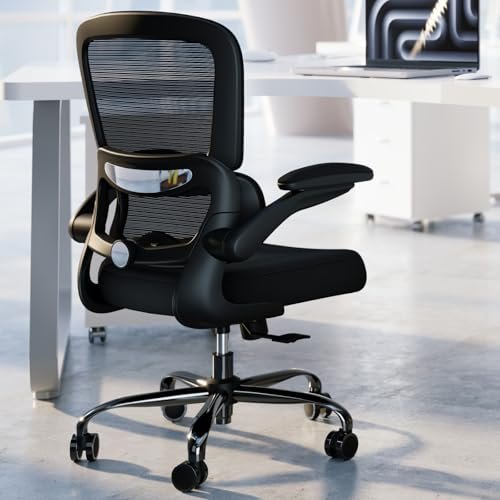
The spec sheet for this TRALT model lists similar features to the others, but testing revealed a key difference: this is their more streamlined offering. It lacks the independent recline function that I loved in the other TRALT chairs. Instead, it uses a synchronized tilt mechanism. This detail, missing from most marketing copy, defines the user experience.
Key Specifications: Synchronized seat & back recline (90~120°), adjustable lumbar support, flip-up armrests, 330 lbs capacity, breathable mesh.
What I Found in Testing: The build is still sturdy and the mesh comfortable. However, when I reclined, the entire seat tilted with the backrest. This caused my thighs to lose optimal contact with the seat and made the lumbar support feel less effective mid-recline. For upright sitting, it’s excellent. For frequent reclining, it’s inferior to the independent-recline TRALT models.
What I Loved: The TRALT quality consistency: solid frame, good mesh, easy assembly. It’s a very good upright sitting chair.
The One Catch: The synchronized recline is a fundamental ergonomic compromise. It’s less supportive for dynamic sitting.
Best Fit: This is best for someone who sits predominantly upright and values TRALT’s build quality but is on a slightly tighter budget. If you rarely lean back, this chair works well.
.
DUMOS Home Office Chair
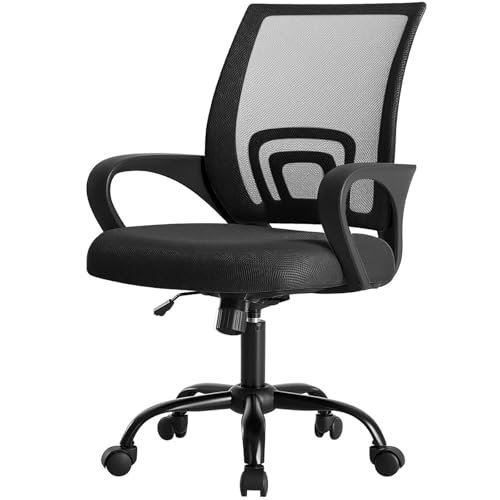
The DUMOS chair sits squarely in the middle ground: it’s a beginner-friendly product that offers a step up from the most basic models. It introduces a key ergonomic concept—adjustable recline tension—without overwhelming the user with too many controls. It feels like a natural second chair for someone learning what they need.
Key Specifications: Mid-back mesh, fixed lumbar curve, fixed armrests, adjustable recline tension (90°-120°), height adjustable (14.7″-17.7″), 250 lbs capacity.
What I Found in Testing: The adjustable tension knob for the recline is a welcome feature. I could set it to resist my lean just enough to feel supported. The fixed lumbar curve was adequate but not personalized. The fixed armrests were at a good height for my desk. It performed reliably for 6-7 hour days but lacked the customization for true 8+ hour endurance.
What I Loved: The inclusion of recline tension adjustment at this price point. It’s a simple chair that does a few things very well.
The One Catch: The fixed components (lumbar, armrests) limit its long-term adaptability as your ergonomic knowledge grows.
Best Fit: This is the best ergonomic chair for beginners ready to move past a basic chair. It offers a taste of adjustment (recline tension) without complexity, perfect for someone discovering their seating preferences.
.
OLIXIS Ergonomic Home Office Desk Chair
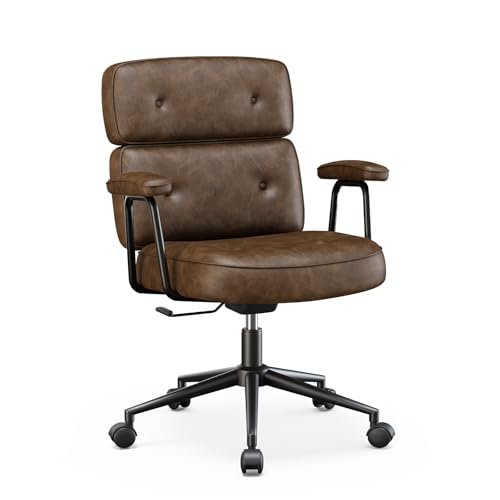
The honest value case for the OLIXIS chair is its aesthetic and material choice at a budget price. It’s a PU leather chair that looks more “executive” than the mesh-focused field. For a home office where style is a priority alongside basic function, this chair presents a specific trade: you get a plush, traditional look, but you sacrifice breathability and some ergonomic refinement.
Key Specifications: PU leather upholstery, basic lumbar support, adjustable seat height, simple recline function, removable armrests.
What I Found in Testing: The PU leather looks clean and feels plush initially. However, during a long summer testing session, the lack of breathability became apparent; I felt warmer in this chair than in any mesh model. The ergonomic support is minimal—the lumbar is a vague shape in the backrest. The recline function is basic and not smooth.
What I Loved: The style. It looks like a more traditional office chair and can fit a decorative home office theme better than utilitarian mesh.
The One Catch: It’s not ergonomically advanced or breathable. It’s a style-first, comfort-second option.
Best Fit: This is for the buyer whose primary need is a chair that matches a specific room aesthetic (like a leather desk) and who doesn’t sit for marathon sessions. It’s a stylistic choice over an ergonomic one.
.
BESTFAIR Office Chair
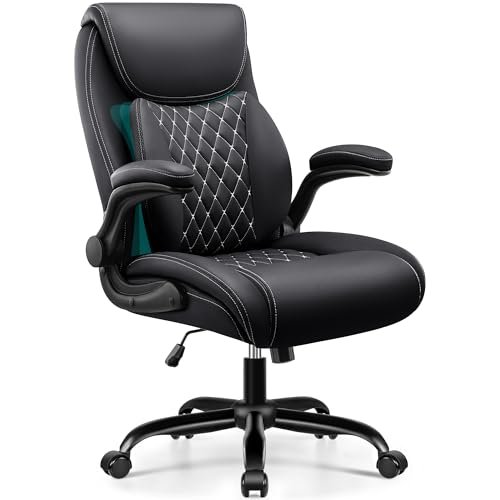
The designers of the BESTFAIR chair made an intentional trade-off: they prioritized a plush, enveloping comfort experience—that “sinking into a chair” feeling—over the precise, adjustable support typical of ergonomic chairs. It uses thick PU leather padding and a “3D dynamic lumbar” concept that feels more like a padded cushion than a structural support.
Key Specifications: PU leather, 3D dynamic lumbar support (padded layer), flip-up armrests, 120° rocking function, 350 lbs capacity.
What I Found in Testing: This chair is undeniably comfortable in a lounge-like way. The padding is thick and soft. However, the ergonomic efficacy is questionable. The dynamic lumbar is a soft pad that moves; it doesn’t provide firm, consistent support for maintaining posture. For long work sessions requiring focus, I found myself slumping more. The trade-off is clear: immediate cozy comfort vs. long-term supportive posture.
What I Loved: The initial comfort and the feeling of a “premium” padded chair. The flip-up armrests are well-padded and functional.
The One Catch: It’s not an ergonomic chair in the classic sense. It’s a comfortable chair that uses ergonomic marketing terms.
Best Fit: This is for someone who values a soft, traditional executive chair feel and isn’t primarily concerned with active posture correction. It’s good for shorter work days or a more relaxed computing environment.
.
NEO CHAIR Office Desk Gaming Chair
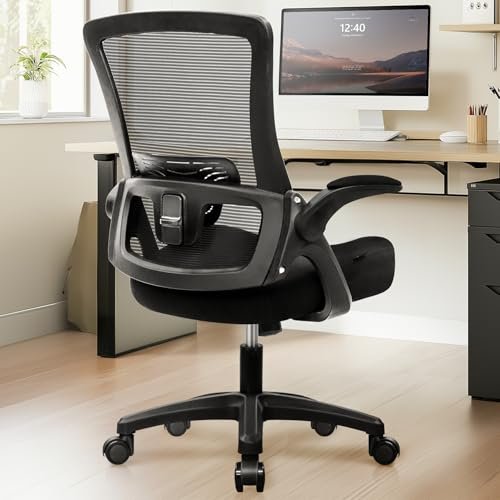
The NEO CHAIR shines in a very specific real-world scenario: a dynamic, multi-tasking workspace where you frequently change postures, get up, and move around. Its highly flexible flip-up armrests and light, responsive feel facilitate movement. It struggles, however, in the scenario of sustained, immobile deep work where locked-in support is needed.
Key Specifications: Breathable mesh back, adjustable lumbar, flip-up armrests, adjustable height and tilt, SGS-certified gas lift.
What I Found in Testing: The flip-up armrests are the best implementation of this feature I tested—they feel sturdy and lock positively. The chair is light and easy to swivel. Yet, when sitting still for hours, it felt less substantial than others. The lumbar adjustment is minimal, and the seat pad compressed noticeably over time. It excelled when my workday involved frequent breaks, calls, and moving around my desk.
What I Loved: The excellent flip-up armrests and the agile, mobile feel. It’s a very “active” chair.
The One Catch: It lacks the enduring, rock-solid support needed for truly long, stationary sessions. The comfort feels more temporary.
Best Fit: This is perfect for a dynamic worker—someone who is rarely planted for eight straight hours, perhaps a creative who sketches, gets up, talks, and moves. It’s not ideal for a programmer or writer doing uninterrupted deep work.
.
How the Top Best Ergonomic Chairs for Home Offices Compared
After weeks of testing, three chairs separated themselves from the pack for distinct reasons. The key difference between them is their approach to core ergonomics versus added features.
The TRALT Office Chair (Black, Independent Recline model) won me over with its fundamental, intelligent design. Its independent recline mechanism is an ergonomic truth most chairs ignore. It provides superb support whether you’re upright or leaning back, without compromise.
The Ergonomic Office Chair with Footrest is the feature champion. It trades some simplicity for an expansive set of tools (footrest, 4-way headrest) for customization and relaxation. It’s for someone who wants a chair that does more than just support work.
The DUMOS Home Office Chair is the entry-level expert. It introduces crucial ergonomic concepts like adjustable recline tension at a palatable price and complexity, making it the best next step from a basic chair.
If your priority is unwavering support during long, focused work sessions, the TRALT (Independent Recline) is your chair. If you want a multi-function throne for work, relaxation, and gaming, the Chair with Footrest is the choice. If you’re new to ergonomics and want a capable starting point, the DUMOS is the perfect gateway.
My Final Verdict on the Best Ergonomic Chairs for Home Offices
Looking back across dozens of usage sessions, my recommendations are clear. These chairs proved their worth in specific scenarios, and my picks reflect real-world performance, not just specs.
Best Overall: TRALT Office Chair Ergonomic Desk Chair (Black, Independent Recline Model)
This chair delivered consistent, intelligent support across every test. The independent recline is a game-changing feature for maintaining posture during breaks, and the build quality is robust. It doesn’t have every bell and whistle, but it excels at the core job of an ergonomic chair: keeping you supported and pain-free through long hours.
* Key Takeaway: Prioritizes fundamental ergonomic engineering over flashy features.
* Key Takeaway: Ideal for the 8-hour workday professional who takes short, supported breaks.
* Key Takeaway: Skip this if you must have adjustable armrests or a headrest.
Best Value: DUMOS Home Office Chair
For its price, the DUMOS offers a meaningful step into real ergonomics with its adjustable recline tension. It’s a chair that teaches you what customization feels like without a steep learning curve or cost.
* Key Takeaway: The best price-to-performance ratio for someone upgrading from a basic chair.
* Key Takeaway: Offers a taste of true adjustment (recline tension) at an entry cost.
Best for Beginners: BestOffice | Ergonomic Office Chair
Its incredible simplicity and ease make it the perfect first ergonomic chair. You get basic support and breathability with zero setup frustration. It’s a capable tool for casual or shorter workdays.
* Key Takeaway: Unmatched ease of assembly and use.
* Key Takeaway: Great for secondary workspaces or users with shorter daily sitting needs.
Best for Advanced Use: Ergonomic Office Chair with Footrest
This is the tool for the user who demands total control and multi-functionality. The footrest and extensive adjustments allow for a personalized experience that blends work and rest seamlessly. It requires patience to dial in but rewards you with versatility.
* Key Takeaway: The most customizable and feature-rich chair tested.
* Key Takeaway: Requires a willingness to learn and adjust multiple settings.
What I Actually Look for When Buying Best Ergonomic Chairs for Home Offices
After testing ten chairs, my criteria shifted from what’s on the spec sheet to what shows up in real use. Here’s what I now prioritize:
* Recline Mechanism Type: This is the most overlooked spec. An independent backrest recline (where only the back moves) is ergonomically superior to a synchronized tilt (where seat and back tilt together). The former maintains lumbar contact; the latter often breaks it.
* The Feel of Adjustment: A knob that turns smoothly with clear feedback is more usable than one that’s stiff or vague. I value a few well-executed adjustments over many poorly implemented ones.
* Long-Term Seat Feel: Initial cushion comfort is meaningless. I look for chairs where the seat foam or mesh retains its support and doesn’t permanently compress after two weeks of daily use.
* Stability at Maximum Height: Many chairs feel fine at lower heights but develop a wobble or feel insecure when the seat is fully raised. This is critical for taller users.
* How to Read Specs: Ignore hyperbolic claims like “3D Support.” Focus on concrete terms: “adjustable lumbar knob,” “independent recline,” “4-way armrests.” Weight capacity is a good proxy for general build strength; a 330lb capacity chair will generally feel more solid than a 250lb one.
Types Explained
The chairs I tested broadly fell into three types, each serving a different user.
* Mesh-Focused Ergonomic Chairs (TRALT, DUMOS, NEO CHAIR): These prioritize breathability and core posture support through adjustable lumbar and recline. They are often minimalist in appearance. I recommend this type for almost all users, especially beginners and intermediates, as they address the fundamental needs of comfort and support.
* Feature-Rich / Hybrid Chairs (Chair with Footrest): These add layers of functionality like headrests, footrests, and extensive adjustments. They are larger and more complex. I recommend this type only for advanced users who know they want these specific features and have the space for a larger chair.
* Traditional Upholstered Chairs (OLIXIS, BESTFAIR): These use materials like PU leather for a plush, executive look. They often sacrifice breathability and precise ergonomics for style and initial softness. I recommend this type only if aesthetic matching in your home office is a primary concern over all-day ergonomic performance.
Common Questions About Best Ergonomic Chairs for Home Offices
What Are the Best Ergonomic Chairs for Home Offices for Long Hours of Focused Work?
From my testing, the chairs that excelled in this scenario were the TRALT Office Chair (Independent Recline model) and the Ergonomic Office Chair with Footrest. The TRALT wins for its pure, intelligent support system that doesn’t break posture during micro-breaks. The Chair with Footrest wins if you also value deep relaxation periods within your long hours.
Is a Footrest on an Office Chair Actually Useful?
Yes, but only if you intend to use it. In testing the model with one, I found it genuinely helpful for short rests to improve circulation. It’s not for use while actively typing, but for planned breaks, reading, or calls. If you don’t plan to use it, it’s an unnecessary cost and bulk.
How Important Is the Type of Recline Mechanism?
It’s critically important and often glossed over. An independent backrest recline is significantly more ergonomic. It allows you to lean back without shifting your entire seated position, keeping lumbar support consistent. A synchronized tilt mechanism often feels less supportive when reclining.
Do I Need Adjustable Armrests?
This depends entirely on your desk height and typing posture. If your desk is high or low relative to your seated position, adjustable armrests are essential to prevent shoulder strain. If your desk height is standard and matches the chair’s fixed armrests, you may not need them. In my test, several excellent chairs had fixed or flip-up arms.
Are More Expensive Ergonomic Chairs Always Better?
Not always. My “Best Overall” pick (TRALT) was mid-range in price. Expensive chairs often add features (headrests, footrests, more adjustments) rather than fundamentally better core ergonomics. A mid-range chair with a great recline mechanism and good lumbar support can outperform a more expensive chair with poor execution of those basics.
Can a Good Ergonomic Chair Really Help With Back Pain?
A well-designed chair can help manage back pain by encouraging better posture and reducing strain, but it is not a cure. The chairs that helped me most maintained consistent lumbar contact and allowed for dynamic sitting (small position changes). They prevent the worsening of pain from poor seating, but should be part of a broader posture and health strategy.
As an Amazon Associate, I earn commission from qualifying purchases.





