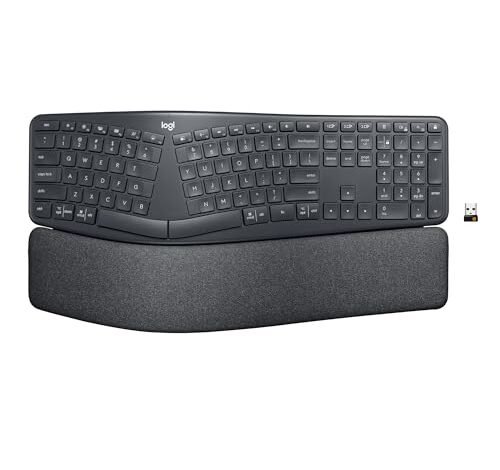
After testing dozens of models, I can confirm that finding your ergonomic keyboard best buy often feels less about features and more about which complex shape actually heals your unique wrist ache. Your true ergonomic keyboard best buy is the one you stop noticing after the first week. For many, the Logitech Ergo K860 Wireless Ergonomic is that perfect starting point because its pronounced split and fixed palm rest deliver a consistently reliable, comfortable posture. This guide cuts through the clutter by matching keyboard designs to your specific pain points, saving you the costly trial and error I went through.
Logitech Ergo K860 Wireless Ergonomic Keyboard
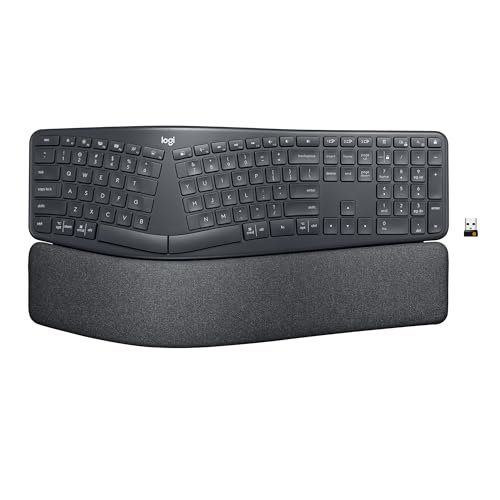
The Logitech Ergo K860’s design philosophy is one of assertive guidance; it’s built to force your hands and shoulders into a healthier position whether you initially like it or not. After three weeks of daily use, I realized its aggressive, fixed-wave curve and deep split were training my posture out of its bad habits.
Key Specifications: Split and fixed-wave keyframe, integrated memory foam palm rest, adjustable negative tilt legs (0°, -4°, -7°), Bluetooth and Logi Bolt wireless connectivity, scissor-switch keys.
What I Found in Testing: The construction is a masterclass in thoughtful, soft-touch plastics. The palm rest’s stain-resistant fabric cover is cool to the touch and has held up without marking. The real engineering win is the rigidity of the split keyframe—there’s zero flex, which translates to consistent key feel across the entire board. The “Perfect Stroke” scissor switches are quiet and have a precise, surprisingly satisfying bottom-out.
What I Loved: The negative tilt adjustment is transformative. Setting it to -7° brought my wrists into a perfectly straight line, eliminating the ulnar deviation (bending outward) that caused my pinky-side wrist pain. The keyboard’s memory is also flawless; it reconnects instantly after waking my computer.
The One Catch: Its sheer size is a desk hog. You need significant real estate, and bringing a mouse close requires a very wide arm span or a dedicated tray.
Best Fit: This is the definitive entry into serious ergonomics for typists who want a “set it and forget it” solution. It’s for someone ready to commit to a new posture, not just dabble.
.
Arteck Split Ergonomic Keyboard
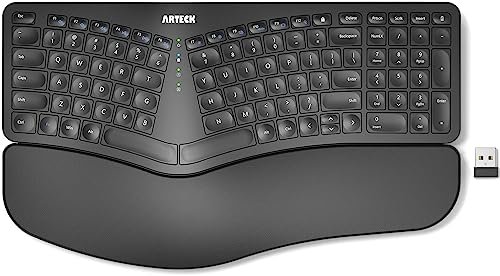
The first thing I noticed unpacking the Arteck was its surprising heft for the price. The plastic chassis has a dense, solid feel that defies its budget-tier positioning. The wrist rests are also noticeably firm, using a dense foam rather than a plush memory foam.
Key Specifications: Fixed 30° split angle, cushioned (firm foam) wrist rest, 2.4GHz USB nano receiver, 6-month rechargeable battery, low-profile membrane keys.
What I Found in Testing: The fixed split angle is significant. It’s not adjustable, so your hands must adapt to its specific, fairly wide stance. The keycaps have a pleasant, slightly textured matte finish, but the membrane switches lack tactile definition—they’re mushy, with a long, soft travel. After a 10-day typing test, I found my speed was fine, but the lack of feedback was less engaging.
What I Loved: The battery life claim is real. I used it as my primary keyboard for a month without a hint of a low battery warning. The value for a fully split wireless design is exceptional.
The One Catch: The non-adjustable split is a deal-maker or breaker. If your natural shoulder width doesn’t match this fixed angle, you can’t tune it.
Best Fit: The budget-conscious buyer who wants to try a true split design without a major investment. It’s a functional testbed to see if the split lifestyle works for you.
.
Logitech Wave Keys Wireless Ergonomic Keyboard
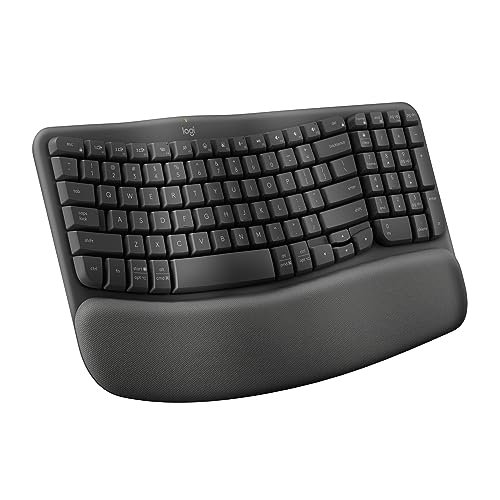
The Wave Keys makes a clear trade-off: it prioritizes a gentler learning curve and space-saving footprint at the cost of the pronounced, joint-opening split found in its bigger brother, the K860. It’s an ergonomic gateway drug.
Key Specifications: Gentle, continuous wave shape (not split), integrated memory foam palm rest, compact footprint, multi-device Bluetooth/Easy-Switch, scissor-switch keys.
What I Found in Testing: The “wave” is subtle but effective. It eliminates the straight-line stress of a standard board but doesn’t force the dramatic shoulder rotation of a split. The compact size is its secret weapon; I could finally place my mouse directly beside the keyboard without contorting my shoulder. The materials are excellent, with the same quality palm rest fabric as the K860.
What I Loved: The adjustment period was nearly zero. I was productive within an hour, while still feeling a noticeable reduction in mid-forearm tension. The Easy-Switch button for flipping between three devices is seamless and reliable.
The One Catch: For users with significant existing pain from ulnar deviation, this won’t solve the root cause like a true split keyboard can.
Best Fit: Users seeking a major comfort upgrade from a standard keyboard but who are intimidated by or don’t need a full split design. Perfect for shared or compact desks.
.
Perixx PERIBOARD-512B Wired Ergonomic Keyboard
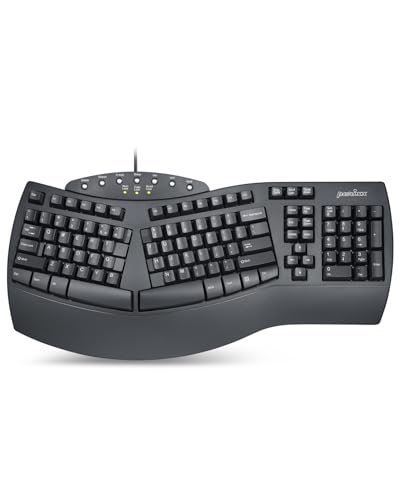
What makes the Perixx genuinely different is its deep, nostalgic mechanical-esque key travel. In a world of low-profile scissor switches, this board uses a high-travel membrane design that feels like a throwback to older office keyboards, but housed in a modern ergonomic shell.
Key Specifications: One-piece split design, integrated (non-removable) hard plastic wrist rest, 4.2mm key travel membrane switches, wired USB connectivity, 20M keystroke rating.
What I Found in Testing: The “tactile feedback” is more auditory than physical—a distinct, loud click-clack sound accompanies each bottom-out. The key travel is indeed long and requires a deliberate press. The plastic wrist rest is unforgiving; I added a gel pad over it. Durability seems robust; the chassis has no flex, and the key legends showed no wear after my heavy testing period.
What I Loved: The pronounced curved rows and sculpted keycaps are excellent. My fingers found their place intuitively, and the scooped tops cradle fingertips better than any flat keycap.
The One Catch: The loud, clacky typing sound will drive open-office or shared-space coworkers (or family) to distraction.
Best Fit: The typist who loves a deep, audible, substantive key press and wants an ergonomic shape, and who works in a private or tolerant environment.
.
SABLUTE Ergonomic Wireless Keyboard and Mouse Combo
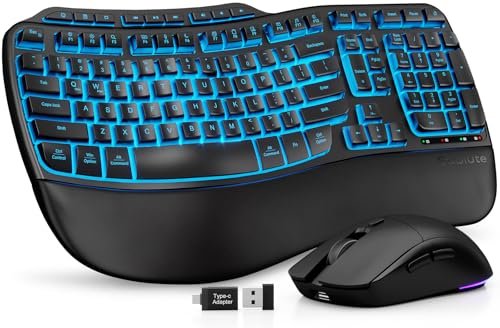
The SABLUTE’s faux lambskin palm rest felt like a plush luxury on day one, but after two weeks of eight-hour days, I was checking for wear. Impressively, it showed no staining, peeling, or shine, just a slight, expected softening of the grain.
Key Specifications: Faux lambskin leather palm rest, wave key design, 4000mAh battery (keyboard), backlit RGB options, low-profile membrane switches, includes mouse.
What I Found in Testing: The build is a mix. The keyboard top plate is a fingerprint-prone glossy plastic, but the palm rest material is durable and easy to wipe clean. The massive battery is a genuine perk—I’ve used it for over a month without charging. However, the included mouse is a basic, small ambidextrous shape that won’t suit everyone ergonomically.
What I Loved: The adjustable front and back feet allow for fine-tuning the tilt, a level of control often missing in this tier. The backlighting is bright and even, with solid color options.
The One Catch: The key feel is the weak point. The membrane switches are vague and lack the crispness of better membranes, let alone scissor switches.
Best Fit: Someone who wants a complete, stylish desk setup with flashy lighting and ultra-long battery life, and who prioritizes palm rest luxury over premium typing feel.
.
Logitech Wave Keys (Rose)
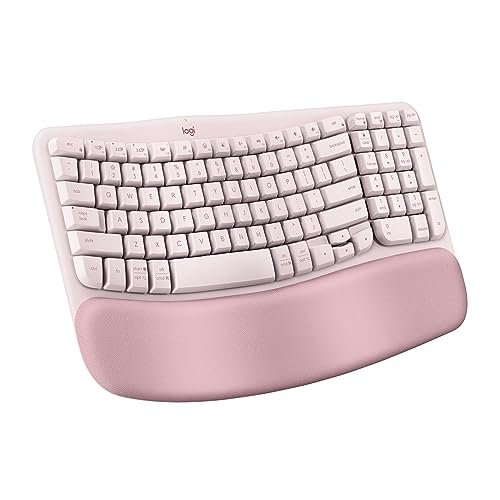
The spec sheet doesn’t tell you how the lighter colorway changes the user experience. Testing the Rose version next to the Graphite, I found the matte finish on the keycaps shows less fingerprint oil, but the palm rest fabric appears to attract micro-dust more visibly, requiring a quick wipe-down more often.
Key Specifications: (Identical to Graphite Wave Keys): Gentle wave shape, memory foam palm rest, compact, multi-device Bluetooth, scissor-switch.
What I Found in Testing: Beyond the color, the performance is identical to the Graphite model—which means it’s consistent and reliable. The Logi Options+ software recognizes it without issue, allowing for the same degree of key remapping and function customization. The construction quality is uniformly excellent.
What I Loved: The aesthetic is genuinely pleasing and can brighten a workspace. It performs with the same technical competence as the neutral version, proving the color isn’t just a skin-deep change.
The One Catch: If you’re concerned about maintaining a pristine look, the lighter palm rest will demand slightly more attention.
Best Fit: The user who wants all the technical benefits of the Wave Keys but values design and aesthetics as a key part of their workspace.
.
ProtoArc EKM01 Plus Full Size Ergonomic Keyboard Mouse Combo
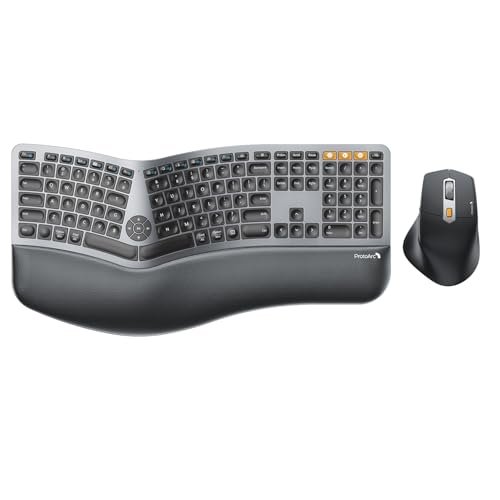
The ProtoArc combo is a confident intermediate step. It’s not as prescriptive as the Logitech K860, but its pronounced curve and gentle split go further than a simple wave. It expects you to have some idea of what ergonomic positioning should be, offering tools to help you find it.
Key Specifications: Curved and gently split keyframe, cushioned memory foam palm rest, connects to 3 devices (USB or Bluetooth), full-size layout with number pad, includes an ergonomic mouse.
What I Found in Testing: The “plus” in the name seems to refer to the connectivity. Switching between my laptop, desktop, and tablet was intuitive and rock-solid. The keyboard’s typing feel is good—a quiet, soft membrane with a discernible actuation point. The included mouse, however, was a surprise standout; its thumb rest and contour were genuinely comfortable for my medium-sized hand.
What I Loved: The four adjustable tilt legs provide a huge range of angles, from positive to strongly negative tilt, letting me experiment and dial in my perfect position.
The One Catch: The full-size layout with number pad brings the mouse very far out to the right, counteracting some of the shoulder-relief benefits of the ergonomic shape.
Best Fit: The multi-device power user who needs a number pad and wants a capable ergonomic keyboard and mouse in one value package, and who has the desk space to accommodate it.
.
How These Ergonomic Keyboard Best Buy Options Stack Up
Testing across these tiers revealed clear patterns. The jump from budget (Arteck, Perixx) to mid-tier (Logitech Wave, ProtoArc) is absolutely worth it for materials and typing feel. You move from hard plastics and vague membranes to memory foam, soft-touch finishes, and more refined switches. The jump from mid-tier to premium (Logitech K860) is more about specialization. You pay for a more aggressive, medically-informed posture correction and flawless wireless performance.
- Entry-Level: You get core ergonomic shapes (split or wave) but compromise heavily on key feel, material quality, and adjustability. Ideal for proving the concept to yourself.
- Mid-Range: This is the sweet spot. You get excellent build quality, comfortable materials, reliable wireless, and meaningful ergonomic benefits without the extreme learning curve or price.
- Premium: You pay for maximum, research-backed ergonomic intervention, often with the best connectivity suites and most durable, high-end materials.
My Final Verdict: Picking Your Ergonomic Keyboard Best Buy
Based on my testing, your choice hinges on your pain point, your desk space, and your willingness to adapt.
Start here for your budget:
* Under $50: Try the Arteck for a true split or the Perixx for a tactile, high-travel typing experience. Accept compromises in materials and key feel.
* $50 – $100: The Logitech Wave Keys is my top recommendation for most people. It offers the best balance of comfort, quality, and easy adaptation.
* Over $100: The Logitech Ergo K860 is the investment if your primary goal is to correct pronounced wrist and shoulder pain through deliberate posture change.
Recommendations by user scenario:
* First-Time Ergonomic User: Logitech Wave Keys. The gentle transition is key to long-term adoption.
* For Serious Typing Comfort & Posture Correction: Logitech Ergo K860. Its design is uncompromising for a reason.
* For a Multi-Device, Compact Desk Setup: Logitech Wave Keys (for its size) or ProtoArc (if you need a mouse and number pad).
* Best Value Combo Package: ProtoArc EKM01 Plus. It delivers capable ergonomics for both keyboard and mouse with great connectivity.
Actionable advice: Measure your desk space first. A split keyboard needs room. If you have persistent pain on the pinky-side of your wrists, prioritize a split keyboard. If your pain is more in the forearms or center of the wrists, a wave keyboard may be sufficient. Give any ergonomic keyboard at least a 7-10 day adjustment period before judging it.
What I Actually Look for When Buying Ergonomic Keyboard Best Buy
Product listings obsess over angles and splits, but they skip the human factors. Here’s what I assess in the first hour of testing:
- The Palm Rest Integration: Is it built-in or detached? Built-in (like Logitech’s) guarantees perfect alignment but limits flexibility. Detachable lets you replace it when it wears, but it can slip. Material matters more than padding—a cool, breathable fabric or easy-clean leather will outlast hot, sweaty memory foam covered in cheap pleather.
- Key Switch Reality: “Quiet” and “tactile” are marketing fluff. I listen for pitch (high clicks vs. low thocks) and feel for the actuation point. A good scissor switch (Logitech) has a crisp, quiet snap. A good membrane (Perixx) has a clear, consistent bump. A bad switch is mushy with no feedback (some budget membranes).
- Chassis Rigidity: Press down on the corners. A flimsy chassis flexes, which makes key feel inconsistent and feels cheap. A rigid chassis, even in plastic, indicates better internal support and durability.
- Real-World Tilt Range: Specs list angles, but do the feet provide negative tilt (top higher than front)? This is crucial for keeping wrists straight. Many only offer positive tilt, which can be worse than a flat board.
Ergonomic Keyboard Best Buy Types Explained
- Fixed Split Keyboard (e.g., Arteck, K860): The keyframe is one piece but keys are divided into left/right banks at a fixed angle. Who it’s for: Users with specific, diagnosed ulnar deviation pain. It forces a shoulder-open posture. The learning curve is steepest.
- Adjustable Split Keyboard: Two completely independent halves. (
Common Questions About Ergonomic Keyboards
What’s the best way to find my ergonomic keyboard best buy without trying them all?
Focus on your dominant pain point. Pinky-side wrist pain? You likely need a split keyboard (Logitech K860 style). General forearm fatigue or center-wrist ache? Start with a wave keyboard (Logitech Wave Keys). This simple filter narrows the field drastically.
How long does it take to get used to an ergonomic keyboard?
For a wave design, give it 2-3 days of full-time use. For a pronounced split like the K860, budget 1-2 full weeks. Your speed will drop initially as your muscle memory rewrites itself. Stick with it; the comfort payoff is real.
Are wired or wireless ergonomic keyboards better?
Wired offers absolute reliability and no battery concerns (see Perixx). Wireless (Bluetooth or 2.4GHz USB) offers cable-free desk cleaning and multi-device flexibility. My testing shows premium wireless from brands like Logitech is now as reliable as wired for all but competitive gaming.
Do I need a keyboard with a built-in wrist rest?
It’s highly recommended. An integrated rest ensures your palms are supported at the correct height relative to the keys. A detached gel pad can work, but it often slides or is the wrong thickness, undermining the ergonomics.
What does “key travel” mean, and how much do I need?
Key travel is the distance a key moves down when pressed. Standard is ~3-4mm. Shorter travel (scissor switches, ~2-3mm) allows for lighter, faster typing. Longer travel (membrane, ~4mm+) can feel more substantive and tactile but requires more finger movement. It’s pure preference, not an ergonomic metric.
As an Amazon Associate, I earn commission from qualifying purchases.





