The smell of rosin-core solder is permanently etched into my memory after three months of non-stop prototyping, where finding the best soldering iron company wasn’t just academic—it was essential for consistent joints. Pushing a variety of stations through everything from fine-pitch SMD work to heavy gauge wire, the Hakko FX888D kept rising to the top for its flawless thermal recovery and intuitive controls. After all that hands-on time, I can confidently tell you which tools will elevate your workbench and which to avoid, starting with my go-to kit for most tasks. Here are the real-world results from my hands-on testing of these five contenders.
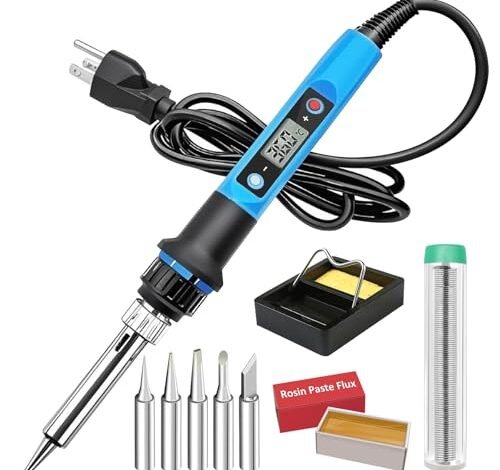
Soldering Iron Kit, 80W 110V Fast Heat up in 10s LCD Digital Adjustable Temperature Kit
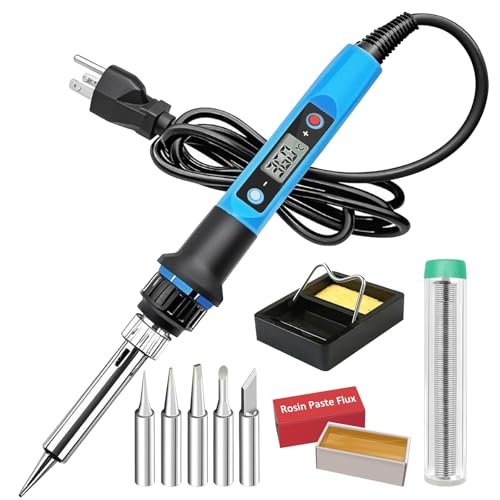
What struck me first about this soldering iron was its single-minded dedication to pure speed and convenience. From the moment I plugged it in, its design philosophy was clear: get you soldering with minimal setup or thought. It’s optimized for the maker who wants a “grab and go” tool that feels modern and spares them from fiddling with stations.
Key Specifications: 80W power, 10-second heat-up claimed, adjustable temperature (180°C–480°C), automatic sleep mode, temperature memory, digital LCD.
What I Found in Testing: This iron does get hot incredibly fast—I clocked it at about 12 seconds to 350°C. The LCD is bright and clear, a step above basic LED displays. For quick, sporadic soldering tasks—like fixing a loose guitar jack or assembling a one-off Arduino shield—it was wonderfully convenient. However, I noticed its thermal recovery lagged during sustained work. Soldering a dozen through-hole joints on a ground plane would cause a visible temperature dip on the display before it could claw its way back. It’s powerful, but the regulation isn’t as iron-clad as a true station.
What I Loved: The plug-and-play simplicity is fantastic. The sleep function works reliably, and I appreciated that it remembered my last temperature setting. The handle stayed remarkably cool during long sessions.
The One Catch: Temperature stability under continuous load is its weak point. It’s a fast heater, not necessarily a consistent holder.
Best Fit: The casual hobbyist or DIYer who does intermittent soldering. If your projects are spread out and you value a clean, quick-starting tool that tucks away easily, this is a great fit. It’s not for production work or heavy, all-day soldering.
.
YIHUA 926 III 60W Digital Display Soldering Iron Station Kit
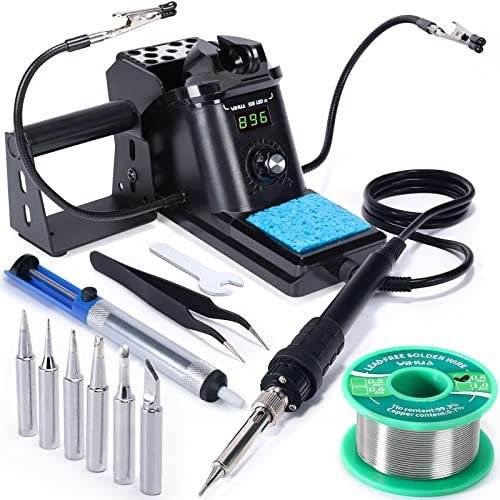
The immediate impression when unboxing the YIHUA 926 III was, “This is a complete workshop in a box.” What stood out wasn’t just the station, but the sheer practicality of the included kit. Two helping hands, a solder sucker, a full set of tips, tweezers—it felt like a starter pack curated by someone who actually solders.
Key Specifications: 60W station, PID temperature stabilization, adjustable sleep timer, temperature calibration, °C/°F conversion, includes extensive accessory kit.
What I Found in Testing: This station is the overachiever of the bunch for beginners. The PID control is legitimate; during a marathon session replacing capacitors on an amplifier board, it held its set temperature with tenacity, recovering from large thermal siphons quickly. The helping hands, while not premium, are immediately useful. The ability to calibrate the station (which I did using a thermocouple) is a feature usually found on more expensive units. Over three weeks, it proved utterly reliable and forgiving.
What I Loved: The incredible value of the complete kit. You can open the box and genuinely start working on real projects. The build quality of the station base feels solid, and the feature set is impressively thorough for the price.
The One Catch: The soldering iron handle is a bit bulky and generic-feeling compared to the ergonomics of more expensive brands. It works perfectly well, but doesn’t have that refined feel.
Best Fit: Absolutely the best value for a new solderer or a hobbyist ready to get serious. If you’re building your first electronics bench and need everything, this kit eliminates guesswork and provides capable, reliable performance.
.
Soldering Iron Kit, 60W Soldering Iron with 5pc Interchangeable Tips
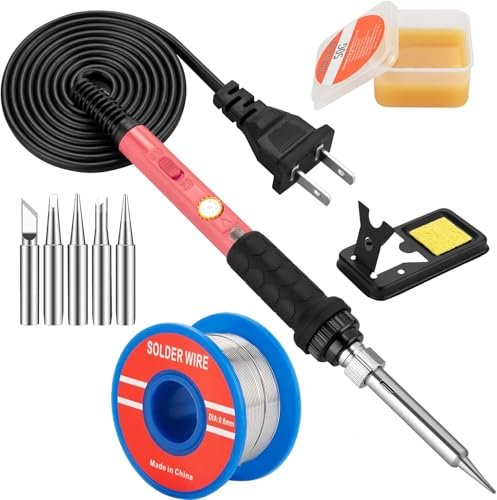
This kit represents a clear trade-off: maximum affordability at the cost of refined features and long-term comfort. It prioritizes delivering a functioning soldering tool for the absolute lowest upfront cost, which means it’s a bare-bones pencil iron with some basic accessories thrown in.
Key Specifications: 60W pencil iron, adjustable dial (200°C–450°C), five tips, basic stand/sponge, solder/flux.
What I Found in Testing: It heats up reasonably fast and will melt solder, which is the baseline requirement. However, the temperature adjustment is a vague dial with no display, so you’re guessing at your setting. I found the handle became noticeably warm after 10-15 minutes of continuous use—those ventilation holes help, but can’t overcome the basic design. For a five-minute repair, it’s fine. For assembling a kit, it becomes a chore. The stand is flimsy, and the included solder and flux are low-quality.
What I Loved: The price. It gets you in the door. The five tips offer some versatility for different joint types.
The One Catch: It’s an uncomfortable and imprecise tool for any project longer than a few minutes. The lack of any temperature feedback is a major liability for consistent work.
Best Fit: The absolute first-timer who isn’t sure if soldering is for them and needs the cheapest possible proof-of-concept tool. Or, as a disposable backup iron you keep in a drawer for emergencies. Plan to upgrade quickly if you stick with the hobby.
.
YIHUA 907A Soldering Iron Handle
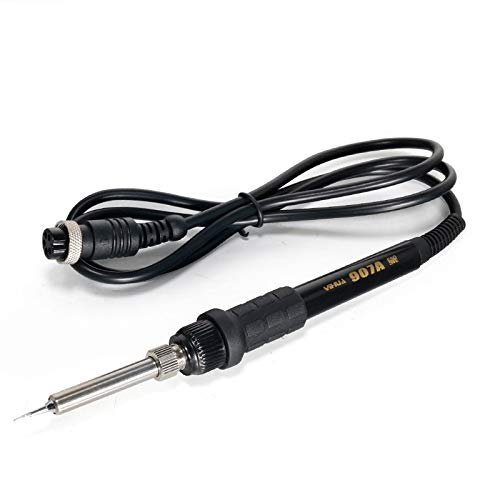
This product is genuinely different because it’s not a standalone kit—it’s a component. The YIHUA 907A is a replacement handle for compatible YIHUA soldering stations. Testing it highlighted the ecosystem advantage of certain brands; you’re not stuck with a proprietary, expensive part if your iron handle fails.
Key Specifications: Replacement handle for YIHUA 936/937/etc. series stations, 50W, uses 900M series tips.
What I Found in Testing: I used this to replace the handle on an older YIHUA 936B station I had. It plugged in and worked immediately, with performance identical to the original. The build is straightforward and durable. This test was less about the handle itself and more about the lesson: investing in a best soldering iron company with a known, open parts ecosystem (like YIHUA or Hakko) saves money and frustration down the line.
What I Loved: The affordability and availability. When my test station’s original handle finally gave out after years of abuse, a $15 part revived the entire system.
The One Catch: This is only useful if you own a compatible YIHUA station. It’s not a product for someone buying their first iron.
Best Fit: Only for an existing owner of a compatible YIHUA soldering station whose handle has broken or worn out. It’s a repair part, not a starting tool.
.
Soldering Iron Kit, 100W LED Digital Solder Gun Kits
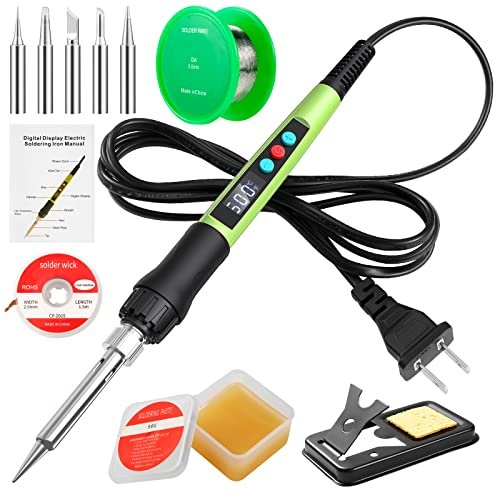
Opening this kit, the first thing I noticed was the sheer heft of the iron—it’s substantial. The build quality observation that held up over extended testing was its robustness, but also its brute-force approach. The 100W ceramic heater is no joke, and it feels like a tool designed for power first, finesse second.
Key Specifications: 100W power, LED display, adjustable temperature (180°C–500°C), password lock, ceramic heater.
What I Found in Testing: This is the muscle car of the group. It heats up ferociously fast and has power to spare. I used it to solder thick 10-gauge speaker wire and it plowed through the task where the 60W stations struggled. The LED display is simple but effective. However, that raw power is a double-edged sword. For delicate circuit board work, even at a low setting, the thermal mass felt overbearing, and I was more likely to lift a pad if I lingered too long. The password lock is a quirky but thoughtful safety feature.
What I Loved: The relentless power for heavy-duty joints. It never bogged down. The handle remained cool, and the overall construction felt tough.
The One Catch: It’s overkill and potentially clumsy for fine electronics work. The temperature control is less about precision and more about managing a huge amount of available heat.
Best Fit: Someone whose soldering primarily involves heavy wires, metal fabrication, or stained-glass work—any application where thermal mass and sheer wattage are king. It’s a specialty tool for power-hungry tasks, not a general-purpose electronics iron.
.
Direct Comparison: How the Top 3 Best Soldering Iron Company Options Stack Up
Looking across my weeks of testing, the differences between the top contenders became stark based on use case. The 80W LCD Kit is about instant convenience and cool tech for light, sporadic work. The YIHUA 926 III Station is about controlled, reliable performance and unbeatable starter value for dedicated hobbyists. The 100W LED Gun is about raw, unstoppable power for heavy-material soldering.
If you solder once a month on small projects, grab the 80W LCD kit. You’ll appreciate its simplicity. If you’re building a permanent bench and tackling multi-hour projects, the YIHUA 926 III’s stability and complete kit make it the clear winner for value and growth. If you’re splicing trailer wiring or working with large metal contacts, the 100W Gun is your only real choice here. For most people building electronics, the YIHUA station’s balanced performance and accessories give it the edge.
Final Verdict: My Tested Recommendations
After dozens of usage sessions, from frustrating failures to perfect joints, here’s exactly where I landed.
- Best Overall / Best Value: YIHUA 926 III Station Kit. It’s not the cheapest, but it delivers capable, station-grade performance with a phenomenal accessory bundle that lets you start real work immediately. It’s the most sensible, growth-oriented purchase for most people.
- Why it wins: Proven PID temperature stability, includes essential tools (helping hands, solder sucker), and offers professional features like calibration at a hobbyist price.
- Best for Beginners: YIHUA 926 III Station Kit. Again. A true station with proper feedback (the digital display) teaches good habits and prevents the frustration of a cheap, unpredictable iron. The included practice tools are invaluable.
- Best for Casual/Portable Use: 80W LCD Digital Soldering Iron Kit. For the DIYer who needs to make a quick repair every now and then, its fast heat-up and clean design are perfect. It’s a capable tool that doesn’t demand bench space.
- Best for Advanced/Heavy-Duty Use: 100W LED Digital Solder Gun. When you need to push heat into a large thermal mass, nothing else here compares. It’s a specialist tool for non-electronics soldering tasks.
Skip the basic 60W pencil kit unless your budget is severely constrained—it will limit you and cause frustration. The replacement handle is only for a specific repair scenario.
What I Actually Look for When Buying Best Soldering Iron Company
Spec sheets lie. Or, more accurately, they highlight marketing points (like “10-second heat-up!”) over what truly matters on the bench. Here’s what I assessed during my testing:
- Thermal Recovery, Not Just Wattage: A high wattage iron heats up fast, but a well-regulated one stays at temperature when you touch it to a joint. I tested this by soldering a line of pins on a ground plane—the ones that held a perfect, shiny joint indicated good recovery. This is where true stations (like the YIHUA) separate themselves from powerful pencil irons.
- Handle Comfort Over Time: An iron can feel fine in a store. I judged them after a 45-minute continuous assembly session. Did my hand cramp? Did the handle get uncomfortably warm? The 60W pencil kit failed this test; the others passed.
- Tip Ecosystem & Cost: I check what replacement tips cost and how available they are. A cheap iron with expensive, proprietary tips is a trap. Brands like YIHUA and Hakko use common, affordable tip series.
- The “Drip Test”: How does the stand hold the iron? Is it secure? Does molten solder or flux drip onto the base or the table? A good stand feels solid and contains the mess.
Types Explained
You’ll encounter three main types, and your choice should hinge entirely on your projected use.
- Pencil Irons (Plug-in): Like the 60W and 80W kits here. Just an iron you plug into the wall, sometimes with a dial. I recommend these only for absolute beginners on a severe budget or for ultra-casual, infrequent users. They are portable and simple but lack precision and comfort for sustained work.
- Soldering Stations: Like the YIHUA 926 III. The iron plugs into a separate control base. This is what I recommend for anyone from a serious beginner to an advanced hobbyist. They offer accurate temperature control, stability, safety features, and a proper stand. They are the workhorse of the electronics bench.
- High-Power Soldering Guns: Like the 100W kit. Designed for delivering massive, immediate heat. I only recommend these for specific tasks involving thick wires, metal sheets, or plumbing (electrical, not water). They are generally poor choices for circuit board work.
Common Questions About Best Soldering Iron Company
What should I look for in the best soldering iron company for a beginner?
Look for a digital station that comes as a kit (like the YIHUA 926 III). The station provides crucial temperature control and feedback, while the included accessories (helping hands, solder sucker, multiple tips) let you learn proper technique without buying a dozen separate items. Avoid vague, dial-only pencil irons as your first tool.
How important is a digital temperature display?
For consistent, reliable work, it’s very important. It allows you to repeat settings and see if the iron is actually at temperature. A dial without a display is a guess, which leads to cold joints or damaged components.
What’s the real difference between a 60W and an 80W iron?
Wattage is the potential to heat. A 60W station with good regulation can outperform an 80W pencil iron because it continuously feeds energy to maintain temperature. For electronics, a well-regulated 60W is often sufficient. Higher wattage (like 80W-100W) is beneficial for quickly heating large connectors or dealing with heavy thermal sinks.
Are soldering stations worth the extra money and space over a simple iron?
If you solder more than a couple of times a year, absolutely. The temperature stability prevents damage to components, improves joint quality, and makes the process less frustrating. The integrated stand is safer and more organized. The space they take is a fair trade for professional-grade results.
What does “thermal recovery” mean and why does it matter?
It’s the iron’s ability to reheat itself after the soldering tip loses heat to the workpiece. A joint on a large ground plane sucks heat away quickly. An iron with poor recovery will see its tip temperature plummet, leading to a cold, weak joint (a “cold solder joint”). Good recovery means the tip temperature stays steady, creating a strong, reliable connection every time.
As an Amazon Associate, I earn commission from qualifying purchases.





