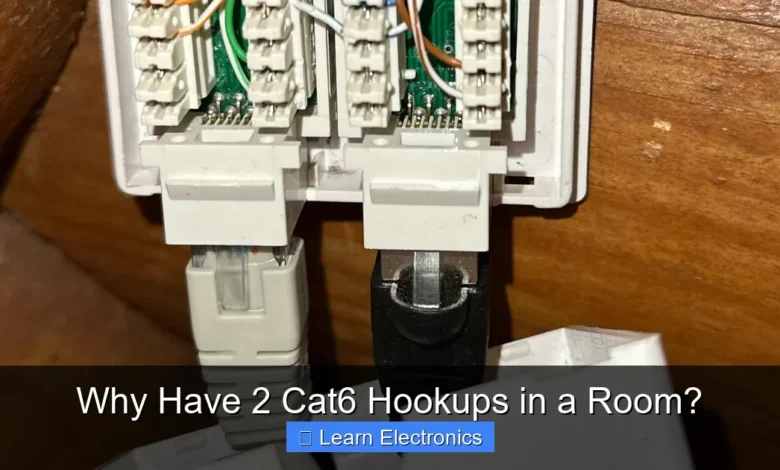
Why Have 2 Cat6 Hookups in a Room? The primary reason is to provide enhanced flexibility, reliability, and performance for modern home and office networks. This approach ensures that you have redundant connectivity and sufficient bandwidth for multiple devices, accommodating present and future technological demands.
Implementing this method offers significant advantages, from supporting high-bandwidth applications simultaneously to simplifying troubleshooting. It’s a strategic move for anyone looking to build a robust and adaptable network infrastructure.
Quick Answers to Common Questions
Why not just rely on Wi-Fi for all my devices?
While Wi-Fi is convenient, a dedicated Cat6 hookup offers significantly faster, more stable, and lower-latency connections, which is essential for things like lag-free gaming, seamless 4K streaming, or critical work-from-home tasks.
What’s the real advantage of having *two* Cat6 hookups instead of just one?
Having two Cat6 hookups provides incredible flexibility! You can connect multiple wired devices like a PC and a smart TV simultaneously, provide a dedicated connection for a gaming console, or even have a backup port ready for future needs.
Is installing two Cat6 hookups overkill if I only have one device needing a wired connection right now?
Absolutely not! Installing two Cat6 hookups is excellent future-proofing. It allows for easy expansion, different device setups, or the addition of new tech down the line without needing extra switches or messy cable runs.
📑 Table of Contents
- Enhanced Reliability and Redundancy: Why Have 2 Cat6 Hookups in a Room?
- Boosting Performance for Multiple High-Bandwidth Devices
- Future-Proofing Your Home Network: Why Have 2 Cat6 Hookups in a Room?
- Power over Ethernet (PoE) Applications
- Simplified Troubleshooting and Maintenance
- Cost-Effectiveness and Convenience in the Long Run
- Conclusion
Enhanced Reliability and Redundancy: Why Have 2 Cat6 Hookups in a Room?
One of the most compelling reasons to install dual Cat6 hookups is the immediate benefit of enhanced reliability and redundancy. In an increasingly connected world, network downtime, even for a few minutes, can be disruptive. Having a second port acts as an instant backup, safeguarding against common connectivity issues.
Backup Connection
- Port Failure: Ethernet ports, whether on your wall plate or the device itself, can fail. If one port stops working due to physical damage, a loose connection, or internal component failure, the second port allows you to seamlessly switch connections without waiting for repairs or troubleshooting.
- Cable Damage: Ethernet cables can also be susceptible to damage. Kinks, pin breaks, or rodent chewing can render a cable useless. With a second hookup, you simply swap the cable to the operational port, ensuring continuous internet access. This simple redundancy can prevent significant work or entertainment interruptions.
Network Segmentation
Beyond simple backup, this practice allows for logical network segmentation within a single room. You might dedicate one connection to sensitive work devices and another to general-purpose or entertainment devices. While not a complete security solution on its own, it forms a foundation for more advanced network configurations like Virtual Local Area Networks (VLANs), which can further enhance security and manage traffic flow by keeping different types of data separate.
Boosting Performance for Multiple High-Bandwidth Devices
Modern households and professional setups often feature multiple devices requiring substantial bandwidth, especially simultaneously. A single Cat6 connection, while robust, might face limitations when sharing its capacity across several demanding applications. The practice of installing dual hookups directly addresses this challenge.
Gaming and Streaming Simultaneous
Consider a scenario where one family member is engaged in online multiplayer gaming, which demands low latency and consistent bandwidth, while another is streaming 4K video content or engaging in a high-definition video call. Each of these activities can saturate a significant portion of a single network connection if not managed effectively. By providing separate, dedicated Cat6 lines, each device gets its own direct, unshared pathway to the network switch or router, minimizing contention and ensuring optimal performance for both.
- Reduced Latency: Critical for competitive online gaming.
- Buffer-Free Streaming: Ensures smooth, high-quality video playback without interruptions.
Work-from-Home Setups
For professionals working from home, a reliable network is paramount. Many remote workers use multiple devices simultaneously: a primary desktop, a VoIP phone, a network-attached storage (NAS) device for backups, or a dedicated video conferencing unit. With two Cat6 hookups, you can allocate one for your primary workstation and the other for VoIP, NAS, or even a second monitor that supports network-based display sharing. This separation prevents any single device from monopolizing bandwidth or introducing latency for critical applications.
Future-Proofing Your Home Network: Why Have 2 Cat6 Hookups in a Room?
Technology evolves at a rapid pace, and what seems sufficient today might become a bottleneck tomorrow. Adopting the strategy of having two Cat6 hookups per room is an excellent way to future-proof your network infrastructure, anticipating advancements in device capabilities and bandwidth demands.
Adapting to New Technologies
Even though Cat6 supports speeds up to 10 Gigabit Ethernet (10GbE) over shorter distances, and Cat6a extends this capability further, the number of devices requiring such speeds is constantly increasing. Future devices might not just demand more speed but also dedicated connections for specific functions. Having an extra port ready means you won’t need to run new cabling through walls or rely solely on Wi-Fi when faster or more specialized wired connections become standard.
- Emerging Device Categories: Think beyond computers and TVs. Augmented reality (AR) and virtual reality (VR) headsets may soon integrate wired network capabilities for optimal performance, and high-speed external SSDs could become common network storage solutions.
- Higher Resolution Content: As 8K and even higher resolution content becomes mainstream, the bandwidth requirements for streaming and local network transfers will continue to grow, making dedicated wired connections even more valuable.
Smart Home Integration
While many smart home devices rely on Wi-Fi, there’s a growing trend towards wired backbones for critical or high-bandwidth smart home components. This includes advanced security cameras, centralized smart home hubs, and even networked audio systems. Installing dual Cat6 hookups allows you to connect these devices directly, ensuring stable performance, reducing Wi-Fi congestion, and often providing better security than wireless alternatives.
Power over Ethernet (PoE) Applications
Power over Ethernet (PoE) is a technology that allows network cables to carry electrical power simultaneously with data. This eliminates the need for separate power outlets for certain devices, simplifying installation and reducing cable clutter. Having two Cat6 hookups per room significantly expands your options for deploying PoE-powered devices.
IP Cameras and Access Points
For example, you might want to install an IP security camera or a wireless access point (WAP) in a corner of your room to extend Wi-Fi coverage. If one of your Cat6 hookups is connected to a PoE-enabled switch, you can power these devices directly through the Ethernet cable, avoiding the need for a bulky power adapter and an electrical outlet nearby. This offers immense flexibility in device placement and installation.
VoIP Phones and Thin Clients
In a home office or small business environment, VoIP (Voice over Internet Protocol) phones are commonly powered by PoE. A second Cat6 connection dedicated to a VoIP phone means it can draw power and data from the same cable, leaving your primary hookup free for your computer or other devices. Similarly, thin clients or mini-PCs, which are sometimes PoE-enabled, can benefit from this setup.
Simplified Troubleshooting and Maintenance
Anyone who has spent hours diagnosing network issues knows the value of simplicity. Multiple wired connections in a room, while seemingly more complex initially, actually streamline troubleshooting and maintenance significantly.
Isolating Issues
If you encounter a network problem, having an extra hookup makes it much easier to pinpoint the source. If one connection isn’t working, you can immediately test the other. If the second works, you know the issue lies with the first port, cable, or the device connected to it, rather than the entire network segment or your internet service provider. This diagnostic capability saves time and frustration.
Testing Connections
Periodic maintenance, such as testing network speeds or verifying cable integrity, becomes simpler. You can use one port for active network usage while using the second for diagnostic tools, loopback tests, or temporary device setups without interrupting your main workflow. This proactive approach can help identify potential issues before they cause significant disruption.
Cost-Effectiveness and Convenience in the Long Run
While the initial cost of installing two Cat6 hookups might seem slightly higher than just one, the long-term benefits in terms of cost-effectiveness, convenience, and avoidance of future hassle far outweigh this marginal difference. Retrofitting additional wiring later can be significantly more expensive and disruptive.
Avoiding Wireless Congestion
Relying solely on Wi-Fi for all devices in a room can lead to network congestion, especially in densely populated areas or homes with many wireless devices. Each wired connection offloads traffic from your Wi-Fi network, improving wireless performance for devices that truly need to be wireless (like smartphones and tablets). This effectively extends the lifespan and utility of your existing wireless infrastructure before needing costly upgrades.
Professional Installation vs. DIY Retrofits
Installing structured cabling, particularly running wires through walls and ceilings, is best done during construction or renovation. Adding a second drop while the walls are open or during an initial installation is marginally more expensive than adding just one. However, trying to run a new cable later, especially without accessible crawl spaces or attics, can involve cutting into drywall, patching, and painting, leading to substantially higher labor and material costs. Investing in dual hookups upfront is a wise economic decision.
Comparative Scenarios: Single vs. Dual Cat6 Hookups
To further illustrate the benefits, consider the following practical scenarios:
| Scenario | Single Cat6 Hookup | Dual Cat6 Hookups |
|---|---|---|
| High-Bandwidth Devices (e.g., Gaming PC + 4K TV) | One device must use Wi-Fi or share bandwidth, potentially causing lag or buffering. | Each device gets a dedicated wired connection for optimal performance. |
| Port/Cable Failure | Complete loss of wired connectivity for that room until fixed. | Seamless switch to the backup port, maintaining connectivity. |
| Work-from-Home Setup (PC + VoIP Phone) | VoIP phone shares bandwidth with PC, or requires Wi-Fi/separate power outlet. | Dedicated wired connection for PC, separate PoE connection for VoIP phone. |
| Adding an IP Camera or WAP | Requires additional power outlet and might add Wi-Fi congestion. | Can be powered directly via PoE from the second hookup, simplifying installation. |
| Future Device Upgrades | May necessitate new wiring or reliance on slower Wi-Fi for new demanding devices. | Ready for new devices needing dedicated wired speeds or special connections. |
Conclusion
In summary, installing two Cat6 hookups in a room is far from an indulgence; it’s a pragmatic and forward-thinking investment in your network infrastructure. From ensuring uninterrupted reliability through redundancy and providing dedicated bandwidth for multiple high-performance devices, to future-proofing your home or office against evolving technological demands, this approach offers myriad benefits.
It simplifies troubleshooting, enables convenient Power over Ethernet applications, and ultimately provides a more stable, faster, and flexible network experience. For anyone considering new network installations or upgrades, opting for dual Cat6 connections is a decision that will pay dividends in convenience, performance, and peace of mind for years to come.
Frequently Asked Questions
Why would I need two Cat6 hookups in a single room?
Many modern rooms benefit from multiple network connections. You might have a desktop computer and a smart TV, a gaming console, or a network-attached storage (NAS) device that all require a stable wired connection for optimal performance. Having two Cat6 hookups provides the flexibility to connect multiple devices without relying on Wi-Fi or additional switches.
What are the primary benefits of having two Cat6 hookups installed?
The main benefits include improved performance, reliability, and future-proofing. You can dedicate one connection to a high-bandwidth device like a gaming PC or a streaming box, ensuring it gets a clear, fast link, while the other serves another device. It also provides redundancy, so if one port or cable ever fails, you have an immediate backup.
Can I use one of the Cat6 hookups for a specific network application, like a dedicated gaming connection or a media server?
Absolutely, this is a common and excellent use case for dual Cat6 hookups. You can prioritize one connection for a latency-sensitive application like online gaming or video conferencing, ensuring it has an uninterrupted, high-speed path to your router. The other port can then be used for general internet browsing, connecting a smart TV, or linking a local network device like a printer or a media server.
Is installing two Cat6 hookups overkill if I only plan to connect one device initially?
While one Cat6 hookup might seem sufficient for immediate needs, installing two is often a smart long-term investment. It provides valuable future-proofing for your home or office, as you never know what additional wired devices you might acquire down the line. It’s much easier and more cost-effective to run two cables during initial installation than to add a second one later.
As an Amazon Associate, I earn commission from qualifying purchases.