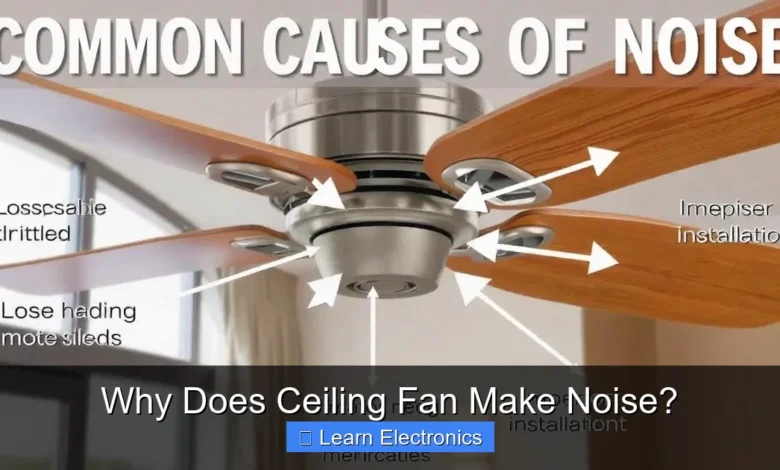
Why Does Ceiling Fan Make Noise? It often stems from a combination of loose components, motor wear, or improper installation. Understanding the root cause of this common household issue is the first step toward restoring peace and quiet to your living space.
This article will delve into the various reasons behind fan noise, providing practical solutions to diagnose and fix the problem effectively. Addressing fan sounds early can prevent further damage and extend your fan’s lifespan.
Quick Answers to Common Questions
Why is my ceiling fan making a humming noise?
A persistent hum often indicates an issue with the electrical components, like a faulty dimmer switch, an incompatible speed control, or even just loose wiring inside the fan motor itself. These are common reasons why a ceiling fan makes noise.
What’s that clicking or rattling sound coming from my fan?
Clicking or rattling sounds usually point to loose screws somewhere on the fan, especially where the blades attach or in the light kit. Sometimes, it could also be a decorative cover vibrating against the motor housing, causing your ceiling fan to make noise.
My ceiling fan is wobbling and loud – what’s wrong?
A wobbling fan that makes noise is often due to imbalanced blades or a loose mounting bracket. You might need to check if all the blades are securely attached and if the fan is properly fastened to the ceiling junction box.
📑 Table of Contents
- Understanding Common Sources of Fan Noise
- The Wobble Effect: Blade Imbalance and Warping
- Motor Troubles: Bearings and Electrical Hum
- Addressing Fan Mounting Issues
- The Role of Airflow and Blade Pitch in Noise Generation
- Common Ceiling Fan Noises and Solutions
- When to Call a Professional (or Replace the Fan)
Understanding Common Sources of Fan Noise
A ceiling fan is a relatively simple appliance, yet it comprises numerous moving parts that can develop issues over time, leading to irritating noises. Identifying the type of sound your fan is making can often point directly to the underlying problem.
Loose Hardware
One of the most frequent culprits for a noisy ceiling fan is loose hardware. Over time, vibrations from the fan’s operation can cause screws, bolts, and other fasteners to loosen. This can manifest as clicking, rattling, or even a subtle grinding sound.
- Blade Screws: The screws holding the fan blades to their brackets, and the brackets to the motor housing, are prime candidates for loosening.
- Light Fixture Screws: If your fan has an integrated light kit, the screws securing the globe or light fixture can rattle.
- Canopy Screws: The screws holding the decorative canopy flush against the ceiling can also become loose, causing a subtle vibration against the ceiling surface.
Quick Fix: Turn off the power at the breaker, then carefully inspect and tighten all visible screws on the fan, including those on the blades, light kit, and canopy. Be firm but avoid overtightening.
Dust and Debris Buildup
While often overlooked, an accumulation of dust and debris can contribute to fan noise. Dust can settle on the blades, unbalancing them slightly, or even work its way into the motor housing, interfering with internal components.
- Blade Dust: A thick layer of dust on the fan blades can create an uneven weight distribution, leading to a wobble and associated noises.
- Motor Debris: If dust or small debris enters the motor, it can interfere with the bearings or other moving parts, resulting in grinding or squeaking sounds.
Quick Fix: Regularly clean your fan blades with a damp cloth to remove dust. For motor-related dust, use compressed air to clear vents, but avoid spraying directly into sealed bearings.
The Wobble Effect: Blade Imbalance and Warping
A wobbly ceiling fan is not only distracting but can also be a significant source of noise. Wobbling often indicates an imbalance in the fan blades, which can stem from several issues.
Identifying Imbalanced Blades
Blade imbalance occurs when the weight of the blades is not evenly distributed around the fan’s central axis. This can cause the fan to oscillate or “wobble” during operation, leading to a rhythmic thumping or knocking sound.
- Bent or Warped Blades: Blades made from materials like MDF can warp over time due to humidity changes or prolonged use.
- Uneven Blade Weight: Sometimes, blades from the factory might have slight weight discrepancies.
- Loose Blade Holders: The holders or brackets that attach the blades to the motor can bend or become loose.
How to Balance Fan Blades
Addressing this specific type of fan making noise can often be done with a simple balancing kit, available at most hardware stores.
- Visual Inspection: Turn off the power. Carefully inspect each blade for any signs of bending, warping, or cracks. Ensure all blades are at the same height from the ceiling; a yardstick can help measure this. Gently push each blade up and down to check for loose connections.
- Tighten Blade Screws: Re-tighten all screws connecting the blades to the blade holders, and the blade holders to the motor housing.
- Use a Balancing Kit: Follow the kit’s instructions. Typically, you’ll clip small weights onto different blades while the fan is running at medium speed, moving them until the wobble is minimized or eliminated. A common technique involves temporarily taping a penny to a blade’s trailing edge until balance is achieved, then marking that spot for permanent weight placement.
Motor Troubles: Bearings and Electrical Hum
The motor is the heart of your ceiling fan, and problems within it can produce some of the most persistent and concerning noises. These usually point to mechanical wear or electrical issues.
Squealing or Grinding Motor Bearings
Many older ceiling fans utilize sealed ball bearings that can wear out over time, leading to friction and noise. A persistent squealing, grinding, or chirping sound is often indicative of dry or worn motor bearings.
- Lack of Lubrication: Bearings can lose their lubrication, causing metal-on-metal friction.
- Age and Wear: Over years of operation, bearings simply wear down.
Solution: Some fan motors have oil ports for lubrication; if yours does, consult your fan’s manual for the correct type of oil. For sealed bearings, lubrication is difficult or impossible. In such cases, the motor or the entire fan may need replacement.
Electrical Buzzing and Humming
An electrical hum or buzzing sound, especially noticeable at lower fan speeds, suggests an electrical issue rather than a mechanical one. This common noisy ceiling fan symptom requires careful diagnosis.
- Capacitor Failure: The capacitor helps regulate the fan’s motor speed. A failing capacitor can cause the motor to hum loudly as it struggles to operate.
- Dimmer Switch Incompatibility: Standard light dimmer switches are often not compatible with ceiling fan motors. Using one can cause the fan motor to buzz or overheat. Always use a fan-specific or fan-rated dimmer switch.
- Loose Wiring: Loose connections within the fan’s housing or at the wall switch can also cause electrical buzzing.
Solution: Turn off power. Check all wiring connections. If you’re using a dimmer, ensure it’s fan-rated. Replacing a capacitor is a relatively simple fix for experienced DIYers, but if you’re uncomfortable with electrical work, call an electrician.
Addressing Fan Mounting Issues
The way a ceiling fan is mounted to the ceiling can significantly impact how much noise it makes. Improper installation can lead to persistent wobbling and rattling, even if the blades themselves are balanced.
Improper Junction Box Installation
Ceiling fans are heavy, and they need to be securely anchored to a specialized, fan-rated electrical junction box. Standard junction boxes might not be strong enough or properly braced for the fan’s weight and dynamic movement.
- Unsecured Box: If the junction box itself is loose or not adequately secured to a ceiling joist, the entire fan assembly will wobble.
- Non-Rated Box: Using a light-fixture-only junction box for a ceiling fan can cause it to flex, leading to vibrations and noise, and creating a safety hazard.
Solution: This usually requires professional intervention. An electrician can install a proper fan-rated junction box, often with a brace that spans between ceiling joists for maximum stability.
Loose Downrod or Canopy Screws
The downrod connects the motor housing to the mounting bracket, and the canopy covers the electrical connections and mounting bracket against the ceiling. Loose components here can lead to significant noise.
- Loose Downrod Pins/Screws: The pin or screws securing the downrod to the motor and mounting bracket must be tight. If loose, the fan will sway and rattle.
- Canopy Not Flush: If the canopy isn’t tight against the ceiling, it can vibrate and produce a buzzing or rattling sound.
Quick Fix: Turn off power. Tighten the screws on the canopy, ensuring it sits flush against the ceiling. Inspect the downrod for any loose pins or screws and tighten them.
The Role of Airflow and Blade Pitch in Noise Generation
Sometimes, the noise isn’t mechanical or electrical but rather related to the way the fan interacts with the air. These sounds are typically ‘whooshing’ or ‘wind’ noises.
Whooshing and Air-Cutting Sounds
Every ceiling fan will create some level of airflow noise, especially at higher speeds. However, excessive whooshing or a noticeable “cutting” sound could indicate specific issues.
- Blade Pitch: The angle of the blades (pitch) is crucial for efficient air movement. If the pitch is too aggressive or inconsistent between blades, it can create more air turbulence and noise. This is usually a design characteristic and not adjustable on most fans.
- Fan Speed: Higher speeds naturally move more air and thus generate more sound. If your fan is consistently noisy at high speeds, it might be operating as designed.
- Fan Size vs. Room Size: An oversized fan for a small room might need to run at lower speeds, but if forced to run high, it can produce excessive airflow noise.
Solution: While blade pitch is generally fixed, ensuring blades are clean and free of dust can reduce air resistance. Operating the fan at a lower speed can also significantly reduce airflow noise.
Cleaning and Maintenance for Quieter Operation
Regular maintenance is key to preventing many of the issues that cause a noisy ceiling fan. A clean fan operates more smoothly and quietly.
- Dust Blades Regularly: As mentioned, dust adds weight and can unbalance blades.
- Check for Obstructions: Ensure no curtains, blinds, or other objects are too close to the fan’s rotation path, as these can create repetitive thumping noises.
- Lubricate When Possible: If your fan motor has oil ports, lubricate it annually according to the manufacturer’s instructions.
Common Ceiling Fan Noises and Solutions
This table summarizes common noises and their probable causes, offering a quick guide for troubleshooting.
| Noise Type | Likely Cause | Quick Fix / Action |
|---|---|---|
| Clicking/Ticking | Loose screws, debris in motor, light kit issue | Tighten all screws, clean fan, check light fixture |
| Wobbling/Vibrating | Imbalanced blades, loose mounting hardware, bent blade holders | Balance blades using a kit, tighten mounting, check blade height |
| Grinding/Squealing | Worn motor bearings, debris in motor | Lubricate bearings (if accessible), consider motor/fan replacement |
| Humming/Buzzing | Electrical issue (capacitor, dimmer), loose wiring | Check wiring, replace capacitor, use fan-rated dimmer switch |
| Whooshing/Air Sound | High speed, blade pitch, dust on blades | Clean blades, reduce fan speed, ensure clear path |
| Rattling | Loose canopy, light fixture, or internal components | Tighten all exterior screws, inspect internal components if accessible |
When to Call a Professional (or Replace the Fan)
While many fan noise issues can be resolved with DIY troubleshooting, some situations warrant professional help or even a full replacement. If you’ve tried the common fixes and the problem persists, or if you’re dealing with complex electrical issues or structural mounting problems, it’s best to consult a qualified electrician.
Consider replacing your fan if:
- The motor bearings are sealed and cannot be lubricated, and the grinding noise is severe.
- The fan is old, severely worn, and constantly making noise despite attempts to fix it.
- The cost of parts and professional repair approaches the cost of a new fan.
- You suspect a major electrical fault or improper ceiling support that you are not comfortable addressing.
Ignoring persistent or unusual sounds from your ceiling fan can sometimes lead to further damage, reduced efficiency, or even safety concerns. Addressing the problem promptly ensures your fan continues to provide comfort silently and effectively.
A noisy ceiling fan can be an annoyance, but in many cases, the cause is simple and easily fixable. By systematically checking for loose components, blade imbalance, and electrical or motor issues, you can often restore your fan to quiet operation. Regular cleaning and proper installation are crucial preventive measures that ensure your fan runs smoothly for years to come. Don’t let a minor sound escalate into a major problem; proactive maintenance is key to a peaceful home environment.
Frequently Asked Questions
Why does my ceiling fan make a buzzing or humming noise?
A buzzing or humming noise from your ceiling fan often indicates an electrical issue, such as a loose wire connection, a failing capacitor, or an incompatible dimmer switch. It could also be motor hum, which is more noticeable in older or less expensive fans as the motor bearings wear down.
My ceiling fan is wobbling and making noise; what’s wrong?
A wobbling ceiling fan that makes noise usually points to unbalanced blades, a loose mounting bracket, or an unsecure downrod. Ensure all screws are tightened, the blades are clean and straight, and consider using a fan balancing kit to correct uneven weight distribution.
Why would a brand new ceiling fan make noise after installation?
Even new ceiling fans can make noise if they are not installed correctly or if there’s a manufacturing defect. Common issues include loose screws in the mounting bracket or blade assembly, an unbalanced fan due to warped blades, or a motor that requires a brief “break-in” period.
How can I fix or prevent my ceiling fan from making noise?
To fix your ceiling fan making noise, start by tightening all screws on the blades, light fixture, and mounting bracket. Ensure the fan blades are clean and balanced, and check for loose wire connections if there’s an electrical hum. Regular cleaning and occasional lubrication of the motor (if accessible) can also help prevent future noise.
As an Amazon Associate, I earn commission from qualifying purchases.