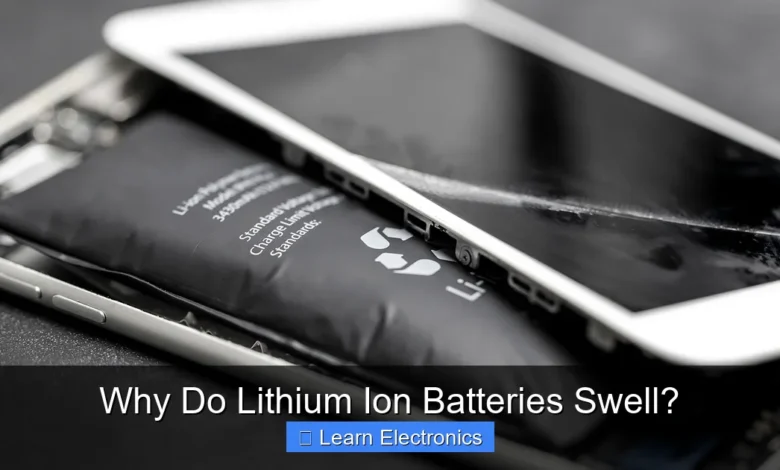
Why Do Lithium Ion Batteries Swell? This common issue primarily stems from the buildup of gas inside the battery cell, often due to electrolyte decomposition or overcharging. This phenomenon is a critical indicator of internal chemical reactions that compromise battery integrity and safety. Understanding the mechanisms behind this problem is crucial for users and developers of portable electronics, ensuring both device longevity and user safety.
Quick Answers to Common Questions
Why do lithium-ion batteries swell in the first place?
Lithium Ion Batteries Swell primarily because of gas production inside the battery cell. This often occurs due to overcharging, excessive heat, or simply age, which breaks down internal components and creates gas.
Is a swollen lithium-ion battery dangerous?
Absolutely, a swollen lithium-ion battery can be dangerous and poses a fire or explosion risk. The internal pressure and compromised structure mean you should handle it with extreme caution.
What should I do if my battery starts to swell?
If you notice your lithium-ion battery swelling, immediately stop using the device and safely disconnect it from power. Do not try to charge it or puncture it; instead, take it to a professional for proper disposal.
📑 Table of Contents
- The Fundamental Chemistry Behind Lithium-Ion Battery Expansion
- Common Causes of Swelling in Lithium-Ion Batteries
- The Dangers and Consequences of a Swollen Battery
- Identifying and Handling a Swollen Lithium-Ion Battery
- Preventing Lithium-Ion Battery Swelling: Best Practices
- Understanding Gas Composition in Swollen Batteries
The Fundamental Chemistry Behind Lithium-Ion Battery Expansion
At the core of a lithium-ion battery’s operation are electrochemical reactions involving lithium ions moving between a cathode and an anode. When these reactions deviate from their intended path, often due to stress or damage, they can lead to the production of gases. This gas formation is the direct cause of the physical expansion or swelling observed in many lithium-ion cells.
Electrolyte Decomposition and Gas Formation
The electrolyte, a liquid solution that facilitates the movement of lithium ions, is the primary source of these gases. Under normal operating conditions, the electrolyte is stable. However, when subjected to conditions like overcharging, deep discharging, or high temperatures, the electrolyte can decompose. This decomposition breaks down the organic solvents within the electrolyte, releasing various gaseous byproducts such as carbon dioxide (CO2), carbon monoxide (CO), methane (CH4), ethylene (C2H4), and hydrogen (H2). These gases, trapped within the sealed battery pouch, exert pressure on the cell casing, causing it to bulge.
Solid Electrolyte Interphase (SEI) Layer and its Role
The Solid Electrolyte Interphase (SEI) layer is a crucial passivating layer formed on the anode surface during the initial charging cycles of a lithium-ion battery. It’s essential for stable battery operation, allowing lithium ions to pass while preventing further electrolyte decomposition. However, this layer can become unstable or rupture under certain conditions, such as repeated deep discharges, high temperatures, or mechanical stress. When the SEI layer degrades, fresh electrolyte comes into contact with the anode, leading to renewed and often uncontrolled electrolyte decomposition and further gas generation. The continued formation and breakdown of the SEI layer contribute significantly to the cumulative gas pressure and thus, battery expansion.
Common Causes of Swelling in Lithium-Ion Batteries
Several factors can accelerate the internal chemical processes that lead to the physical expansion of a battery. Identifying these causes is the first step in preventing this process of expansion and ensuring safer battery usage.
Overcharging and Over-discharging
- Overcharging: Pushing more current into a battery than it can safely hold causes lithium plating on the anode and accelerates electrolyte decomposition. This extreme stress leads to rapid gas generation and puts immense pressure on the battery’s internal structure, causing it to swell.
- Over-discharging: Draining a lithium-ion battery completely, especially below its safe voltage limit, can damage the cathode material and lead to copper dissolution from the current collector. When the battery is subsequently recharged, these dissolved metals can cause internal short circuits and further electrolyte decomposition, also resulting in gas formation and swelling.
High Temperatures and Heat Exposure
Operating or storing lithium-ion batteries in high-temperature environments significantly exacerbates the risk of swelling. Elevated temperatures accelerate the rate of chemical reactions within the battery, including electrolyte decomposition and SEI layer degradation. This increased reaction rate leads to more rapid and pronounced gas production. Heat also reduces the battery’s overall lifespan and stability, making it more susceptible to puffing up even under otherwise normal conditions.
Manufacturing Defects and Ageing
Sometimes, battery swelling can be attributed to inherent flaws introduced during the manufacturing process. These defects might include impurities in the cell materials, imperfect sealing of the pouch, or inconsistencies in the electrolyte composition. While rare in high-quality batteries, such defects can lead to premature degradation and gas formation. Furthermore, all lithium-ion batteries naturally degrade over time, a process known as ageing. As a battery ages, its internal resistance increases, its capacity diminishes, and the chemical stability of its components (including the electrolyte and SEI layer) decreases, making it more prone to gas generation and swelling even with proper use.
The Dangers and Consequences of a Swollen Battery
A swollen lithium-ion battery is not just a cosmetic issue; it’s a significant safety hazard that demands immediate attention. Ignoring battery expansion can lead to severe consequences for the device and, more importantly, for the user.
Reduced Performance and Capacity
One of the immediate impacts of swelling is a noticeable decline in battery performance. The internal pressure exerted by the accumulated gases can distort the internal components, reducing the efficiency of lithium ion movement and increasing internal resistance. This typically translates to a shorter battery life, reduced maximum capacity, and faster discharge rates. Users might find their devices needing to be recharged more frequently or failing to hold a charge effectively.
Risk of Thermal Runaway and Fire
The most severe danger associated with a swollen battery is the risk of thermal runaway. The internal pressure and compromised integrity can lead to internal short circuits. A short circuit generates significant heat, which further accelerates decomposition reactions, producing more gas and more heat in a dangerous feedback loop. If the temperature reaches a critical point, the battery can vent flammable gases, ignite, or even explode. This poses a serious risk of fire, property damage, and personal injury.
Device Damage and Structural Integrity
As a battery swells, it physically expands, pushing against the internal components of the device it powers. This can lead to visible damage such as a bulging back cover on a smartphone, a keyboard lifting on a laptop, or a warped casing on a tablet. Over time, this pressure can crack screens, dislodge internal connectors, or permanently deform the device’s chassis, rendering the electronic gadget unusable or requiring costly repairs beyond the battery replacement itself.
Identifying and Handling a Swollen Lithium-Ion Battery
Early detection and proper handling of a swollen battery are crucial for safety. Recognizing the signs of battery expansion and knowing the correct response can prevent serious accidents. Addressing battery swelling promptly is non-negotiable.
Visual Cues and Early Detection
The most obvious sign of a swollen battery is a visible bulge in the device’s casing. Look for:
- A raised screen or back cover: Especially noticeable on smartphones, tablets, or laptops.
- Unusual gaps: Where panels or seams should fit flush.
- A soft or spongy feel: If you can gently press on the battery area and feel a give.
- Difficulty pressing buttons: If buttons on the device become stiff or unresponsive due to internal pressure.
- Device wobbling: If a laptop or other flat device no longer sits level on a flat surface.
If any of these signs are present, assume the battery is swollen.
Safe Disposal Protocols
Once identified, a swollen battery must be removed from service immediately and handled with extreme care. Do NOT attempt to puncture, bend, or dismantle the battery. Doing so can trigger a thermal event. Instead, follow these steps:
- Power down the device: Turn off the device completely and unplug it from any power source.
- Remove the battery (if easily accessible and safe to do so): If the battery is user-replaceable and comes out without force, gently remove it. If it’s glued or difficult to remove, do not force it.
- Store safely: Place the swollen battery (or the device with the swollen battery) in a cool, dry, non-flammable container, such as a metal tin or a bucket filled with sand. Keep it away from combustible materials.
- Seek professional disposal: Do not throw swollen batteries in regular trash. Contact local recycling centers, electronics stores, or hazardous waste disposal facilities. Many places have specialized programs for recycling lithium-ion batteries.
Preventing Lithium-Ion Battery Swelling: Best Practices
While complete prevention might not always be possible due to factors like battery ageing, adopting best practices can significantly reduce the risk of lithium-ion battery swelling and extend the lifespan of your devices.
Optimal Charging Habits
- Avoid overcharging: Disconnect devices once they reach 100% charge, especially if they don’t have smart charging features that automatically stop current flow. Modern devices often have sophisticated charging circuits to mitigate this, but old or cheap chargers may not.
- Avoid deep discharging: Try not to let your battery drain completely to 0%. Recharging from very low levels puts stress on the battery. Aim to recharge when the battery level drops to around 20-30%.
- Use original or certified chargers: Always use the charger supplied with your device or a reputable third-party charger that meets safety standards. Off-brand or faulty chargers can deliver incorrect voltage or current, leading to overcharging or damage.
- Charge in moderation: For long-term battery health, consider keeping your battery charge between 20% and 80% whenever possible. This range is often considered the “sweet spot” for lithium-ion longevity.
Temperature Management
- Avoid extreme temperatures: Do not expose your devices or batteries to excessive heat (e.g., leaving a phone in a hot car, direct sunlight). Similarly, avoid extremely cold temperatures, which can also stress the battery.
- Ensure proper ventilation: When using laptops or other devices that generate heat, ensure they have adequate airflow. Avoid blocking vents and use them on hard, flat surfaces rather than soft furnishings that can trap heat.
- Store properly: If storing devices for an extended period, ensure they are partially charged (around 50%) and kept in a cool, dry place.
Quality Control and Purchasing Genuine Batteries
Always opt for genuine, original equipment manufacturer (OEM) batteries and devices from reputable sources. Counterfeit or low-quality batteries often use inferior materials and lack robust safety features, making them far more susceptible to swelling and other failures. While they may be cheaper, the risks associated with them far outweigh any perceived savings.
Understanding Gas Composition in Swollen Batteries
The specific types and proportions of gases produced during battery swelling can vary depending on the battery’s chemistry, the root cause of the swelling (e.g., overcharge vs. thermal abuse), and the extent of degradation. However, certain gases are commonly detected, providing insight into the underlying decomposition processes.
Here’s a simplified overview of common gases and their potential sources:
| Gas Component | Primary Source/Cause | Notes |
|---|---|---|
| Carbon Dioxide (CO2) | Electrolyte oxidation (overcharge, high temp) | Most common gas, often from carbonate solvents. |
| Carbon Monoxide (CO) | Incomplete electrolyte oxidation, side reactions | Indicates more severe decomposition or higher temperatures. |
| Ethylene (C2H4) | Electrolyte reduction, SEI formation/degradation | Common organic gas from electrolyte decomposition. |
| Methane (CH4) | Electrolyte decomposition, especially during over-discharge | Also an organic decomposition product. |
| Hydrogen (H2) | Electrolyte reduction, reaction with water impurities | Can occur, though often in smaller quantities than CO2/C2H4. |
The presence of these gases confirms internal chemical breakdown and highlights the volatile nature of a swollen battery. The internal pressure from these gases is what creates the visible puffing.
In conclusion, a swollen lithium-ion battery is a clear signal of internal chemical distress, primarily caused by gas buildup from electrolyte decomposition. While factors like overcharging, high temperatures, and manufacturing defects contribute to this issue, understanding the underlying mechanisms and adopting preventative measures are critical. Prioritizing proper charging habits, managing temperature exposure, and choosing quality products can significantly mitigate the risk. Should you encounter a swollen battery, always prioritize safety by handling it with care and ensuring professional disposal to prevent potential hazards like thermal runaway and fire.
Frequently Asked Questions
Why do lithium ion batteries swell?
Swelling in lithium ion batteries primarily occurs due to gas production inside the battery cell. This gas is a byproduct of electrolyte decomposition, often triggered by overcharging, excessive heat, or internal short circuits, which can lead to a buildup of pressure.
Is a swollen lithium ion battery dangerous?
Yes, a swollen lithium ion battery is a significant safety hazard. The internal pressure can rupture the casing, potentially leading to thermal runaway, fire, or even explosion as the flammable electrolyte and gases are exposed to air.
Can swelling in lithium ion batteries be prevented or reversed?
While swelling cannot be reversed once it occurs, it can largely be prevented by using the correct charger, avoiding extreme temperatures, and not fully discharging or overcharging the battery. Once a lithium ion battery has swelled, it should be immediately removed from service.
What specific chemical processes cause lithium ion batteries to swell?
The primary cause is the decomposition of the electrolyte and other internal components within the lithium ion battery. This decomposition releases various gases, such as carbon dioxide, carbon monoxide, and hydrogen, which accumulate and exert pressure on the battery casing.
What should I do if my lithium ion battery starts to swell?
If you notice your lithium ion battery swelling, stop using it immediately and disconnect it from any device or charger. Carefully remove it from the device if possible and place it in a safe, non-flammable location, then arrange for proper disposal at a certified electronics recycling facility.
As an Amazon Associate, I earn commission from qualifying purchases.