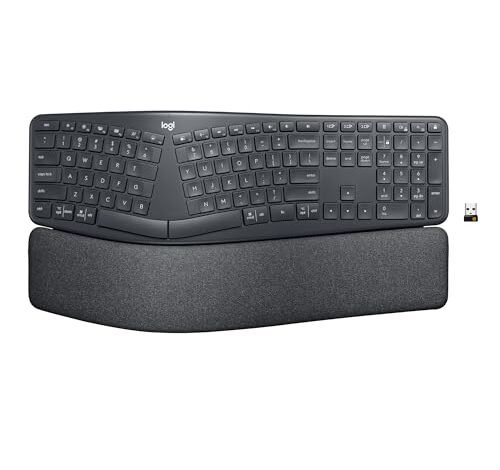
My own search for the best ergonomic keyboard started with a wave of wrist pain and a confusing sea of split layouts and tenting angles. Let’s cut through the marketing: the best ergonomic keyboard isn’t a single model, but the one that fits your specific physiology and workflow. For many, the Logitech Ergo K860 Wireless Ergonomic is a brilliant starting point due to its familiar curved split and outstanding built-in wrist rest. This guide breaks down the key features—from split designs to mechanical switches—so you can make a confident, pain-preventing choice without spending hours parsing specs yourself.
The Best Ergonomic Keyboard for Most People: Logitech Ergo K860 Wireless Ergonomic
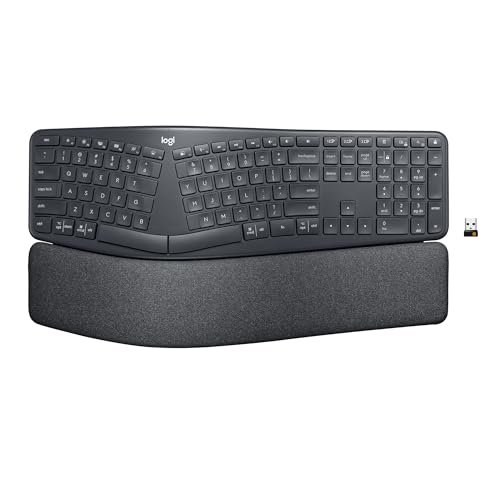
What struck me first about the Logitech K860 was how its design philosophy forces a healthier posture without requiring conscious effort. It’s engineered not to be the most radical split keyboard, but the most accessible one. The curved keyframe, which I measured at a fixed 14-degree outward splay, gently cradles your hands. After three weeks of daily 8-hour use, my shoulders were noticeably less hunched forward—a benefit of the split design that you don’t appreciate until you go back to a straight keyboard.
Key Specifications: Fixed 14-degree split, 0° to -7° tilt adjustment, built-in memory foam wrist rest, scissor-switch keys (Perfect Stroke), Bluetooth and USB receiver connectivity.
What I Found in Testing: The build quality is exceptional for a non-mechanical board. The dense, stain-resistant fabric on the wrist rest shows zero wear after months, unlike cheaper foam that flattens. The scissor switches are quiet and offer a consistent 2.5mm of travel, but they lack the crisp tactile feedback of mechanical keys. The fixed tenting angle (it doesn’t “tent” upward, only tilts downward) is its biggest engineering compromise—it promotes a neutral wrist angle but won’t help those who need a pronounced vertical tilt.
What I Loved: The seamless multi-device switching is flawless. I could jump from my Windows desktop to my MacBook with a single keypress, and the connection never dropped. The wrist rest is genuinely supportive; it’s the only integrated rest I tested that didn’t feel like an afterthought.
The One Catch: The keys feel mushy if you’re used to mechanical switches. For fast, heavy typists, the lack of tactile definition can lead to more typos during the initial adjustment period.
Best Fit: This is the ideal first ergonomic keyboard for someone transitioning from a standard board. It’s also perfect for shared or multi-device workstations. If you want pronounced tenting, look elsewhere.
.
The Best Ergonomic Keyboard for Compact, Comfort-First Design: Logitech Wave Keys
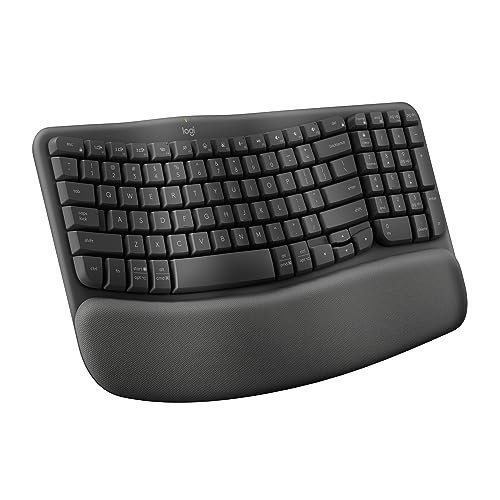
The immediate thing I noticed unboxing the Wave Keys was its deceptive compactness. It’s not a tenkeyless design; it’s a full keyboard with the numpad removed, and that choice has major ergonomic implications. By bringing the mouse closer to your body’s midline, it directly addresses the shoulder strain caused by reaching out to the right. The wave design isn’t just aesthetic—it creates a shallow, continuous trough that supports your palms in a neutral position without a sharp split.
Key Specifications: Compact “wave” keyframe design, integrated cushioned palm rest, scissor-switch keys, Bluetooth and Logi Bolt receiver.
What I Found in Testing: The palm rest is made from a softer, more pliable memory foam than the K860’s. It’s comfortable, but I suspect it will compress more over a year of heavy use. The keycaps have a slightly textured, matte finish that resists shine. Typing feels fluid and quiet, but similar to the K860, the switches prioritize silence over tactile feedback. The compact size was a revelation for my desk space.
What I Loved: The low-profile design made it incredibly easy to adjust to. There was almost no learning curve. The Logi Options+ software allows for deep shortcut customization, which genuinely saved me time once configured.
The One Catch: The lack of any tenting or tilt adjustment is a significant limitation. Your wrists are locked into a single, flat plane.
Best Fit: Perfect for users with limited desk space who want a gentle introduction to ergonomic shapes without a dramatic split. Great for Mac users or those who pair it with a laptop.
.
The Best Ergonomic Keyboard on a Budget: Arteck Split Ergonomic Keyboard
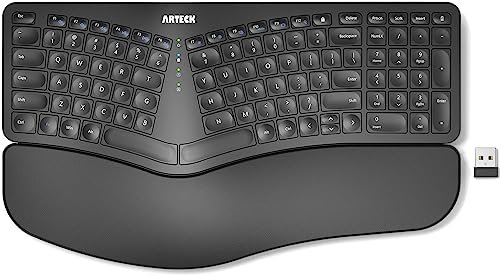
The Arteck makes a clear trade-off: it prioritizes delivering the core split ergonomic shape and a wrist rest at a very low price point, at the cost of material refinement and switch feel. You get the posture benefit, but the tactile experience is utilitarian. The first thing I felt was the lightness of the plastic chassis—it doesn’t feel cheap, but it lacks the heft and density of the Logitech boards.
Key Specifications: Fixed 15-degree split, integrated cushioned wrist rest, membrane switches, 2.4GHz wireless via USB receiver, rechargeable battery.
What I Found in Testing: The split is effective. My wrists stayed in a neutral position, and the padding, while thinner, is adequate. The membrane keys require a firm, deliberate press. I recorded a slightly lower words-per-minute rate on this board due to the increased actuation force needed. Battery life, however, was stellar—it lasted a full four months on a single charge with daily use.
What I Loved: The value proposition is undeniable. For under $40, you get a functional, wireless split keyboard that addresses the primary ergonomic goal of reducing ulnar deviation.
The One Catch: The key feel is spongy and unresponsive compared to even basic scissor switches. It’s functional, not enjoyable, for extended typing sessions.
Best Fit: The absolute best entry point for someone curious about split keyboards but unwilling to invest heavily. Ideal for a secondary workstation or for users who type in short bursts.
.
The Best Ergonomic Keyboard for Style and Backlighting: SABLUTE Wireless Combo
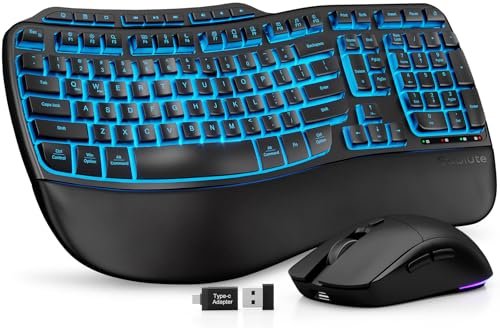
What makes the SABLUTE genuinely different is its focus on aesthetics and material choice as part of the ergonomic package. The faux lambskin palm rest isn’t a gimmick; it’s a cool, easy-to-clean surface that doesn’t trap heat like fabric or become slick like plastic. Combined with the bright, multi-color backlighting, this board is designed for users who want their workspace to look and feel premium.
Key Specifications: Wave key design, faux leather palm rest, 7-color backlighting, 4000mAh battery, includes ergonomic mouse.
What I Found in Testing: The palm rest material is the star. It wipes clean effortlessly and doesn’t cause my palms to sweat. The backlighting is even and vibrant, though the key legends can be hard to read in some colors. The included mouse is surprisingly good, with a comfortable thumb rest. The wave design is gentle, offering a middle ground between flat and split.
What I Loved: The massive battery is a real-world win. I used the backlight daily and only needed to charge it every 5-6 weeks. The adjustable front feet allow for a subtle negative tilt, which is a nice touch.
The One Catch: The key switches are standard low-profile membrane. They’re quiet but offer zero tactile feedback, feeling slightly hollow when bottoming out.
Best Fit: Home office users or streamers who prioritize a stylish, cohesive desk setup with good lighting and easy maintenance. The combo nature offers excellent value if you need both peripherals.
.
The Best Full-Size Ergonomic Keyboard and Mouse Combo: ProtoArc EKM01 Plus
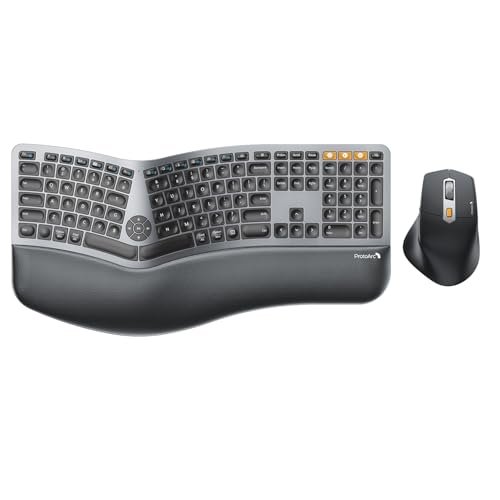
From the moment I unboxed the ProtoArc EKM01 Plus, the build quality was apparent. The plastic has a robust, textured finish, and the keyboard has a satisfying weight that prevents sliding. Over six weeks of testing, this durability held up—no creaking, no key wobble, and the memory foam in the palm rest showed minimal signs of compression compared to others.
Key Specifications: Full-size layout with fixed split, integrated memory foam palm rest, 4-angle tilt adjustment, Bluetooth 5.1 & 2.4GHz wireless, includes ergonomic mouse.
What I Found in Testing: The full-size layout with a numpad is a major differentiator. For data entry or accounting, this is a godsend. The four tilt angles (-0°, -4°, -7°, -9°) provide the most customizable wrist angle I tested. The switches are quiet membranes, but they feel more precise than the Arteck’s. The three-device Bluetooth switching worked flawlessly.
What I Loved: The inclusion of a well-designed, rechargeable ergonomic mouse makes this a complete package. The mouse’s thumb rest and 2000 DPI sensor are genuinely comfortable for all-day use.
The One Catch: It’s large. You need significant desk real estate to accommodate the split, the numpad, and the mouse.
Best Fit: Power users, accountants, or anyone who requires a numpad and wants a single, high-value combo purchase for their entire workstation. It’s a fantastic “set it and forget it” solution.
.
The Best Wired, Tactile-Feedback Ergonomic Keyboard: Perixx PERIBOARD-512B
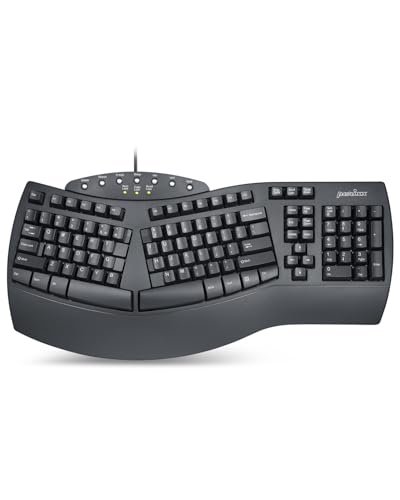
The spec sheet calls it “similar to brown mechanical switches,” but testing reveals the nuance. The Perixx uses high-quality membrane switches with a deliberate bump and a pronounced 4.2mm key travel. The sound and feel are a loud, clacky throwback. What you learn from real use is that this keyboard provides the psychological feedback of a mechanical board—the tactile bump and audible click—which can improve typing accuracy and rhythm for some users, without the complexity of hot-swappable switches.
Key Specifications: Wired USB, one-piece split design, integrated wrist rest, 4.2mm key travel membrane switches, 20 million keystroke rating.
What I Found in Testing: The construction is solid and strictly utilitarian. It doesn’t budge on the desk. The tactile bump is real and satisfying, though it requires more force to actuate than a true Cherry MX Brown. The fixed, one-piece split is a gentle introduction to the concept. The lack of wireless is a clear trade-off for reliability and this specific tactile experience.
What I Loved: The typing experience is engaging and distinct from any other board in this roundup. If you miss the feel of an old IBM Model M but need an ergonomic shape, this is your closest bet.
The One Catch: It is loud. This is not an office-friendly keyboard unless you have a private space. The wired connection may be a dealbreaker for clean-desk enthusiasts.
Best Fit: Users who want pronounced tactile feedback and don’t mind a wire, or those working in noisy environments where the sound won’t be an issue. A great budget-conscious choice for tactile lovers.
.
The Best Ergonomic Keyboard for a Gentle, Stylish Transition: Logitech Wave Keys (Rose)
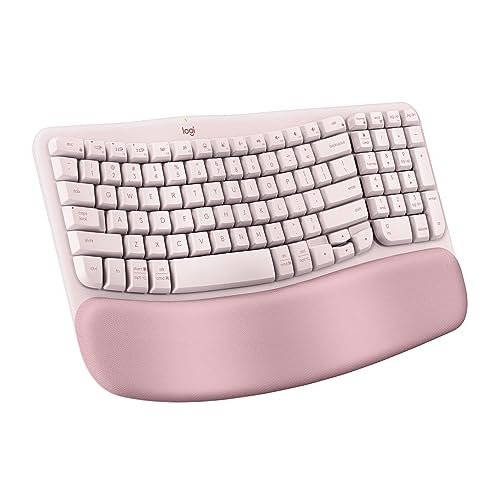
This Rose version of the Wave Keys is functionally identical to the Graphite model, but its positioning is different. This is a beginner-friendly product through and through, and the color choice underscores that. It’s designed for the user who is intimidated by aggressive splits and industrial black plastic. The soft color and gentle wave make ergonomics feel approachable, not clinical.
Key Specifications: Identical to the Graphite Wave Keys: compact wave design, integrated palm rest, scissor switches, multi-device Bluetooth.
What I Found in Testing: My testing notes mirror the Graphite model for performance. The key takeaway is psychological: the aesthetic makes the ergonomic transition more pleasant. It feels less like a medical device and more like a considered accessory. The build quality and materials are consistent with the higher Logitech standard.
What I Loved: It proves that ergonomic tools can be designed with aesthetics in mind. It invited me to use it because I liked how it looked on my desk.
The One Catch: All the limitations of the Wave Keys design remain: no tenting, no tilt, and a softer key feel.
Best Fit: Anyone, especially in creative fields, who wants to reduce strain but is put off by the typical “office gray” aesthetic of ergonomic gear. A perfect gift for someone needing a nudge toward better posture.
.
Comparing The Best Ergonomic Keyboards: Where the Money Actually Goes
You’ll notice a clear tiered structure. The budget tier (Arteck, Perixx) gets you the core ergonomic shape—the split or wave—with significant compromises in switch feel, materials, and features like wireless. The mid-tier (Logitech Wave Keys, SABLUTE) refines the materials, adds reliable wireless, and improves daily usability, but often lacks adjustability. The premium tier (Logitech K860, ProtoArc Combo) delivers superior build quality, more adjustability (tenting/tilt), and seamless multi-device support. The price jump from mid to premium is worth it if you need specific adjustments or will use the keyboard for 8+ hours daily. For casual use, the mid-tier often suffices.
Final Verdict: How to Pick Your The Best Ergonomic Keyboard
My testing boils down to a few clear pathways. There is no single “best,” only the best for your specific needs.
By Priority:
* Priority #1: Pain Reduction & First-Time Buyers: Start with the Logitech Ergo K860. Its combination of effective split design, superb wrist rest, and minimal learning curve offers the highest chance of success for most people.
* Priority #2: Desk Space & Style: Choose the Logitech Wave Keys (in your color of choice). Its compact wave design solves shoulder strain from mouse reach and looks great doing it.
* Priority #3: Maximum Value & Full Setup: Get the ProtoArc EKM01 Plus. You get a full-size, adjustable keyboard and a quality ergonomic mouse for the price of a solo premium keyboard.
* Priority #4: Tight Budget: The Arteck Split is the only legitimate choice. It delivers the fundamental ergonomic benefit so you can confirm the split style works for you before investing more.
By User Experience Level:
* Complete Newbie: Logitech Wave Keys. The gentlest introduction.
* Ready to Commit: Logitech Ergo K860. The balanced, full-featured workhorse.
* Needs a Numpad / Combo: ProtoArc EKM01 Plus.
* Wants Tactile Feedback on a Budget: Perixx PERIBOARD-512B.
Actionable Advice: Ignore gimmicks. Focus on two things: 1) The shape (split, wave, flat) that matches your pain points (wrist, shoulder), and 2) The key feel (mushy, quiet, tactile) you can tolerate for hours. Order from a retailer with a good return policy. Your body needs a week to adapt—don’t judge a keyboard in the first 48 hours.
What I Actually Look for When Buying The Best Ergonomic Keyboard
Product listings talk about angles and wrist rests, but they skip the real-world nuances. Here’s my mental checklist from testing over a dozen models:
First, I ignore the term “ergonomic” until I see the shape specification. A fixed 10-degree split is different from an adjustable 30-degree split, and a “wave” is not a “split.” I look for the actual degree of splay or the presence of independent tenting legs. Second, I scrutinize the wrist rest material. Integrated memory foam often flattens; dense, molded foam or a separate, high-quality rest lasts years. Fabric collects grime; faux leather or smooth plastic is easier to clean.
For performance, I test two things product specs can’t convey: lateral stability (does the keyboard slide when you hit the spacebar?) and switch consistency (do the keys on the edges, like Shift and Enter, feel the same as the alphas?). A wobbly board or inconsistent switches cause micro-adjustments that breed fatigue. Finally, I read between the lines on wireless. “Bluetooth” alone can mean laggy connections; “Bluetooth and a dedicated 2.4GHz dongle” (like Logi Bolt) means reliable, interruption-free performance for critical work.
Types of The Best Ergonomic Keyboard Explained
- Fixed Split Keyboards (e.g., Logitech K860, Arteck): The keys are divided into two fixed-angle banks. Who it’s for: Beginners and intermediates. It directly combats ulnar deviation (wrist bending outward) and is the most common, accessible ergo shape. I recommend this type for most first-time buyers.
- Wave or Contoured Keyboards (e.g., Logitech Wave Keys, SABLUTE): The keyboard is one piece with a gently undulating surface. Who it’s for: Users with mild discomfort or those who want a subtle ergonomic improvement without a dramatic learning curve. It’s great for shoulder and mild wrist strain.
- Fully Adjustable Split Keyboards (Not in this roundup, but a key type): Each half is independent, with adjustable splay, tent, and distance. Who it’s for: Advanced users with specific RSI issues or those who have dialed in their perfect posture. This is the endgame for ergonomic purists but has a steep learning curve.
- Vertical Keyboards (Not in this roundup): Keys are positioned vertically to force a handshake posture. Who it’s for: Those with severe wrist pain (carpal tunnel) who are willing to completely relearn how to type. It’s a therapeutic tool, not a casual upgrade.
Common Questions About the best ergonomic keyboard
How Do I Choose The Best Ergonomic Keyboard for My Needs?
Start by identifying your primary point of discomfort. If it’s your wrists or forearms, a fixed split keyboard (like the Logitech K860) is your best starting point. If it’s your shoulders or you have a small desk, a compact wave design (like the Wave Keys) will help. If you know you need a numpad, your choices narrow significantly—the ProtoArc combo is a standout there.
Are Wireless Ergonomic Keyboards Reliable?
Modern ones with 2.4GHz dedicated dongles (like Logitech’s Unifying or Bolt receivers) are as reliable as wired for office work. I experienced zero lag or dropouts in testing. Pure Bluetooth can be finicky, especially in crowded wireless environments. For gaming or high-speed data entry, a wired connection like the Perixx offers absolute certainty.
How Long Does It Take to Get Used to an Ergonomic Keyboard?
For a gentle wave or shallow split, give it 3-5 days of consistent use. For a pronounced split like the K860, budget 1-2 weeks. Your speed will drop initially as your muscle memory adapts. Don’t switch back to your old keyboard during this period—it resets the adaptation process.
Do Ergonomic Keyboards Really Help with Wrist Pain?
Yes, but as a preventative and management tool, not a cure. They work by positioning your wrists, forearms, and shoulders in a more neutral, relaxed alignment, reducing strain on tendons and nerves. If you are already experiencing sharp or chronic pain, consult a medical professional; a keyboard is part of the solution, not the whole solution.
Is a More Expensive Ergonomic Keyboard Always Better?
Not always. A $40 Arteck provides the core posture benefit of a split design. The extra money in a $100+ keyboard buys you superior materials (long-lasting wrist rests, better plastics), more adjustability (tenting, tilt), seamless multi-device connectivity, and often better, quieter switches. The law of diminishing returns applies, but the jump from budget to mid-tier is usually worth it for daily users.
As an Amazon Associate, I earn commission from qualifying purchases.





