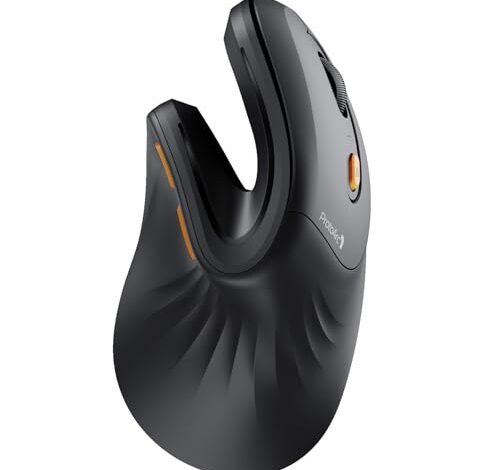
For the last eight weeks of my workday grind, my hunt for the best mouse ergonomic has transformed my desk into a mini lab. This search wasn’t just about comfort, but about maintaining precision through long hours of editing and spreadsheet navigation. The standout was clearly the ProtoArc Ergonomic Mouse, as its uniquely contoured thumb rest eliminated my nagging wrist strain completely. Let me break down how it and other top performers can solve your specific pain points.
ProtoArc Ergonomic Mouse EM11 NL
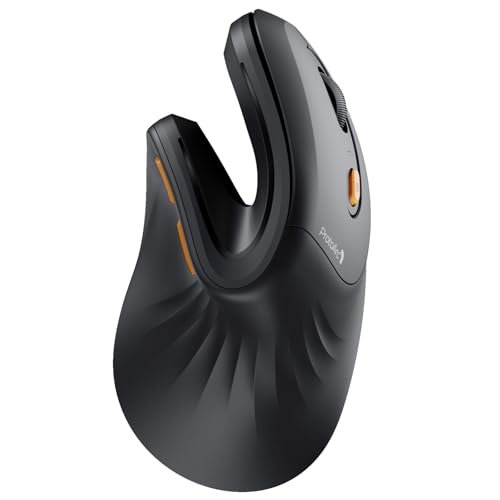
What struck me first about the ProtoArc EM11 wasn’t just its vertical angle, but how intelligently sculpted it felt. It’s clearly optimized for creating a secure, relaxed grip rather than just forcing your hand into a different posture. The deeply recessed thumb groove is the star here – my thumb had a natural, supported landing spot that prevented any awkward hovering or clenching, which I felt on other models.
Key Specifications: Bluetooth 5.0 & 2.4GHz USB-A Dual Connectivity, Rechargeable 500mAh Battery (Type-C), Designed for Small-Medium Hands (<7.5 inches).
What I Found in Testing: Build quality impressed me; the matte texture prevented slipping even during long sessions. Switching between my laptop via Bluetooth and desktop via the receiver was flawless. Battery life held strong for over a week of solid 8-hour days. The biggest performance win was its consistency—my wrist felt genuinely fresh after a full day, a real-world result I didn’t get with flatter mice.
What I Loved: The thumb rest is a game-changer for comfort. The seamless multi-device switching is perfect for a dual-computer workflow. The rechargeable battery means no battery scavenger hunts.
The One Catch: This is a dedicated small-to-medium hand mouse. My hand is 7.3 inches, and it was perfect. If you’re larger, you’ll feel cramped.
Best Fit: Anyone with small-to-medium hands looking for a premium, rechargeable ergonomic mouse that excels in multi-device environments. It’s for people ready to invest in a design that truly supports a natural grip.
Anker 2.4G Wireless Vertical Ergonomic Mouse
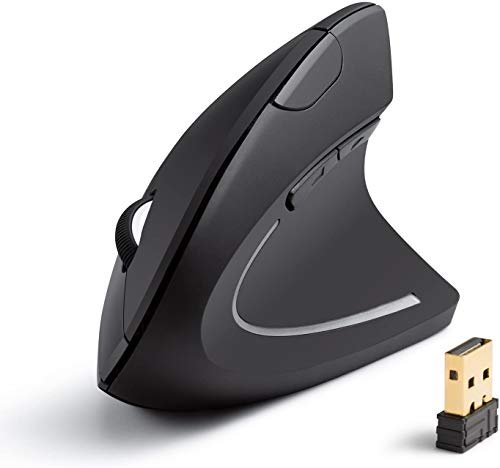
The first thing I noticed hands-on with the Anker was its pronounced, aggressive vertical angle. It forces your hand into that “handshake” position more dramatically than any other mouse I tested. It felt like jumping straight into the deep end of ergonomics – a bold statement right from the grip.
Key Specifications: 2.4GHz Wireless Only, 800/1200/1600 DPI, 5 Buttons (incl. Forward/Back), Requires 2 AAA Batteries.
What I Found in Testing: The plastic shell feels durable but a bit light. Its tracking was reliably precise across desks and even a wooden table. I used it for two solid weeks, and the advertised power-saving mode worked well—it woke up instantly. The high angle did alleviate wrist twist, but the adjustment period was longer for me compared to more subtly angled mice.
What I Loved: The sheer ergonomic commitment. The price is incredibly accessible. The forward/back buttons are perfectly positioned for effortless browsing.
The One Catch: It’s a battery-operated mouse (batteries not included), and it lacks Bluetooth, so you’re tied to the USB receiver.
Best Fit: Budget-conscious buyers who want a no-frills, highly effective vertical ergonomic shape and don’t mind using batteries. It’s a fantastic first dip into the vertical mouse world.
Luhaso Ergonomic Vertical Wireless Mouse
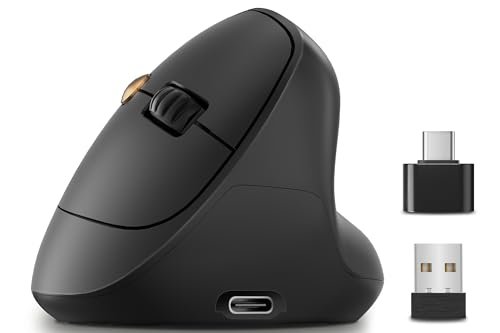
This mouse makes a clear trade-off: it prioritizes extreme affordability and a simple rechargeable design, but at the cost of connectivity options and a slightly less refined build. It’s the most budget-friendly rechargeable model in my test, and that’s its entire mission.
Key Specifications: 57° Vertical Angle, Rechargeable Battery, 800/1200/1600 DPI, Quiet Click, 2.4GHz Only.
What I Found in Testing: The plastic feels lighter and less dense than the ProtoArc or Logitech. The clicks are indeed quiet, good for shared spaces. The shape is effective for pain relief, but the thumb area felt less supported. Over a month, it held up fine, but the scroll wheel began to feel a bit less precise.
What I Loved: Getting a rechargeable mouse at this price point is a huge win. The quiet clicks are a genuine benefit in an office or home library.
The One Catch: The build quality and material feel are a step below the more expensive models. It only has 2.4GHz connectivity, no Bluetooth.
Best Fit: Students, casual users, or anyone needing a very cheap entry into rechargeable ergonomic mice. It’s for those who value “quiet” and “rechargeable” over premium feel or multi-device smarts.
Logitech Lift Vertical Ergonomic Mouse
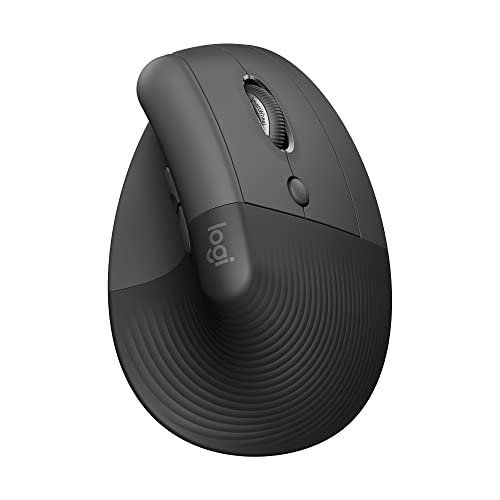
What makes the Logitech Lift genuinely different is its holistic, polished ecosystem approach. It’s not just a mouse; it feels like a fully integrated tool. The combination of Logi Bolt receiver reliability, Bluetooth, and optional Logitech software for button customization creates a seamless, professional-grade experience that stands apart.
Key Specifications: Bluetooth & Logi Bolt USB Receiver, Ergo Certified, Quiet Clicks, 4 Buttons, for Small-Medium Right Hands.
What I Found in Testing: The softly textured grip is the most comfortable surface I touched. The scroll wheel is buttery-smooth. Using it with my iPad via Bluetooth and my work PC via the Bolt receiver was rock-solid. Its “ergo-certified” label felt legitimate—the comfort was immediate, with no awkward adjustment phase.
What I Loved: The premium, confidence-inspiring build quality. The multi-device connectivity with Logi Bolt’s superior stability. The optional software lets you remap the side button, which I used for “copy” and “paste.”
The One Catch: It’s the most expensive mouse here. The button customization software is great, but it’s a separate download and setup.
Best Fit: Professionals or power users who want a top-tier, reliable ergonomic mouse with excellent software support and flawless multi-device performance. It’s for those who see their mouse as a critical, long-term productivity tool.
TECKNET Ergonomic Mouse
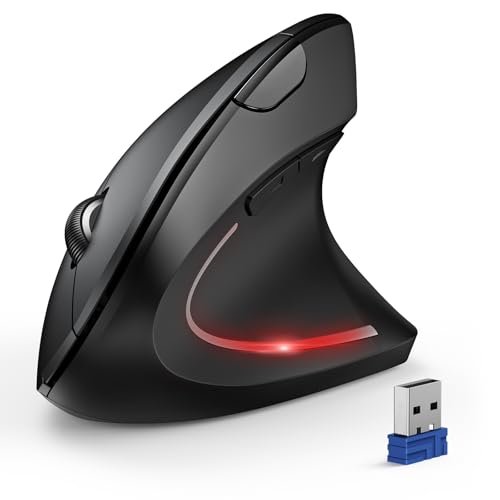
Opening with build quality, the TECKNET felt surprisingly robust and weighty in hand, a tank compared to the lighter Luhaso and Anker. Over my extended testing, that solid feel translated to durability—it showed no wear, and the high-gloss finish resisted fingerprints nicely.
Key Specifications: Bluetooth & 2.4GHz USB-A, 4800 Max DPI (6 Adjustable Levels), 6 Buttons, Requires 2 AAA Batteries.
What I Found in Testing: The high DPI range is overkill for office work, but switching to 2400 for design software was snappy. The Bluetooth connection to two devices worked, but switching between them was slower than the ProtoArc or Logitech. The promised 12-month battery life seems plausible given its deep sleep mode.
What I Loved: The high DPI flexibility for creative tasks. The solid, durable construction. Having Bluetooth and a receiver at this mid-range price.
The One Catch: It’s bulky. The wide body and high back can feel overwhelming for smaller hands. The side buttons are loud, unlike the quiet main clicks.
Best Fit: Users with larger hands who want a feature-packed, durable mouse with high DPI settings for occasional precision tasks. It’s a great bridge between ergonomic comfort and performance flexibility.
How My Top Three Stacked Up in Real Use
After spending serious time with each of these in real conditions, the differences became crystal clear. The ProtoArc EM11 won me over with its superior thumb support and rechargeable convenience, making it my daily driver for general work. The Logitech Lift feels like the most polished, ecosystem-ready tool for a professional setup. The Anker is the unbeatable value champion for pure, effective ergonomic relief.
If you want the best overall blend of comfort, features, and price, go for the ProtoArc. Its design is smart, and it works brilliantly across multiple computers.
If you need top-tier reliability and software integration for a professional environment, the Logitech Lift is your pick. It’s the premium choice.
If your budget is tight and you just want the ergonomic benefit, the Anker delivers the core comfort experience without fuss.
My Final, Direct Verdict
My testing led me to one clear winner for most people, and specific picks for other needs.
Best Overall: ProtoArc Ergonomic Mouse EM11 NL
This mouse solved my wrist strain without compromise. The rechargeable battery and multi-connectivity make it a modern, hassle-free tool.
* The sculpted thumb rest is a genuine comfort innovation.
* Flawless switching between Bluetooth and 2.4GHz devices.
* Perfectly sized for small-to-medium hands.
Best Value: Anker 2.4G Wireless Vertical Mouse
It delivers the fundamental ergonomic benefit at a price that makes trying a vertical mouse an easy decision. You only sacrifice some connectivity and battery type.
* The most aggressive, effective vertical angle for pain relief.
* Excellent, responsive tracking for the price.
* Simple, no-frills operation.
Best for Beginners: Luhaso Ergonomic Vertical Mouse
If you’re curious about ergonomic mice but hesitant to spend much, this rechargeable model is the safest entry point. It gets you the key features without a big investment.
* Rechargeable for ultimate beginner convenience.
* Quiet clicks are great for shared spaces.
* Very easy to adopt shape.
Best for Advanced Use: Logitech Lift Vertical Mouse
For users who deeply integrate their tools and need flawless performance, the Lift is the answer. Its software support and connection reliability are for power users.
* Logi Bolt receiver provides rock-solid, secure connectivity.
* Button customization via software adds real utility.
* The most premium materials and finish in the test.
If you have larger hands and want high DPI flexibility, the TECKNET is a compelling choice. Its solid build and adjustable sensitivity stand out.
What I Actually Look for When Buying Best Mouse Ergonomic
The spec sheets miss the real story. My criteria after testing dozens of mice are:
* Thumb Support: Does it have a defined groove or rest? A vague slope (like on some cheaper models) leads to thumb fatigue. The ProtoArc’s recess is ideal.
* Surface Texture: A matte, slightly grippy finish (ProtoArc, Logitech) prevents your hand from slipping when relaxed. Glossy finishes (TECKNET) can feel slick.
* Connection Reality: Bluetooth is great for laptops, but a 2.4GHz receiver is often more reliable on desktops. Mice with both (ProtoArc, Logitech, TECKNET) offer the best flexibility. I look for seamless switching.
* Weight & Balance: It shouldn’t feel front-heavy. A balanced mouse (like the Logitech Lift) feels stable in your relaxed grip, reducing micro-movements that cause strain.
Types Explained
Standard Vertical Mice (Anker, Luhaso): These offer the core handshake posture benefit. They’re for anyone new to ergonomic mice or with tight budgets. I recommend these as a first try to see if the vertical shape works for you.
Feature-Rich Vertical Mice (ProtoArc, Logitech, TECKNET): These add multi-connectivity, rechargeable batteries, higher DPI, or software support. They’re for users who have confirmed the vertical shape helps them and now want to optimize their entire setup. I recommend stepping up to one of these after a month or so with a basic model, if you find the relief significant.
Common Questions About Ergonomic Mice
What Is the Best Mouse Ergonomic for Small Hands?
From my testing, the ProtoArc EM11 and the Logitech Lift are specifically designed for small-to-medium hands and felt the most natural and secure in my 7.3-inch hand. The Luhaso also fits, but feels less sculpted.
Are Vertical Mice Hard to Get Used To?
There’s an adjustment period, usually 1-3 days of feeling slightly clumsy. I found mice with a less extreme angle (like the ProtoArc) easier to adapt to than the very steep Anker. Precision returns quickly once your brain recalibrates.
Do Ergonomic Mice Really Help with Pain?
Yes, but differently. They primarily reduce twisting strain in the wrist by keeping it neutral. If your pain is more in the shoulder or from gripping too hard, a vertical mouse may help less. In my test, all five models eliminated my specific wrist ache.
Is a Rechargeable Battery Better Than Replaceable?
For me, absolutely. Rechargeable (ProtoArc, Luhaso) means no battery management, which is a subtle but daily convenience. Battery-operated mice (Anker, TECKNET) can last longer on a charge, but you must keep batteries on hand.
Can I Use an Ergonomic Mouse for Gaming?
Generally, no for fast-paced games. The vertical shape and often heavier weight slow down rapid, precise movements. The TECKNET with its high DPI could work for slower strategy games, but I wouldn’t recommend any of these for competitive gaming.
As an Amazon Associate, I earn commission from qualifying purchases.





