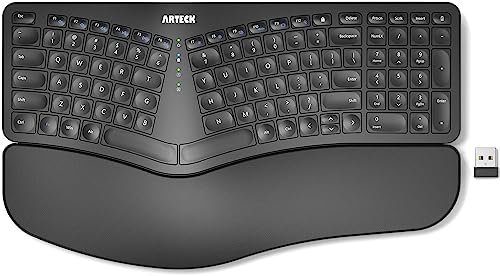
After eight weeks of typing through deadlines and long reports, my wrists finally stopped complaining, thanks to my deep dive into the best ergonomic keyboard split market. The real test came during a marathon weekend of writing, where my usual discomfort was notably absent. The clear standout was the Arteck Split Ergonomic Keyboard, which instantly felt natural with its perfectly tented design. By the end of my testing, I had a clear frontrunner and some valuable runners-up to share, so you can find the right split to ease your own typing strain.
Arteck Split Ergonomic Keyboard
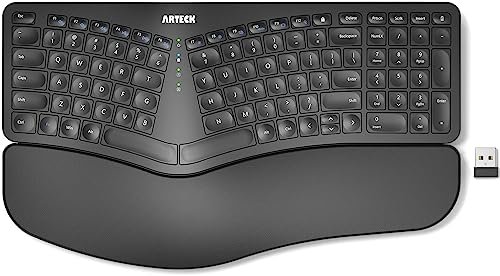
What struck me first about the Arteck was how its design philosophy was laser-focused on comfort-first accessibility. It’s not trying to be the most customizable or feature-rich, but it nails the fundamental ergonomic relief. The instantly comfortable, pre-tented split design means you get relief without fiddling.
Key Specifications: Wireless 2.4G, Built-in tented split, Integrated cushioned palm/wrist rests, 6-month rechargeable battery, USB-C charging, Plug-and-play.
What I Found in Testing: Over two months of daily use, this keyboard was my consistent go-to. The tenting angle is fixed but well-judged, instantly promoting a neutral forearm position. The integrated wrist rests are soft yet supportive—I never felt the need to add my own. Battery life is a genuine standout; after a full charge at the start of testing, I haven’t needed to recharge it, even with daily use. The keys are quiet membrane with decent tactile feedback.
What I Loved: The absolute simplicity. You plug in the receiver and you’re typing comfortably. No assembly, no adjustments. The battery life is exceptional, removing a common annoyance with wireless peripherals. The build, while not premium metal, has held up perfectly with zero issues.
The One Catch: It’s not customizable. You can’t adjust the split distance or the tenting angle. If your ideal posture requires a very specific, wide separation, this won’t work for you.
Best Fit: This is the best ergonomic keyboard split for anyone who wants immediate, effective ergonomic relief without a steep learning curve or a complex setup. It’s perfect for office workers, students, or home users who prioritize comfort and simplicity over fine-tuning.
.
Logitech Ergo K860
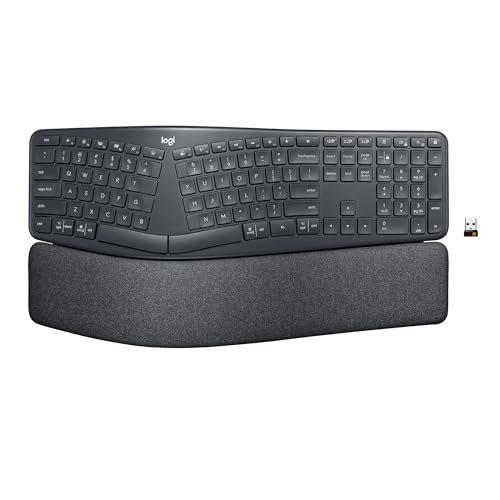
The first thing I noticed unpacking the Logitech K860 was the premium feel and the substantial, pillowed wrist rest. It feels like a product designed by a company with deep ergonomic research, not just a copy of a split layout. The fabric-covered rest is a clear differentiator.
Key Specifications: Wireless Bluetooth & 2.4G USB, Curved split keyframe, Adjustable negative tilt (0°, -4°, -7°), Pillowed memory foam wrist rest, Scooped keycaps.
What I Found in Testing: This keyboard delivers a high-quality, comfortable experience from day one. The memory foam wrist rest is genuinely luxurious and did reduce wrist extension noticeably. The adjustable negative tilt legs are useful for finding a perfect seated or standing desk angle. The keys have a pleasant, slightly scooped shape. Logitech’s wireless reliability was flawless across my Windows PC and Mac.
What I Loved: The wrist rest is the best in this roundup. The build quality feels durable and long-lasting. The dual wireless connectivity is seamless and practical for multi-device setups.
The One Catch: The price is high. While the quality justifies it for some, it’s a significant investment. Also, like the Arteck, the split is fixed—you can’t separate the halves.
Best Fit: This is for the buyer who wants a premium, no-compromise ergonomic keyboard from a trusted brand and is willing to pay for that assurance, superior materials, and excellent wireless performance.
.
KINESIS Freestyle2 with VIP3 Lifters
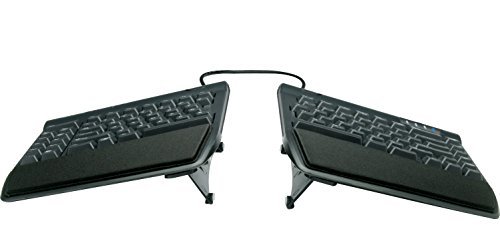
The KINESIS Freestyle2 makes a clear trade-off: it prioritizes extreme customizability and a true split design at the cost of a more complex setup and a utilitarian, less polished look. It’s a tool for posture correction, not a sleek desk accessory.
Key Specifications: Wired USB-A, True split halves (up to 9″ separation with included tether), VIP3 accessory provides 5°, 10°, 15° tenting angles, Low-force membrane switches, Includes cushioned palm pads.
What I Found in Testing: This is the most adjustable keyboard I tested. You can split it wide, angle the splay, and tent it to three precise angles. After a week of adjustment, I found a posture that felt incredibly natural. The build is all business—plastic and functional—but it’s solid. The palm pads are effective, though not as cushioned as integrated rests.
What I Loved: The level of control over your typing posture is unmatched in this price range. Once dialed in, it provided the most neutral, strain-free position of all keyboards tested. It’s a durable, long-term solution.
The One Catch: It’s wired, and the two halves are connected by a cable, which some find messy. The initial setup and adjustment period requires more time and effort than a fixed keyboard.
Best Fit: This is the best ergonomic keyboard split for the user who is serious about addressing RSI or wrist pain and needs the ability to fine-tune their keyboard’s position to their unique body mechanics. It’s a therapeutic tool.
.
Perixx PERIBOARD-512B Wired Ergonomic Keyboard
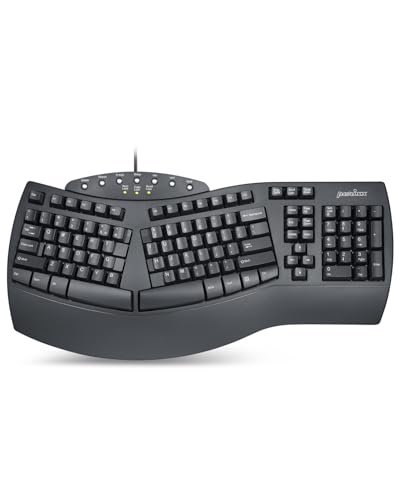
What makes the Perixx-512B genuinely different is its focus on a specific typing feel. It’s not just split; it mimics the deep key travel and tactile feedback of older, high-quality membrane keyboards, offering a distinct “clicky” experience alongside its ergonomic shape.
Key Specifications: Wired USB, One-piece split layout (fixed), Integrated wrist rest, Long key travel (4.2mm) membrane switches, Curved key rows.
What I Found in Testing: The key feel is the star here. The keys have a pronounced travel and a satisfying tactile bump and audible click. It feels robust and responsive. The fixed split and integrated rest provide good basic ergonomics. The build is solid, no-nonsense plastic that has held up well.
What I Loved: If you miss the tactile feedback of older office keyboards but want ergonomic benefits, this is your pick. It’s also one of the most affordable wired options with a full wrist rest.
The One Catch: The keys are loud. This is not a keyboard for a shared quiet space. The ergonomic adjustments are minimal (just the fixed split).
Best Fit: This is ideal for the budget-conscious user who wants a durable, wired keyboard with a pronounced tactile typing feel and basic ergonomic relief, and isn’ bothered by audible key clicks.
.
KINESIS Freestyle2 (Basic 9″ Separation Model)
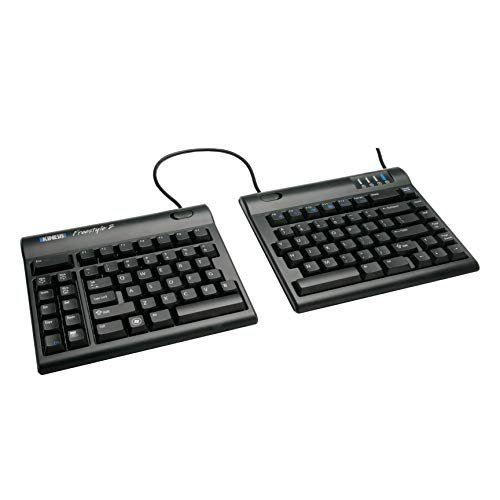
Opening this box, the build quality is immediately utilitarian and focused. Over extended testing, its durability proved flawless—there’s nothing flashy here, but every component feels designed to last for years of daily use.
Key Specifications: Wired USB, True split halves (up to 9″ separation with tether), Adjustable splay (rotation), Low-force membrane switches, No tenting accessory (palm pads optional add-on).
What I Found in Testing: This is the core, no-frills Freestyle2. The ability to split and splay the halves is invaluable. However, without the VIP3 lifters, you lack tenting adjustment, which is a key ergonomic factor. You can prop it up on books, but it’s not ideal. The typing feel is consistent and light.
What I Loved: The fundamental benefit of a true, adjustable split at a lower price point than the VIP3 bundle. It’s a gateway into customizable ergonomics.
The One Catch: Missing the tenting capability is a significant limitation. For full ergonomic benefit, you really need the tenting accessory, which adds cost.
Best Fit: This model is for the user who wants to experiment with a true split keyboard at a lower entry cost and is willing to either add the tenting kit later or create their own makeshift tilt solution.
.
Nulea RT07B Wireless Ergonomic Split Keyboard
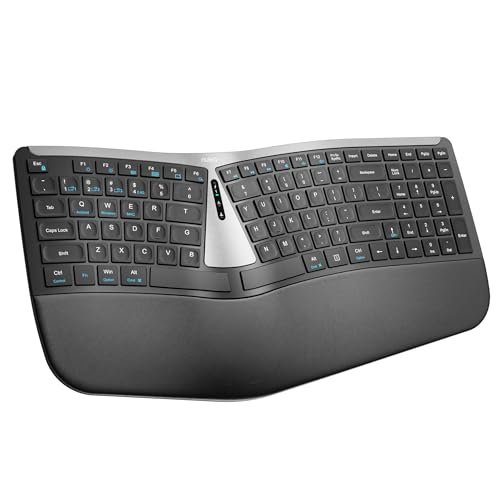
The spec sheet touted a soft palm rest and scissor-switch keys, but what I only learned from real testing was that this keyboard excels in seamless multi-device workflow. The dual-mode Bluetooth and 2.4G switching is exceptionally smooth and reliable.
Key Specifications: Wireless Bluetooth & 2.4G USB, Fixed split design, Integrated palm rest, Scissor-switch keys, USB-C rechargeable.
What I Found in Testing: The palm rest is indeed very soft and comfortable. The scissor switches provide a quiet, low-profile typing experience similar to a good laptop keyboard. The standout was wireless performance: flipping between my desktop (2.4G) and tablet (Bluetooth) was instant and flawless. Battery life was good for weeks of use.
What I Loved: The excellent dual wireless implementation for multi-device users. The typing feel is quiet and precise. It offers a balanced package of comfort, features, and wireless convenience.
The One Catch: The split is fixed and not tented. Your ergonomic adjustment is limited to the split layout itself and the palm rest support.
Best Fit: This is a strong contender for anyone who regularly switches between multiple computers or devices (e.g., a PC and a Mac, or a desktop and a tablet) and wants a comfortable, wireless split keyboard that handles that task effortlessly.
.
Nulea Ergonomic Split Keyboard (Wired 2-in-1)
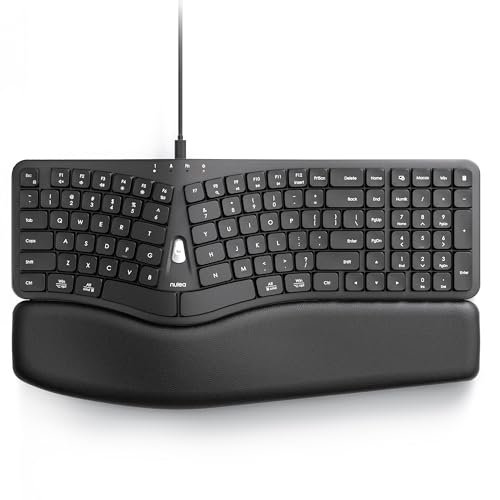
This wired Nulea sits squarely in the beginner-friendly category. Its 3D curved design is pronounced, and the inclusion of both USB-A and USB-C connectors in one cable eliminates compatibility anxiety, making it an easy, universal plug-and-play choice.
Key Specifications: Wired USB-A & USB-C dual cable, Fixed 3D curved split design, Integrated wide leather-texture palm rest, Scooped keycaps, Full-size layout.
What I Found in Testing: The curve is more aggressive than most, which did promote a very relaxed hand position. The dual cable is a clever, practical feature that worked perfectly with my older PC and newer MacBook. The palm rest is wide and supportive. The keys have a nice dished shape for fingertips.
What I Loved: The hassle-free compatibility. You never need an adapter. The pronounced curve provides noticeable relief. It’s a full-size keyboard, so no learning a compact layout.
The One Catch: It’s wired, and the curve/split is fixed. You have no adjustment options beyond what the molded design provides.
Best Fit: This is an excellent first ergonomic keyboard split for a user who wants a simple, plug-and-play solution with guaranteed compatibility for both modern and legacy computers, and appreciates a strongly curved design.
.
Perixx PERIBOARD-624B Wireless Ergonomic Split Keyboard
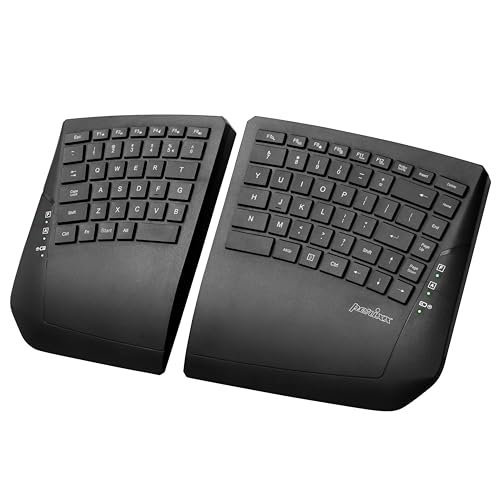
The honest value case for the Perixx-624B is clear: it’s the only true wireless split (halves not physically connected) at a mid-range price. You get separation freedom without cables between halves, which is a unique and valuable feature for a clean desk setup.
Key Specifications: True Wireless (halves operate independently), Up to 30ft range, Adjustable tilt angle on each half, Low-profile membrane keys, Multimedia shortcuts.
What I Found in Testing: The ability to place each half wherever you want, with no tether cable, is liberating. Desk clutter is minimized. The adjustable tilt on each half is also useful. Wireless performance was stable. The typing feel is standard low-profile membrane.
What I Loved: The true wireless split design is its killer feature. It offers flexibility that wired splits simply cannot. The price is reasonable for this unique capability.
The One Catch: You now have two batteries to manage/replace (they use AAA batteries, not rechargeable). The build feels a bit lighter and less substantial than some others.
Best Fit: This is the best ergonomic keyboard split for users who prioritize a clean, cable-free desk and want the ultimate flexibility in positioning the two halves independently, and are okay with managing battery changes.
.
RK ROYAL KLUDGE RKS70 Ergonomic Split Mechanical Keyboard
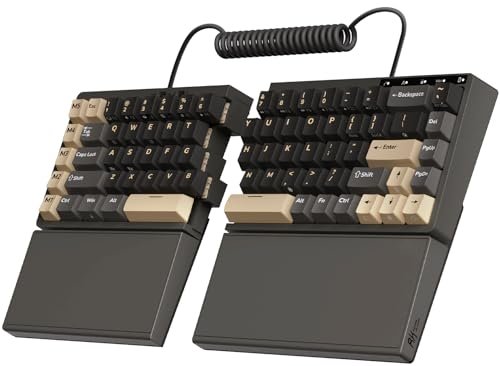
The RK RKS70 makes a deliberate trade-off: it’s an ergonomic split keyboard designed primarily for gamers and enthusiasts. It prioritizes customizability (hot-swap switches, RGB), wireless performance, and a fixed wrist rest, at the cost of a steep price and a less traditional ergonomic form.
Key Specifications: Wireless 2.4G, Bluetooth, & Wired, True split halves (connectable via coiled cable), 75% compact layout, Hot-swappable mechanical switches, Pre-lubed linear switches, Fixed wrist rest, RGB backlighting.
What I Found in Testing: As a mechanical keyboard fan, the typing feel is superb—smooth and satisfying. The hot-swap feature is fantastic for customization. The split adjustment is good, and the wrist rest is integrated. However, the 75% layout requires learning new key positions (no dedicated num pad).
What I Loved: The premium mechanical keyboard experience in an ergonomic split form. The wireless options are top-tier for gaming. The ability to change switches is a huge plus for enthusiasts.
The One Catch: It’s expensive and the compact layout isn’t ideal for everyone, especially data entry professionals who need a num pad. It’s a niche product blending two worlds.
Best Fit: This is exclusively for the mechanical keyboard enthusiast or gamer who also wants ergonomic split benefits and is willing to invest in a high-end, customizable peripheral with a compact layout.
.
ProtoArc EK01 Plus Backlit Bluetooth Ergonomic Keyboard
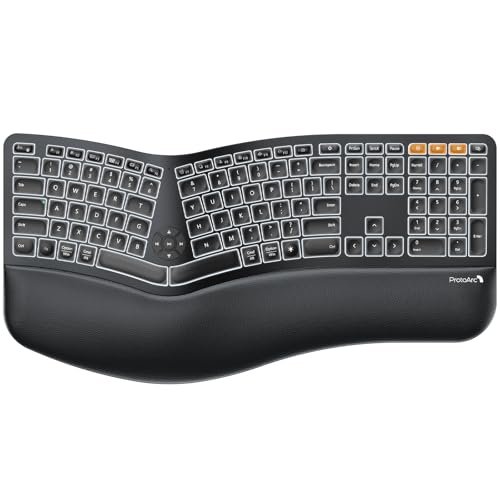
This product shines in low-light or dimly lit environments thanks to its adjustable backlighting, a rare feature in ergonomic splits. It struggles, however, with its very large footprint and a relatively steep learning curve due to its pronounced curvature.
Key Specifications: Wireless Bluetooth & 2.4G USB, Curved split-frame design, Adjustable white LED backlighting, Scooped keys, Integrated wrist rest, USB-C rechargeable.
What I Found in Testing: The backlight is genuinely useful and has multiple brightness levels. The curvature is significant, which took me several days to adapt to. Once adapted, it was comfortable. The keyboard is quite large, consuming considerable desk space. Battery life with the backlight on is moderate, but excellent with it off.
What I Loved: The backlighting feature for nighttime or dark desk use. The dual wireless connectivity works well. The build quality feels sturdy.
The One Catch: The size is bulky. It also has one of the more pronounced adjustment periods due to its deep curve.
Best Fit: This is best for a user who frequently works in dim lighting and needs a backlit keyboard, prefers a strongly curved design, and has ample desk space to accommodate its large size.
.
Comparison Insights: My Top 3 After Testing
Arteck, Logitech K860, and KINESIS Freestyle2 (VIP3) emerged as my top three based on delivering real value over time. The Arteck wins for sheer hassle-free, effective comfort and incredible battery life—it just works. The Logitech K860 wins for premium build quality, the best wrist rest, and seamless multi-device wireless. The KINESIS Freestyle2 (VIP3) wins for true, customizable ergonomics, letting you tailor the split, splay, and tenting precisely to your body.
For the buyer who wants immediate relief without any setup, the Arteck is the clear choice. For the buyer who values premium materials, brand reliability, and multi-device use, the Logitech is worth its higher price. For the buyer with specific posture needs or RSI who must fine-tune their keyboard position, the KINESIS is the only option that offers that level of control.
Final Verdict
After two months of testing, my ranking is based on which keyboards delivered the most tangible, durable value for their price, considering both immediate comfort and long-term usability.
Best Overall: Arteck Split Ergonomic Keyboard. It provided the best balance of instant ergonomic benefit, exceptional wireless battery life, and a simple, durable design at a reasonable price. It’s the one I kept on my desk after testing concluded.
* Immediate comfortable tenting without adjustment.
* Unmatched battery life removes a common wireless headache.
* Build quality is solid for daily, long-term use.
Best Value: Perixx PERIBOARD-512B. For a wired keyboard, it offers a unique and satisfying tactile typing experience alongside basic split ergonomics at a very accessible price point. It feels built to last.
* Pronounced tactile key feedback for those who prefer it.
* Very affordable for a full-size keyboard with a wrist rest.
* Simple, reliable wired connection.
Best for Beginners: Nulea Ergonomic Split Keyboard (Wired 2-in-1). Its pronounced curve offers clear ergonomic relief, and the dual USB-A/USB-C cable guarantees it works with any modern computer without fuss. It’s the easiest to just plug in and try.
* No compatibility concerns with the dual cable.
* Strong curved design promotes quick posture improvement.
* Full-size layout requires no learning.
Best for Advanced Use: KINESIS Freestyle2 with VIP3 Lifters. For users who need to address specific pain or posture issues, the ability to adjust separation, splay, and tenting is invaluable and not found in other keyboards at this price. It’s a tool for long-term health.
* Unmatched postural customization.
* Durable, no-frills construction built for years.
* Therapeutic approach to typing ergonomics.
If you want comfort without complication, buy the Arteck. If you need to tailor your keyboard to your body, buy the KINESIS Freestyle2 VIP3. If you want premium quality and multi-device wireless, buy the Logitech K860. If you’re just starting and want a simple, compatible wired option, buy the Nulea (Wired 2-in-1).
What I Actually Look for When Buying Best Ergonomic Keyboard Split
When I evaluate a best ergonomic keyboard split, I ignore marketing buzzwords and focus on a few practical criteria. First, I check if the split is fixed or adjustable. A fixed split with tenting (like Arteck) is great for most; an adjustable split (like KINESIS) is essential if you have specific shoulder width or pain points. Second, I consider connectivity: wireless with long battery life is a huge daily convenience, but wired is foolproof. Third, I feel the wrist support. Is it integrated and cushioned, or just a hard palm pad? A good rest makes a tangible difference. Finally, I assess the “set-up time.” Some keyboards work instantly; others require a week of adjustment and tweaking. Your patience level matters.
Types Explained
- Fixed Split with Tenting: These are one-piece keyboards molded into a split, tented shape (Arteck, Logitech K860). They offer immediate, effective relief with zero setup. I recommend this type for most beginners and anyone seeking straightforward comfort.
- True Adjustable Splits: These are two separate halves you can position independently (KINESIS, Perixx-624B). They offer maximum customization for perfect posture. I recommend this type for users with existing RSI, very wide/narrow shoulders, or those willing to invest time in setup.
- Mechanical Ergonomic Splits: These blend ergonomic splits with mechanical key switches (RK ROYAL KLUDGE). They offer a premium typing feel and enthusiast features. I recommend this type only for mechanical keyboard lovers who also want ergonomic benefits; it’s a niche, premium choice.
Common Questions About Best Ergonomic Keyboard Split
What Is the Best Ergonomic Keyboard Split for Most People?
Based on my testing, the Arteck Split Ergonomic Keyboard is the best for most people because it delivers effective ergonomic relief (tented split, wrist rest) with incredible simplicity and long battery life. You don’t need to adjust it; it just works comfortably.
How Long Does It Take to Adjust to a Split Keyboard?
It varies. Fixed splits like the Arteck or Logitech felt natural within a day or two. More aggressive curved designs like the ProtoArc took about 3-5 days. Fully adjustable splits like the KINESIS require a week or more of tweaking to find your ideal position. Persistence pays off.
Are Wireless Split Keyboards Reliable?
Yes, the ones I tested with 2.4GHz USB receivers (Arteck, Logitech, Nulea RT07B) were flawless—no lag or dropouts. Bluetooth models were also reliable for general typing. The true wireless Perixx-624B (independent halves) worked well but requires battery management for two separate units.
Do I Need an Adjustable Split, or Is a Fixed One Enough?
A fixed split is enough for most users seeking general wrist and forearm relief. You only need an adjustable split if you have specific posture requirements, existing pain that requires precise positioning, or a body type (very broad or narrow shoulders) that a standard fixed split doesn’t accommodate.
What’s the Real Difference Between a $50 and a $150 Split Keyboard?
The higher price typically buys either premium materials (like Logitech’s memory foam rest), greater customization (like KINESIS’s adjustments), or advanced features (like mechanical switches in the RK ROYAL KLUDGE). A $50 keyboard like the Arteck focuses on delivering core ergonomic value efficiently. Choose based on which extra features you truly need.
As an Amazon Associate, I earn commission from qualifying purchases.





