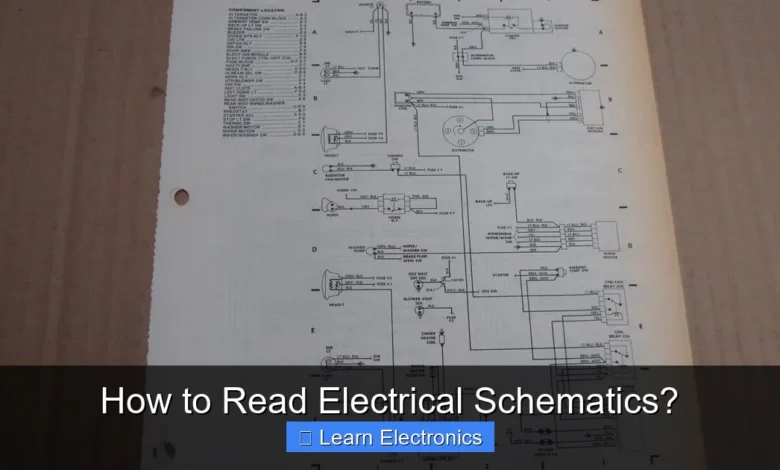
How to Read Electrical Schematics? involves deciphering a universal graphical language that represents electronic circuits. This foundational skill allows engineers, technicians, and hobbyists to understand, design, and troubleshoot electronic systems efficiently. Mastering this technique unlocks the hidden blueprint of any electrical device.
Grasping the fundamentals of this approach is crucial for anyone working with electronics, from repairing home appliances to developing complex industrial systems. It transforms abstract connections into a clear, visual map of electrical functionality.
Quick Answers to Common Questions
What’s the very first thing I should look for when I see an electrical schematic?
Start by identifying the main power source and ground, then look for common components like resistors, capacitors, and switches. Getting familiar with these basic symbols is key to confidently reading electrical schematics.
How can I understand all those different symbols in an electrical schematic?
Don’t feel overwhelmed! Focus on learning the most common symbols first, as many are standardized across industries. A quick reference guide or symbol legend, often included with the schematic, will be your best friend when you’re learning how to read electrical schematics.
Once I know the symbols, what’s the next step to actually “read” an electrical schematic?
After understanding the symbols, practice tracing the signal or power flow from input to output. This helps you visualize the circuit’s operation and how components interact, which is fundamental to truly reading electrical schematics.
📑 Table of Contents
- The Foundation: Understanding Basic Symbols
- Tracing the Flow: Wires, Connections, and Power
- Key Elements in How to Read Electrical Schematics Effectively
- Deciphering Advanced Components and Logic
- Practical Application and Troubleshooting with Schematics
- Mastering the Art: Continuing Your Journey in How to Read Electrical Schematics
The Foundation: Understanding Basic Symbols
Every electrical schematic is built upon a standardized set of symbols, each representing a specific component or function. Learning these symbols is the first critical step in understanding the overall circuit. While variations exist across different standards (like IEEE, IEC, ANSI), core components often have widely recognized representations.
Common Electronic Component Symbols
To begin your journey, familiarize yourself with the most frequently encountered symbols:
- Resistor: Limits current flow. Typically shown as a zigzag line or a rectangle.
- Capacitor: Stores electrical energy. Often depicted as two parallel lines or plates.
- Inductor: Stores energy in a magnetic field. Usually shown as a coiled wire.
- Diode: Allows current to flow in one direction only. Represented by a triangle with a line at its apex.
- Transistor (BJT/MOSFET): Acts as an electronic switch or amplifier. Has various representations depending on type (NPN, PNP, N-channel, P-channel).
- Switch: Connects or disconnects current path. Several types exist (SPST, SPDT).
- Power Source: Supplies electrical energy (e.g., battery, DC power supply). Indicated by parallel lines of varying lengths or a circle with polarity.
- Ground: A common reference point for voltage, often the return path for current. Shown as multiple parallel lines or an inverted triangle.
- Integrated Circuit (IC): A chip containing multiple components. Typically a rectangle with numbered pins.
Understanding the function of each symbol is as important as recognizing its shape. For example, knowing a resistor limits current helps you infer its role when you see it in a circuit diagram.
Tracing the Flow: Wires, Connections, and Power
Once you recognize individual components, the next step is to understand how they are connected and how electricity flows through the circuit. This involves tracing wires, identifying connection points, and understanding power distribution.
Navigating Wires and Junctions
- Wires: Represented by lines connecting components. Straight lines are preferred for clarity.
- Junctions (Connections): When two or more wires are electrically connected, they are typically shown meeting at a single point with a dot. If wires cross but are not connected, they usually pass over each other without a dot, or sometimes with a small arc (a “hop”) over the intersecting line, though the dot/no dot convention is more common today.
- Net Names: Important lines or groups of lines (nets) often have labels (e.g., “VCC,” “GND,” “DATA_LINE,” “CLK”). These labels indicate that all points on that named net are electrically connected, even if not directly drawn as such.
Understanding Power Distribution
Electrical schematics commonly separate power and ground connections for clarity, often placing power rails at the top and ground at the bottom. This convention helps to visualize the overall voltage reference and supply paths.
- VCC/VDD: Common labels for positive power supply lines. VCC usually refers to Bipolar Junction Transistor (BJT) circuits, while VDD is for Field-Effect Transistor (FET) circuits, though they are often used interchangeably for generic positive supply.
- GND (Ground): The common return path for current, typically at 0V. All components connected to ground share this common reference.
- Power Flow: In DC circuits, conventional current flows from the positive terminal of the power source, through the components, and back to the negative terminal (ground). Understanding this flow helps in predicting voltage drops and current paths.
Key Elements in How to Read Electrical Schematics Effectively
Beyond individual symbols and connections, mastering the practice of reading schematics involves understanding the overall structure, common conventions, and what information to prioritize. This section provides a systematic approach to breaking down complex diagrams.
Systematic Approach to Deciphering Schematics
- Understand the Overall Layout: Schematics are generally organized to reflect signal flow from left to right, and power distribution from top to bottom (power rails at top, ground at bottom). Begin by identifying the primary inputs, outputs, and power sections.
- Identify Key Components: Quickly scan for major functional blocks like microcontrollers, power supplies, amplifiers, or sensors. These often dictate the overall purpose of a section.
- Locate Power and Ground: Always identify the power supply rails (VCC, VDD, 5V, 3.3V, etc.) and ground (GND). This defines the operational voltage and reference point for the entire circuit.
- Trace Signal Paths: Follow the signal from input to output. Pay attention to how the signal is modified by components (e.g., amplified by an op-amp, filtered by an RC circuit, switched by a transistor).
- Check Component Designators and Values: Every component usually has a unique designator (e.g., R1, C12, U5) and often an associated value (e.g., 10kΩ, 100nF, 5V). These are crucial for identification and understanding component specifications.
- Utilize Net Names: As mentioned, net names are labels on wires. If a net name appears in multiple places, those points are connected. This is especially helpful in large schematics where direct wire routing might be impractical.
Common Conventions and Best Practices
- Reference Designators: Resistors start with ‘R’, capacitors ‘C’, inductors ‘L’, diodes ‘D’, transistors ‘Q’, integrated circuits ‘U’ or ‘IC’, connectors ‘J’ or ‘P’.
- Polarity: Pay close attention to polarized components like electrolytic capacitors, diodes, and integrated circuits. Incorrect polarity can cause damage.
- Bus Lines: Multiple parallel signal lines (like data buses) are sometimes represented by a single thick line with a slash and a number indicating the number of lines it represents (e.g., /8 for an 8-bit bus).
Deciphering Advanced Components and Logic
As circuits become more complex, schematics incorporate advanced components and logical constructs. Understanding these requires a deeper dive into their internal representations and functions.
Integrated Circuits (ICs) and Microcontrollers
Integrated Circuits are typically represented as rectangular blocks with numbered pins. Essential information includes:
- Pin Names/Functions: Each pin on an IC has a specific function (e.g., VCC, GND, Input, Output, Clock, Reset). These are often labeled directly on the schematic or referenced in the component’s datasheet.
- Internal Blocks: Some complex ICs, particularly microcontrollers, might show internal functional blocks (e.g., ADC, UART, SPI, GPIO) to illustrate how external pins map to internal peripherals.
- Datasheets: For any complex IC, the schematic will often only show the external connections. The comprehensive details of its operation, internal structure, and pin descriptions are found in its datasheet, which is an indispensable companion to the schematic.
Logic Gates and Digital Blocks
Digital circuits utilize logic gates (AND, OR, NOT, XOR, NAND, NOR) to perform Boolean operations. Each gate has a distinct symbol:
- AND Gate: Output is high only if ALL inputs are high.
- OR Gate: Output is high if ANY input is high.
- NOT Gate (Inverter): Output is the opposite of the input.
- XOR Gate: Output is high if inputs are different.
These gates are fundamental building blocks in microprocessors, memory, and control logic. Understanding their truth tables is key to following digital signal paths.
Table of Common Logic Gate Symbols
Here’s a quick reference for common logic gate symbols:
| Gate Type | Symbol Description | Basic Function |
|---|---|---|
| AND Gate | D-shaped, two or more inputs, one output. | Output is HIGH only when all inputs are HIGH. |
| OR Gate | Curved input side, pointed output, two or more inputs, one output. | Output is HIGH when any input is HIGH. |
| NOT Gate (Inverter) | Triangle with small circle (bubble) at output. | Output is the opposite of the input. |
| NAND Gate | AND gate with a small circle (bubble) at output. | Output is LOW only when all inputs are HIGH. |
| NOR Gate | OR gate with a small circle (bubble) at output. | Output is LOW when any input is HIGH. |
| XOR Gate | OR gate with an additional curved line at input. | Output is HIGH when inputs are different. |
Practical Application and Troubleshooting with Schematics
The true value of knowing how to read electrical schematics comes from their practical application in building, testing, and troubleshooting electronic devices. A schematic is not just a diagram; it’s a diagnostic tool.
Using Schematics for Troubleshooting
When a circuit isn’t working as expected, the schematic becomes your most valuable guide:
- Identify Test Points: Schematics often include designated test points (TP1, TP2, etc.) where specific voltages or signals can be measured.
- Predict Expected Values: By understanding the component values and circuit configuration, you can calculate or estimate expected voltages, currents, and waveforms at various points.
- Trace Faulty Paths: If a component or section isn’t working, use the schematic to isolate the fault. Start at the power supply and work your way through the signal path, measuring voltages and checking continuity with a multimeter. For example, if a resistor R1 is supposed to have 5V on one side and 3V on the other, but you measure 5V on both, R1 might be open (broken).
- Component Verification: A schematic provides the precise part number or specifications for each component, allowing you to verify if the correct component was installed or if a replacement is needed.
Designing and Modifying Circuits
For those interested in building or modifying circuits, the schematic is the blueprint:
- New Designs: Schematics are the initial phase of any electronic design, laying out the logical connections before physical layout (PCB design).
- Modifications: If you want to add a feature or change a parameter in an existing circuit, the schematic shows you exactly where and how to make those changes without disrupting other functions.
Always prioritize safety when working with live circuits. Disconnect power before making physical changes, and be aware of high voltages and currents.
Mastering the Art: Continuing Your Journey in How to Read Electrical Schematics
Reading electrical schematics is a skill that improves with practice and continuous learning. The field of electronics is vast, and schematics can vary significantly in complexity and style. Embracing continuous education will help you tackle increasingly challenging designs.
Advanced Schematic Concepts
- Hierarchical Schematics: For very complex systems, a schematic might be broken down into multiple pages, with higher-level diagrams showing functional blocks and lower-level pages detailing the internal circuitry of those blocks. Understanding how to navigate these hierarchical structures is crucial.
- Specialized Schematics: Depending on the domain, you might encounter RF schematics with transmission lines, power electronics schematics with heavy current paths, or analog schematics with fine-tuned filtering networks. Each might have unique symbols or conventions.
- Block Diagrams: Often accompany detailed schematics, providing a high-level overview of system functionality without showing individual components, helping to understand the “big picture.”
Tools and Resources for Further Learning
- EDA Software: Electronic Design Automation (EDA) tools like Altium Designer, Eagle, KiCad, or Fritzing are used to create schematics and PCB layouts. Learning to use these tools not only helps you design but also familiarizes you with professional schematic practices.
- Online Resources: Websites, forums, and communities dedicated to electronics (e.g., EEVblog, Stack Exchange, Reddit’s r/electronics) are invaluable for learning and getting help.
- Practical Projects: The best way to solidify your understanding of how to read electrical schematics is by building circuits from them. Start with simple projects like LED blinkers or sensor interfaces, and gradually move to more complex systems.
- Datasheets and Application Notes: Regularly consulting datasheets for components and reading application notes from manufacturers will deepen your understanding of component behavior and typical circuit implementations.
The journey to mastering this practice is ongoing. Each new schematic you encounter offers an opportunity to learn something new, reinforcing your knowledge and expanding your ability to interpret complex electronic designs.
Learning how to read electrical schematics is an essential skill that unlocks the intricate world of electronics. By understanding the foundational symbols, tracing signal paths, and adopting a systematic approach, you gain the power to comprehend, troubleshoot, and even design electronic circuits. This comprehensive guide has provided you with the necessary tools and strategies to begin your journey. Remember, consistent practice and engagement with real-world circuits are key to truly mastering this invaluable technique. Embrace the challenge, and soon you’ll be speaking the universal language of electronics with confidence.
Frequently Asked Questions
What is an electrical schematic and why is it important to learn how to read them?
An electrical schematic is a diagram that uses standardized symbols to represent the components and connections within an electrical circuit. Learning to read electrical schematics is crucial for anyone working with electronics, as it allows for designing, building, troubleshooting, and understanding how circuits function effectively.
What are the fundamental steps to begin reading electrical schematics effectively?
To start reading electrical schematics, begin by familiarizing yourself with common symbols for components like resistors, capacitors, and power sources. Next, identify the power input and ground connections, then practice tracing the current path through different components to understand the circuit’s flow and function.
How do I identify common component symbols when reading an electrical schematic?
Common component symbols, such as those for resistors, capacitors, inductors, diodes, and transistors, are standardized internationally. You can typically find a legend or reference chart within larger documentation, or refer to industry standards like ANSI or IEC to decipher unfamiliar symbols when reading an electrical schematic.
What are effective strategies for troubleshooting circuits using an electrical schematic?
When troubleshooting with an electrical schematic, start by verifying power and ground connections and then systematically trace the signal path. Look for expected voltages or signals at various test points and compare them to the schematic’s design to isolate faulty components or connections.
As an Amazon Associate, I earn commission from qualifying purchases.