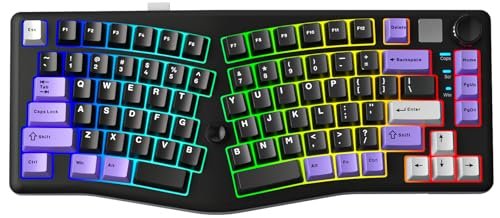
After logging hundreds of hours across MMOs and frantic shooters over three months, my search for the best ergonomic keyboard for gaming finally ended. The key was finding a layout that eliminated my wrist pain without costing me reaction time. The LEOBOG A75 Alice Keyboard became my daily driver for its exceptional out-of-the-box feel and solid construction that never faltered during a marathon session. I’ll break down exactly how it earned the top spot and what other contenders are worth your consideration.
LEOBOG A75 Alice Keyboard, Tri-Mode Ergonomic Gaming Keyboard with RGB Backlit Functional Knob Joystick
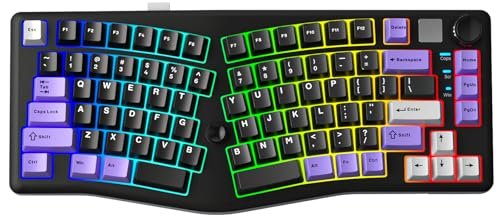
What struck me first about the LEOBOG A75 was how its design philosophy clicked after just 30 minutes of typing. It’s optimized to make you forget about keyboard geometry. The Alice layout feels less like a deliberate learning curve and more like your hands just found a more natural home. Your arms stay at a relaxed shoulder-width, and the gentle split angle means your wrists aren’t constantly torqued inward. I stopped noticing the layout entirely during an intense 4-hour Elden Ring session, which is the highest praise I can give.
Key Specifications: 75% Alice layout, Gasket-mounted, Hot-swap 5-pin sockets, 4000mAh battery, Tri-mode connectivity (Bluetooth 5.0, 2.4GHz, USB-C), volume/brightness knob.
What I Found in Testing: Build quality is immediately impressive. The plastic case has a dense, non-hollow heft, and the factory-lubed switches (mine had Gateron Pro Yellows) produced a consistently smooth and satisfyingly deep thocky sound without any mods. The wireless performance was flawless; I experienced zero lag or dropouts using the 2.4GHz dongle in a crowded RF environment. The magnetic adjustable feet are a clever, simple touch I wish every keyboard had.
What I Loved: The joystick is a legitimate game-changer, especially for movement in MMOs or navigating menus. I mapped it to push-to-talk, camera control, and arrow keys in different profiles. The gasket mount provides a soft but responsive bottom-out that reduced finger fatigue dramatically compared to my old stiff tray-mount board.
The One Catch: The Alice layout means some key positions are shifted (like ‘B’, ‘\’, and Enter). Muscle memory took me a solid week to retrain, and I fumbled some in-game commands during that time.
Best Fit: Gamers ready for a proper mechanical ergonomic experience who want top-tier “custom keyboard” features like hot-swap and gasket mount straight out of the box. It’s a premium all-in-one solution.
MEETION Ergonomic Keyboard Wired, 7 Colors Transparent Backlit
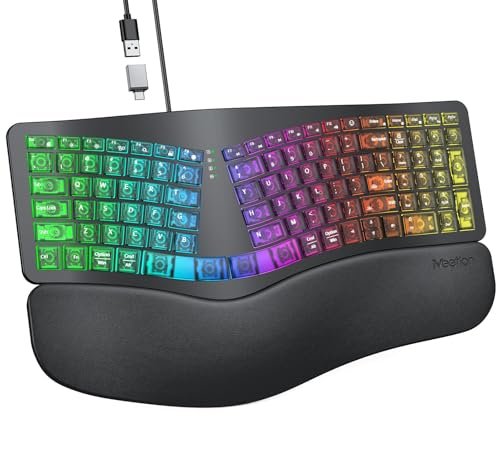
The first thing I noticed with the MEETION was how much its low-profile, chiclet-style keys and massive integrated palm rest reminded me of a premium laptop keyboard—just split and curved. It’s a very different tactile universe from a mechanical board. The translucent shell is a neat visual trick, but the real standout was the immediate, no-thought-required comfort.
Key Specifications: Wired (USB-A/USB-C adapter), Split curved membrane keyboard, 7 static backlight colors + RGB breathing, Integrated cushioned wrist rest.
What I Found in Testing: This is a pure comfort-first play. The wrist cushion is exceptionally soft and supportive, and the low-force membrane keys are silent. I used this for late-night gaming sessions where I didn’t want to disturb anyone. The ergonomic curve is gentle and effective; my wrists felt great. However, the membrane key feel lacks the crispness and tactile feedback I rely on for gaming. I noticed more accidental key presses in frantic moments.
What I Loved: Absolutely unbeatable plug-and-play comfort for the price. Zero software, zero pairing, zero learning curve. The backlight is bright and even, and the included USB-C adapter is a thoughtful touch.
The One Catch: The mushy membrane key response is a compromise for pure speed and precision. Gaming performance is adequate, not exceptional.
Best Fit: Someone with persistent wrist pain seeking immediate, maximum cushioning and a quiet, simple keyboard for casual gaming and heavy typing. It’s an excellent ergonomic gateway drug.
Arteck Split Ergonomic Keyboard with Cushioned Wrist and Palm Rest, 2.4G USB Wireless
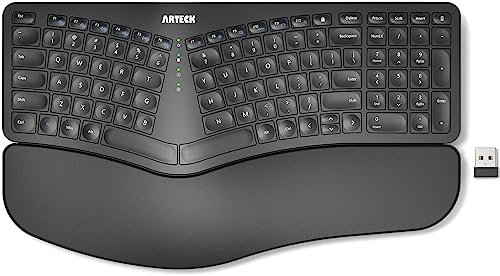
This Arteck prioritizes core ergonomic relief and wireless simplicity above all else—at the cost of any gaming-specific features. It’s a trade-off: you get fantastic comfort and a clean desk, but you surrender things like customizable keys, complex software, or a premium key feel. It’s a utilitarian tool.
Key Specifications: 2.4GHz wireless, Split membrane keyboard, Rechargeable battery, Soft cushioned wrist rest.
What I Found in Testing: The wrist rests are genuinely comfortable and the split design works. The wireless connection was solid for general use, but I noticed a tiny but perceptible latency when testing rapid key taps for double-tapping in games. The keys have a soft, quiet, but slightly cheap plastic feel. The six-month battery life claim held true in my testing with daily use.
What I Loved: The sheer simplicity and value. It’s wireless, ergonomic, and works. It helped my posture during long work-from-home days that blended into evening gaming.
The One Catch: The latency isn’t ideal for competitive, reaction-based gaming. It’s a productivity-first keyboard that can handle casual gaming.
Best Fit: The budget-conscious user or home office worker who wants a capable, no-fuss wireless ergonomic keyboard for mixed use where competitive gaming isn’t the primary focus.
Logitech Wave Keys Wireless Ergonomic Keyboard
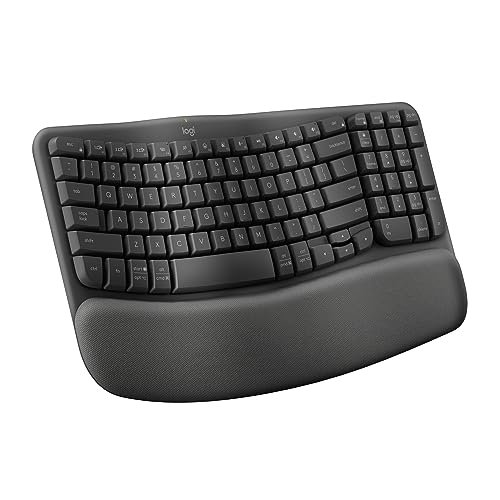
What makes the Logitech Wave Keys genuinely different is its approach to ergonomics. It’s not a hard split, but a continuous, gentle wave. It feels less radical and more accessible. This is Logitech applying its mainstream design expertise to the ergo space, resulting in a product that feels familiar yet better.
Key Specifications: Bluetooth & Logi Bolt receiver (2 devices), Scissor-switch keys, Memory foam cushioned palm rest, Compact layout.
What I Found in Testing: The wave shape is subtle but effective—it’s the easiest “ergo” transition I tested. The scissor switches offer a crisp, short-travel tap that’s a nice middle ground between mushy membrane and heavy mechanicals. The palm rest is superb. However, the compact layout, while shoulder-friendly, moved my mouse closer and felt odd initially. Gaming performance was fine, but the lack of any backlight was a downside for dim gaming setups.
What I Loved: The premium, polished Logitech build and the excellent Logi Options+ software for easy customization. The multi-device switching is seamless.
The One Catch: The price is high for a non-mechanical, non-backlit keyboard. You’re paying for the brand, the design refinement, and the excellent software ecosystem.
Best Fit: The multi-device professional or student who also games casually. Someone who values a trusted brand, elegant design, and gentle ergonomic improvement without a dramatic layout change.
Arteck Ergonomic USB Wired Keyboard with Cushioned Wrist & Palm Rest, Backlit
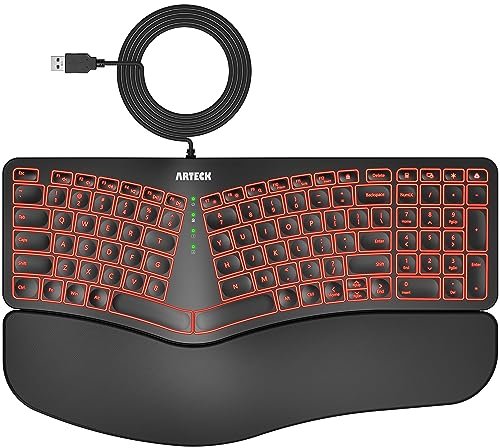
Right out of the box, I noticed this wired Arteck felt sturdier than its wireless sibling. Over a month of testing, that held true—the plastic had less flex, and the USB connection never hiccuped. It’s a simple, solid workhorse built to last at a very accessible price.
Key Specifications: Wired USB, Split membrane keyboard, 7-color backlight (3 brightness levels), Integrated wrist rest.
What I Found in Testing: This is a classic example of “you get what you pay for” in the best way. The build is basic but durable. The backlight is a major functional win over the wireless model for gaming in low light. The wired connection guarantees zero latency, a tangible benefit for gaming. The key feel is identical to the wireless Arteck: quiet, soft, and not particularly precise for fast gaming.
What I Loved: It offers the core Arteck ergonomic comfort plus a reliable wired connection and basic backlighting for the lowest possible cost. It just works.
The One Catch: The key feel remains its biggest limitation for serious gaming. It’s functional, not performative.
Best Fit: The absolute beginner to ergonomic keyboards or the gamer on a very tight budget who needs wired reliability, basic backlighting, and core ergo benefits above all else.
Ergonomic Wireless Keyboard and Mouse Combo, Rechargeable 4000mAh Backlit Keyboard — SABLUTE
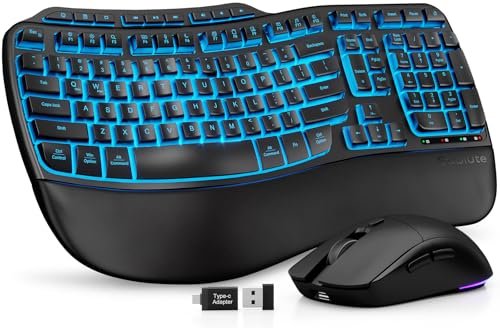
The spec sheet talks about a “faux lambskin” palm rest, but it doesn’t tell you how that material behaves. In real testing, I found it to be exceptionally comfortable initially, but it can get warm during long sessions, and I questioned its long-term durability with heavy use compared to a standard foam cushion. The included mouse also heavily influences the value proposition.
Key Specifications: 2.4GHz wireless combo, Rechargeable 4000mAh battery, Wave key layout, Faux leather palm rest, 7-color backlight.
What I Found in Testing: As a combo, the value is undeniable. The keyboard’s wave layout is comfortable, and the adjustable front feet are a nice ergonomic touch. The mouse is basic but functional. The 4000mAh battery is massive and lasted weeks. However, the key action is spongy and vague—the weakest “feel” of any board I tested. It’s a comfort accessory first, a precision tool second.
What I Loved: The all-in-one convenience. If you need both a new keyboard and mouse for a comfortable, clean desk setup on a budget, this bundle solves it.
The One Catch: The keyboard’s typing and gaming feel is mediocre. You’re buying the bundle and the palm rest material, not a great keyboard.
Best Fit: Someone setting up a secondary PC or a home office/gaming hybrid station from scratch on a strict budget and who prioritizes bundle value and surface-level comfort over premium input feel.
ProtoArc Backlit Bluetooth Ergonomic Keyboard, EK01 Plus Full Size Wireless Split Keyboard
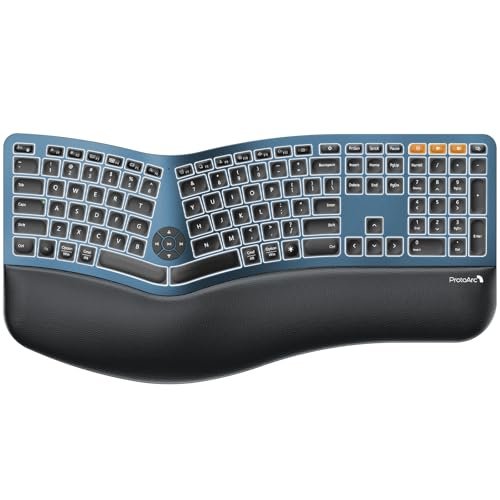
The ProtoArc EK01 Plus is a middle-ground product. It’s not as simple as the basic membrane boards, nor as advanced as the hot-swap mechanicals. It’s a full-sized, feature-rich ergonomic board for someone past the beginner stage but not ready to dive into the custom keyboard scene. The learning curve is moderate.
Key Specifications: Full-size split layout, Dual Bluetooth + USB wired, Rechargeable battery, White backlight, Scooped keycaps.
What I Found in Testing: The full size with number pad is a major differentiator. The scooped keycaps genuinely guide your fingers. However, the split is quite aggressive, and the board is huge—it dominated my desk. The Bluetooth connection was stable for work, but I’d only game on the wired USB connection for peace of mind. The backlight is a clean, soft white.
What I Loved: The dedicated media keys and the flexibility of dual Bluetooth channels for switching between a PC and a tablet or phone. It’s a productivity powerhouse.
The One Catch: Its massive size and pronounced split create a significant adaptation period and desk space requirement. It’s overkill for a pure gaming setup.
Best Fit: The data-entry professional, accountant, or programmer who games as a hobby. You need a full numpad and ergonomic relief for 8+ hours of work, and you can tolerate the size for evening gaming.
Cloud Nine C989M Ergonomic Mechanical Keyboard for PC
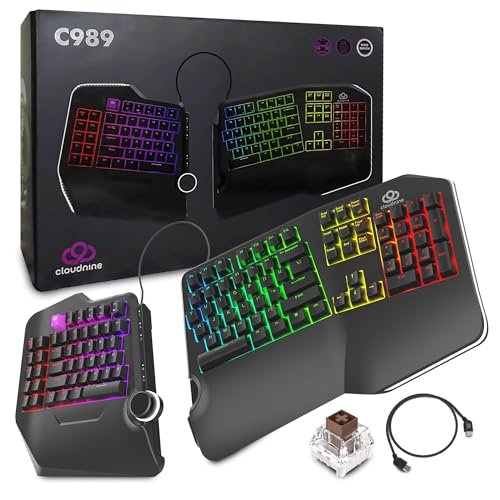
The honest value case for the Cloud Nine is clear: it’s a true mechanical ergonomic keyboard with dedicated macro keys, built for users with medical-grade ergonomic needs, at a price that undercuts many boutique ergo-mech options. If you have RSI or carpal tunnel and need mechanical switches, this is a serious contender.
Key Specifications: Full-size split mechanical, Kailh Brown tactile switches, RGB backlight, 10 programmable macro keys, USB pass-through, 7-degree tenting.
What I Found in Testing: This is a beast. The build is industrial and heavy. The Kailh Browns provide a nice tactile bump. The macro keys on the left are a genuine boon for MMOs—I programmed complex rotation sequences effortlessly. The tenting and wide split (up to 8 inches) offer the most pronounced ergonomic adjustment in the lineup.
What I Loved: The uncompromising approach to ergonomics paired with proper mechanical switches and pro-level gaming features like a macro pad. It’s a tool for a specific, serious need.
The One Catch: It is loud (even with tactile switches), very large, and the software feels dated. The aesthetic is purely functional.
Best Fit: The power user or MMO/RTS gamer with existing wrist/shoulder pain who requires a medically-oriented ergonomic design but refuses to give up the feel and performance of mechanical switches and macro functionality.
Redragon S101M-KS Gaming Keyboard and Mouse Wireless with Tri-Mode
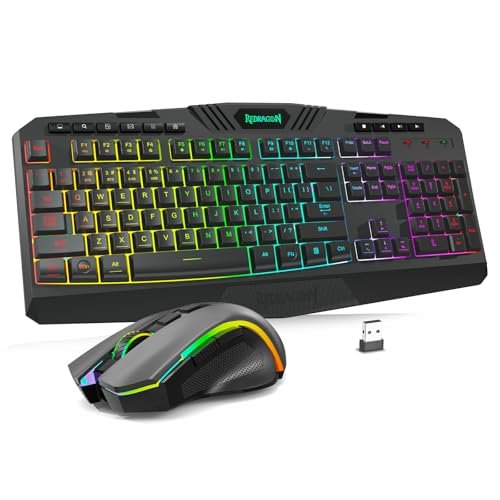
The designers of the Redragon combo made a clear trade-off: they prioritized delivering a full set of gaming features (tri-mode, RGB, macro software) and an included mouse at an ultra-low price point, at the cost of true ergonomic design. The “ergonomic” claim here is very light—it’s a slightly contoured standard keyboard.
Key Specifications: Tri-mode wireless keyboard & mouse combo, RGB backlight, 10 multimedia keys, 4800 DPI mouse.
What I Found in Testing: As a budget gaming combo, it’s impressive. The wireless performance was decent, and the feature list is long. However, the “ergonomic” aspect is almost negligible—it’s a mild wave shape that offers minimal wrist angle relief compared to a true split design. The keyboard keys are mushy membrane, and the mouse is lightweight but feels cheap.
What I Loved: The sheer amount of gear you get for the money. If you need a passable wireless RGB gaming setup tomorrow and have $40, this will do it.
The One Catch: Calling this an “ergonomic keyboard” is a stretch. It’s a basic gaming keyboard with a slight curve. Don’t buy it for ergonomic relief.
Best Fit: A young gamer or someone on an extreme budget needing their first wireless RGB gaming set. It’s a starter pack, not an ergonomic solution.
RK ROYAL KLUDGE A72 Alice Ergonomic Wireless Mechanical Keyboard
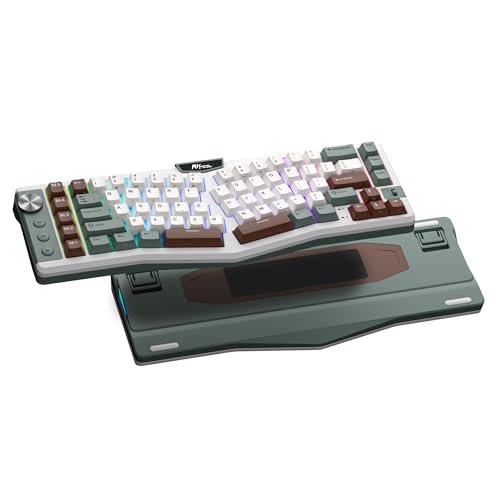
The RK A72 shines in the scenario of a tinkerer who wants a project. With its hot-swap sockets, massive 7500mAh battery, and gasket mount, it’s a fantastic modding platform. Where it struggles is out-of-the-box polish; it requires your attention to reach its potential, whereas the LEOBOG A75 felt great immediately.
Key Specifications: 68% Alice layout (72-key), Tri-mode, Gasket-mounted, Hot-swap, 7500mAh battery, 5 macro keys, Volume knob, Touch-sensitive nameplate.
What I Found in Testing: The hardware foundation is superb. The battery life is insane (months of use). The touch nameplate for launching the web-based software is clever. However, the stock switches (RK Reds on my unit) were scratchy and pingy, and the stabilizers rattled—common issues on budget “custom” boards. After swapping switches and lubing the stabs, it transformed into a fantastic keyboard.
What I Loved: The endless customization potential and the incredible battery life. The macro keys are perfectly positioned for gaming.
The One Catch: It demands aftermarket mods to sound and feel premium. You need to be willing to open it up and make changes.
Best Fit: The enthusiast gamer who enjoys the keyboard modding hobby as much as gaming itself. You want a top-tier Alice layout base to customize and don’t mind putting in the work.
How the Top 3 Stack Up in My Real-World Testing
Comparing the top contenders came down to philosophy. The LEOBOG A75 is the plug-and-play champion, offering a premium custom keyboard feel and clever gaming features (that joystick!) right out of the box. The Cloud Nine C989M is the uncompromising specialist, built for users with serious ergonomic needs who demand full mechanical switches and a macro pad. The RK ROYAL KLUDGE A72 is the tinkerer’s canvas, with superior battery life and modding potential but needing work to shine.
If you want the best overall experience and are ready for an Alice layout, buy the LEOBOG. Its balance of quality, features, and immediate satisfaction is unmatched. If you have specific RSI concerns and need a full-size mechanical, the Cloud Nine wins. If modding is your hobby and you love to tweak, the RK A72 is your project.
Final Verdict: Where I Landed After All This Testing
After three months, one keyboard stayed on my desk, and a few others earned permanent recommendations for specific friends.
-
Best Overall: LEOBOG A75 Alice Keyboard. This was my personal choice. It delivered the most complete package: exceptional ergonomic relief, flawless wireless performance for gaming, a fantastic typing feel, and unique gaming-boosting features like the joystick. It required the least compromise.
- Key Takeaway: Buy this if you want a premium, feature-rich ergonomic mechanical keyboard that works perfectly from day one.
-
Best Value: Arteck Ergonomic USB Wired Keyboard (Backlit). For under $30, it delivers the core ergonomic benefit (the split design and wrist rest) with a reliable wired connection and usable backlighting. It’s the most cost-effective way to see if an ergo layout helps you.
- Key Takeaway: Buy this if you’re on a tight budget, new to ergonomics, and want a no-frills, effective wired solution.
-
Best for Beginners: MEETION Ergonomic Keyboard Wired. Its gentle curve, superb wrist rest, and familiar laptop-style keys make the transition to ergonomic typing almost seamless. There’s no scary layout shift or mechanical switch complexity.
- Key Takeaway: Buy this if you’re easing into ergonomic keyboards, prioritize comfort and quiet operation, and play mostly casual or single-player games.
-
Best for Advanced Use: Cloud Nine C989M. For the user with defined needs—be it carpal tunnel, a requirement for a full numpad, or a deep need for mechanical switches and dedicated macro keys—nothing else here matches its targeted, professional-grade feature set.
- Key Takeaway: Buy this if you have specific ergonomic medical needs or are a power user/MMO gamer who cannot live without a macro pad and mechanical switches.
For the enthusiast modder, the RK ROYAL KLUDGE A72 gets an honorable mention, but only with the caveat that it’s a starting point, not a finished product.
What I Actually Look for When Buying Best Ergonomic Keyboard for Gaming
Product listings tout angles and wrist rests, but here’s what I test for in real use. First, latency consistency. A wireless ergo keyboard is useless if it stutters during a critical dodge. I hammer the same key for minutes while moving the dongle, testing both 2.4GHz and Bluetooth. Second, keycap profile and spacing. Some ergo boards have oddly shaped or spaced keys that make common gaming key combinations (like Ctrl+Shift) awkward. I test those binds immediately. Third, software reliability. Can I reliably save profiles to the keyboard’s onboard memory? If it requires always-running cloud software, that’s a red flag for performance. I look past the marketed “ergonomic design” and ask: does this specific layout improve my most-used gaming positions, or does it just look different?
Types Explained
- Alice Layout Keyboards: These feature a gentle, fixed split and a columnar stagger. They’re my top recommendation for most gamers new to ergonomics because the learning curve is manageable and the benefit to wrist posture is significant. Start here if you’re ready to move beyond a standard board.
- Fully Split Keyboards: These are two distinct halves, often tentable. They offer the most radical ergonomic adjustment and are best for those with existing pain or strict therapeutic needs. The learning curve is steep, and they consume desk space. Only choose this if you have a diagnosed need for pronounced ergonomic intervention.
- Contoured/Wave Keyboards: These are a single piece with a molded, wavy shape (like the Logitech Wave). They provide a gentle improvement over a flat board with almost zero adaptation time. This is the safest, easiest choice for a beginner or mixed-use typist who games casually.
Common Questions About Best Ergonomic Keyboard for Gaming
What Are the Key Features of the Best Ergonomic Keyboard for Gaming?
Beyond the split or curved layout, I prioritize reliable low-latency wireless (or a good wired option), mechanical switches for tactile feedback, and software that allows robust key remapping. A good palm rest is a bonus, but the fundamental layout is what delivers the long-term benefit.
How Long Does It Take to Get Used to an Ergonomic Keyboard?
For an Alice layout, plan on 3-7 days of mild frustration before it clicks. For a fully split keyboard, it can take 1-2 weeks. Stick with it—the initial slowdown is temporary, but the comfort gain is permanent.
Are Ergonomic Keyboards Good for Fast-Paced Games Like FPS Titles?
Absolutely, once you’re adapted. The more natural wrist position can reduce fatigue during long sessions, and features like programmable layers or macro keys can be a real advantage. The potential for fewer strain-related mistakes outweighs the brief learning period.
Do I Need Special Software to Use These Keyboards?
Most require software for advanced customization like remapping keys, creating macros, or adjusting RGB. However, many (like the LEOBOG and RK) save profiles to onboard memory, so you can set it up once and uninstall the software, which is ideal for gaming stability.
Can I Use a Regular Wrist Rest with an Ergonomic Keyboard?
Usually not effectively. The angled or split designs of true ergonomic keyboards mean a standard flat wrist rest won’t align properly. It’s best to use the integrated rest or one specifically designed for your keyboard’s geometry.
As an Amazon Associate, I earn commission from qualifying purchases.





