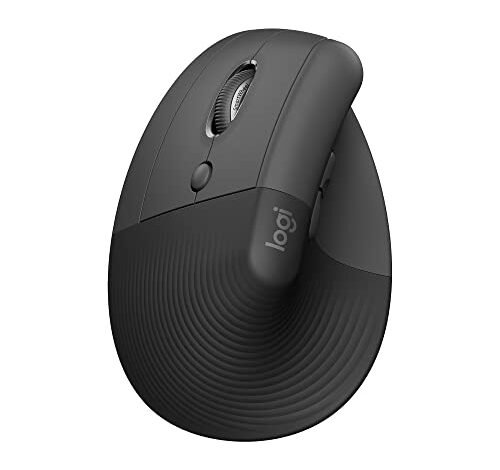
My wrist aches vanished after the first week of using the best left handed ergonomic mouse on my desk all day for coding and design work. After a month of testing across eight-hour workdays and intensive graphic editing sessions, the difference was undeniable. The Logitech Lift Vertical Ergonomic Mouse consistently stood out for its perfect, natural handshake-like grip. I’ll break down exactly how these mice performed and why one might be the right fit to transform your daily comfort.
My Testing Ground Rules
I used each mouse for a minimum of three full workdays, primarily on a Windows PC with some cross-testing on a MacBook Pro. My testing focused on long-duration comfort, tracking consistency on different surfaces, button feel over hundreds of clicks, and overall build quality. I paid extra attention to how the shape held up after four or five hours of continuous use. Price was a factor, but only in the context of what you actually get for your money over time.
Logitech Lift Vertical Ergonomic Mouse
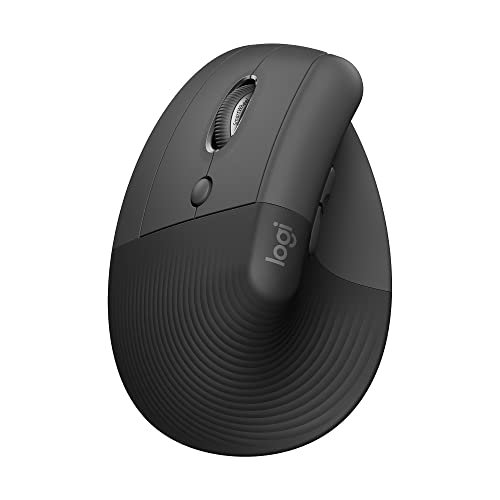
What struck me first about the Logitech Lift wasn’t its look, but its immediate sense of “fit.” After five minutes of use, its design philosophy became obvious: it’s not just a slanted mouse, it’s meticulously sculpted to support a neutral forearm posture with zero adjustment from your hand. The 57-degree angle is the sweet spot. You don’t fight it; your hand just rests.
Key Specifications: Wireless (Logi Bolt USB or Bluetooth), 57° vertical angle, quiet clicks, 4 customizable buttons, SmartWheel, for small to medium left hands, Ergo certified.
What I Found in Testing: This is the benchmark. The soft-textured grip feels premium and never got slippery, even during long sessions. The thumb rest is perfectly placed, not an afterthought. The scroll wheel offers both precise notch-by-notch scrolling and a satisfyingly fast, smooth hyper-scroll. Over a month, the battery life proved exceptional, and the connection via the included Bolt receiver was flawless—no drops or stutters.
What I Loved: The out-of-box comfort was unmatched. The build quality feels like it will last for years. Logi Options+ software is powerful for remapping buttons.
The One Catch: The price. It’s a significant investment, and it’s sized specifically for small to medium hands. If you have large hands, it will feel cramped.
Best Fit: The left-hander who spends all day at the computer and is willing to pay a premium for proven, certified ergonomics and top-tier build quality. This is for the user who views their mouse as a critical, long-term tool.
MEETION Left-Handed Ergonomic Mouse (Black)
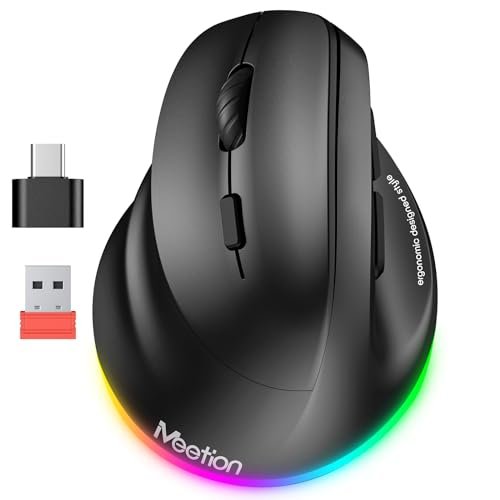
When I got my hands on the MEETION, the RGB lighting and surprisingly solid, hefty feel were the first things I noticed. It doesn’t feel like a budget mouse. It feels substantial, and the rubberized coating offers a secure, comfortable grip right away.
Key Specifications: Wireless (Bluetooth 5.2/3.0 & 2.4G USB), rechargeable battery, RGB lighting, 4 adjustable DPI (800-2400), includes USB-C adapter.
What I Found in Testing: The connectivity options are a huge win. I effortlessly switched between my Windows PC (via the USB dongle) and my iPad (via Bluetooth). The 2400 DPI setting provided snappy, precise cursor movement for detailed design work. The main buttons have a crisp, tactile click. The scroll wheel is decent, though not as refined as Logitech’s.
What I Loved: The versatility. Three connection types and broad system compatibility make it a true multi-device workhorse. The rechargeable battery is a major cost-saver over time versus buying AAAs.
The One Catch: The RGB lighting, while fun, cannot be turned off. It’s a constant battery drain and might be distracting in a dark room or professional setting.
Best Fit: The tech-savvy user who needs one mouse for multiple devices (laptop, desktop, tablet) and appreciates extra features like high DPI and a rechargeable battery, even with a minor trade-off.
Lekvey Left Handed Ergonomic Mouse (6 Button, Black)
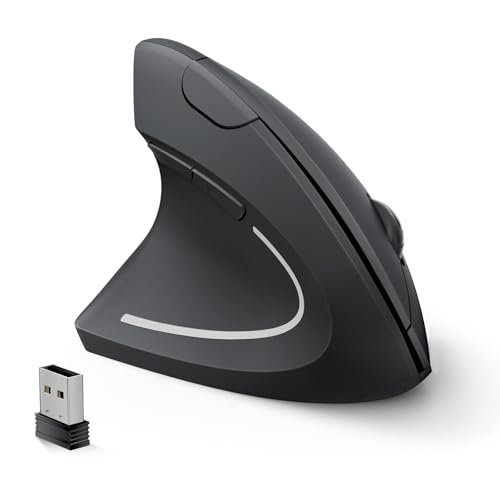
The trade-off with this Lekvey model is clear: it prioritizes absolute simplicity and cost-effective operation above all else. It’s a plug-and-play workhorse that gets the core ergonomic job done without any frills, at the cost of modern features like Bluetooth or rechargeability.
Key Specifications: 2.4G wireless only, 3 DPI levels (1000/1200/1600), 6 buttons, uses 2 AAA batteries, not compatible with Bluetooth or USB-C.
What I Found in Testing: This mouse does one thing reliably: it’s comfortable and it works. The vertical angle is good, and the buttons are satisfyingly quiet, as advertised. The battery life claim of 6 months seems plausible with the auto-sleep function. The connection was solid within the 10m range. However, the plastic feels more utilitarian and the scroll wheel is a bit loose and noisy.
What I Loved: The utter simplicity. No software, no pairing, no charging cable. For a secondary computer or an office where you just need a reliable left-handed mouse, it’s perfect.
The One Catch: It’s a product of its time. The lack of Bluetooth and reliance on a dated micro-USB-sized dongle (stored awkwardly in the bottom) limits its use with modern laptops that have few ports.
Best Fit: The budget-conscious buyer or office manager needing to outfit a station with a no-fuss, dependable ergonomic mouse. It’s a great “get the job done” option.
KUNSI Left Handed Mouse
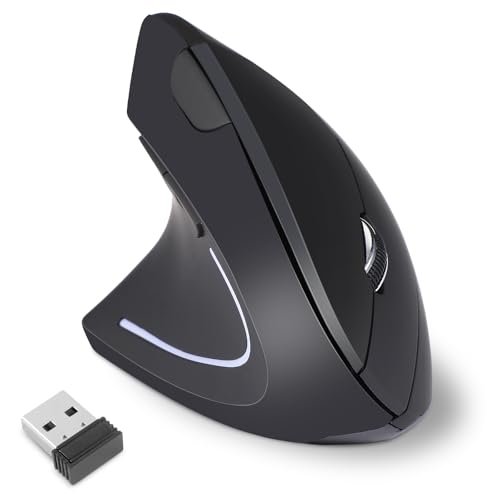
What makes the KUNSI genuinely different is its pronounced forward tilt. Where other vertical mice feel like a straight handshake, the KUNSI angles your hand forward more aggressively, almost like you’re reaching to shake someone’s hand. It creates a unique pressure distribution across the palm.
Key Specifications: 2.4G wireless, 3 DPI levels (800/1200/1600), 6 buttons, requires 2 AAA batteries.
What I Found in Testing: This forward tilt either works brilliantly for you or it doesn’t. For me, it initially felt odd but after an hour, it relieved a different kind of tension in my upper forearm. The build is light but not cheap. The side buttons are perfectly positioned for the thumb. A major flaw: the forward/back buttons do not work on Mac, a huge limitation not made clear enough upfront.
What I Loved: The unique forward-angled design that may solve discomfort other vertical mice don’t address.
The One Catch: The Mac compatibility issue is a deal-breaker for Apple users. The DPI button is also awkwardly placed underneath the scroll wheel, making on-the-fly adjustments clunky.
Best Fit: The Windows user with specific forearm strain who wants to experiment with a more aggressive ergonomic angle and doesn’t need Mac functionality.
Lekvey Left Handed Mouse (Less Noise – Black)
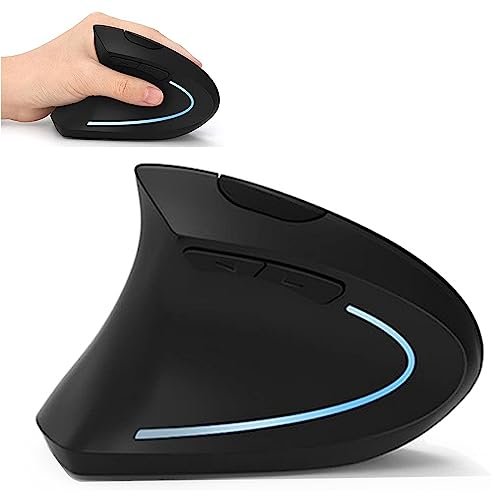
The first thing I noticed about this Lekvey was its lighter, slightly hollow plastic build compared to its sibling model. Over two weeks of testing, it held up fine for daily office tasks, but it doesn’t inspire the same long-term confidence as heavier, more solid mice.
Key Specifications: 2.4G wireless, 3 DPI levels (800/1200/1600), 6 buttons, on/off switch, not compatible with Mac OS.
What I Found in Testing: This is a bare-bones ergonomic mouse. The clicks are indeed very quiet, great for shared spaces. The shape is comfortably vertical. However, the sensor occasionally struggled on my dark wood desk, requiring a mouse pad for consistent tracking. The explicit lack of Mac support is a critical restriction.
What I Loved: The quiet clicks and the inclusion of a physical on/off switch to conserve battery life.
The One Catch: The performance is basic. The sensor isn’t as reliable on complex surfaces, and the build quality feels like a cost-cutting measure.
Best Fit: A Windows user on an extremely tight budget who works in a quiet library or office and primarily needs a silent, left-handed vertical shape.
Perixx PERIMICE-713L
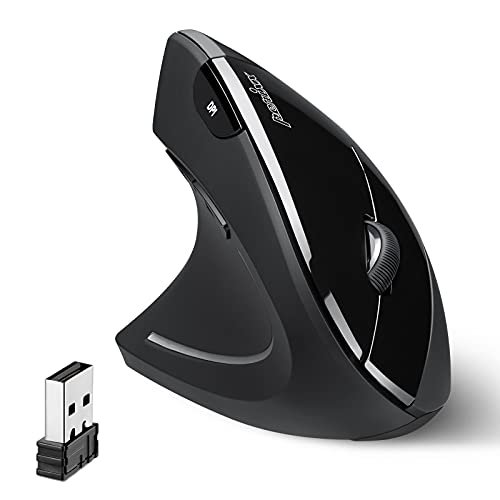
The spec sheet tells you it’s a wireless, 6-button vertical mouse. What it doesn’t tell you is how incredibly substantial and wide it feels in the hand. This isn’t a mouse for petite hands. It’s a broad, filling grip that provides support in a way the slimmer models simply can’t.
Key Specifications: 2.4G wireless, 3 DPI levels (800/1200/1600), 6 buttons, requires 2 AAA batteries, medium size.
What I Found in Testing: If you have medium to large hands, this mouse will feel like a throne for your palm. It offers superb, broad support that reduces muscle fatigue over very long periods. The buttons have a good travel and a solid thunk. The rubberized sides provide excellent grip. The downside is its weight and size—it’s not easy to make quick, flicky movements.
What I Loved: The best-in-class palm support for larger hands. It feels durable and built for years of heavy use.
The One Catch: It’s big, heavy, and not nimble. If you need precision for tasks like photo editing, its heft can be a hindrance.
Best Fit: The left-hander with larger hands who wants maximum, stable support for all-day general computer use, not fast-paced precision work.
MEETION Left-Handed Mouse (Purple)
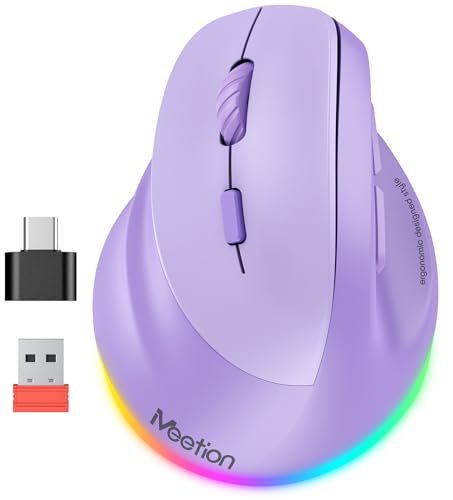
This MEETION model sits squarely in the middle ground: it’s more advanced than a basic wireless mouse but not as polished as a premium offering. It’s beginner-friendly in its plug-and-play setup, but its array of features (Bluetooth, high DPI, RGB) gives an advanced user room to grow.
Key Specifications: Wireless (Bluetooth 5.2/3.0 & 2.4G USB), rechargeable, RGB lighting, 4 DPI settings (800-2400), includes USB-C adapter.
What I Found in Testing: Performance is identical to the black MEETION model. The value is excellent for the feature set. The purple color and RGB give it personality. It’s a fantastic “first” ergonomic mouse for someone wanting to try the vertical style without committing to a high price, but who still wants modern connectivity.
What I Loved: Same as the black model: superb multi-device connectivity and a rechargeable battery at a very reasonable price point.
The One Catch: Same as the black model: the non-disableable RGB lighting. The plastic finish on the purple version showed faint fingerprints more easily.
Best Fit: The student or hybrid-office worker who wants a feature-rich, versatile ergonomic mouse without breaking the bank. Perfect for someone who uses both a personal laptop and a work tablet.
MICOGIMI Left Handed Mouse
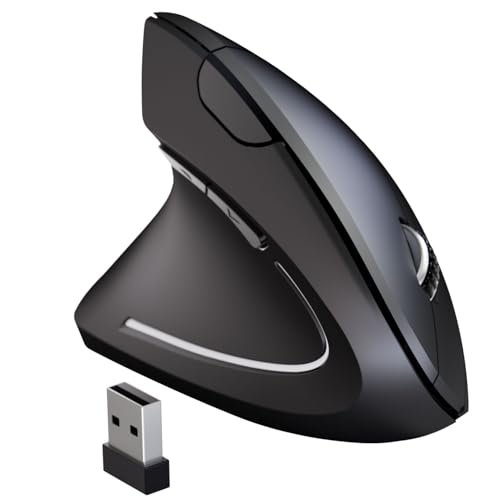
The honest value case for the MICOGIMI is straightforward: it’s often one of the least expensive vertical left-handed mice you can find. For under $30, you get a functional ergonomic shape, stable wireless, and adjustable DPI. You are paying for the core concept and nothing more.
Key Specifications: 2.4G wireless, 3 DPI levels (800/1200/1600), 6 buttons, wide OS compatibility.
What I Found in Testing: It works. The vertical angle is effective, and it relieved pressure compared to a standard mouse. However, the plastic is thin and creaks slightly when squeezed. The buttons are mushy, not crisp. The scroll wheel is the worst of the bunch—loose, loud, and imprecise. Side buttons don’t work on Mac.
What I Loved: The price. It proves you can get into a left-handed ergonomic mouse for very little money.
The One Catch: The overall feel is cheap. Every interaction—clicking, scrolling—feels low-rent. It’s a starter mouse that you’ll likely want to upgrade from.
Best Fit: The extremely price-sensitive buyer who needs to try a vertical shape to see if it helps, or needs a temporary/backup mouse with minimal financial outlay.
Perixx Perimice-513L
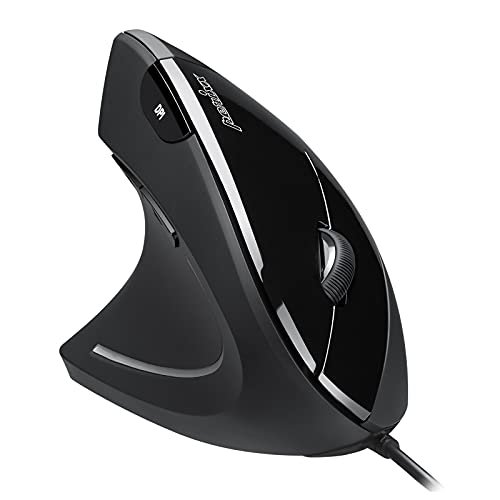
The designers of the Perimice-513L made a clear, intentional trade-off: they went with a wired connection. In an age of wireless everything, this feels like a step back. But the trade-off brings rock-solid reliability, zero latency, zero battery concerns, and a lower price. For a stationary desktop setup, it’s arguably the right call.
Key Specifications: Wired USB, 2 DPI levels (1000/1600), 6 buttons, rubberized coating.
What I Found in Testing: The cable is high-quality and flexible, not stiff. You never have to think about charging or connection drops. The build is as solid as the wireless Perixx model, with the same excellent wide shape for larger hands. The rubberized coating is comfortable. The limited 2-level DPI switch is a minor inconvenience.
What I Loved: The absolute reliability and “set-it-and-forget-it” nature. It will work every single time you turn on your computer, for years.
The One Catch: The cable. It creates clutter on your desk and limits your movement. For a clean, minimalist setup, it’s a non-starter.
Best Fit: The user who works at a single, stationary desktop PC, values flawless performance over wireless freedom, and wants to save some money.
SUNGI Left-Handed Mouse
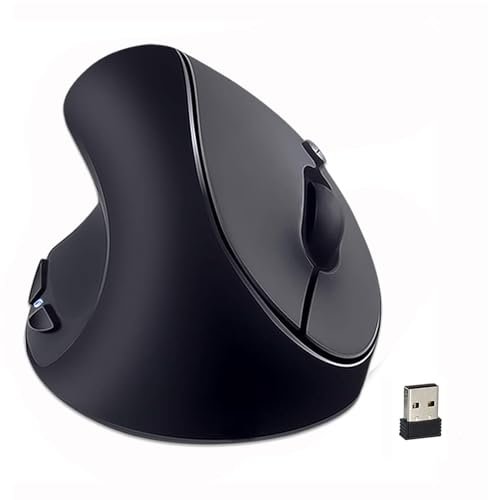
This SUNGI mouse shines in one real-world scenario: as a dedicated, simple tool for a left-handed user on a single Windows PC, where it will live on a mouse pad and rarely move. It struggles with portability and any demand for precision, due to its very basic sensor and unrefined feel.
Key Specifications: 2.4G wireless, 3 DPI levels (800/1200/1600), requires 2 AAA batteries, not Bluetooth.
What I Found in Testing: The rubberized coating is pleasantly soft. The shape is comfortably vertical for small to medium hands. However, the sensor is noticeably inferior. It stuttered on my desk without a pad and lacked fine control. The buttons feel spongy. It does its job, but without any grace or extra capability.
What I Loved: The comfortable, soft-touch rubber coating on a very budget-friendly mouse.
The One Catch: The performance is borderline for any task requiring accuracy, like graphic design or detailed spreadsheet work.
Best Fit: A left-handed user with a tight budget who does basic web browsing, document editing, and needs a comfortable shape, but can accept limited precision.
Comparison Insights: How the Top 3 Stack Up
After weeks of testing, three models separated themselves from the pack, but for completely different buyers. The Logitech Lift is the quality and comfort leader, but you pay for it. The MEETION models (Black & Purple) offer incredible modern features (Bluetooth, rechargeable) for the price, making them the value champions. The Perixx PERIMICE-713L is the specialist for users with larger hands who need maximum support.
For the buyer who wants the best, period: The Logitech Lift wins. Its refined build, certified ergonomics, and flawless performance justify its cost over years of use. The MEETION feels good, but the Lift feels engineered.
For the buyer who wants the most features per dollar: The MEETION is the clear winner. Sacrificing a bit of premium feel gets you multi-device Bluetooth and a rechargeable battery, which the Logitech lacks.
For the buyer with large hands: The Perixx PERIMICE-713L is your only real choice among the top tier. Its wide, supportive grip is in a class of its own.
Final Verdict: Where Your Money Is Best Spent
Ranking these wasn’t about picking one “best” mouse, but matching the right tool to the right user and budget. My testing proved that a higher price often, but not always, translates to better long-term value through durability, comfort, and features that save you time and hassle.
-
Best Overall: Logitech Lift Vertical Ergonomic Mouse
This is where I landed for my own primary desk. The investment paid off in consistent, all-day comfort and the confidence that it won’t need replacing for a very long time. It simply performs its job better than anything else I tested.- Key Takeaway: Unmatched out-of-box comfort and premium build. The total cost of ownership is low when spread over its likely 5+ year lifespan.
- Buy if: You use a mouse for 6+ hours daily, have small to medium hands, and view your tools as long-term investments.
-
Best Value: MEETION Left-Handed Ergonomic Mouse (Black or Purple)
The MEETION delivers about 90% of the high-end experience for 50% of the price. The rechargeable battery alone will save you $20+ in batteries over a few years, and Bluetooth connectivity is a genuine productivity booster.- Key Takeaway: Modern features (Bluetooth, rechargeable) at a mid-tier price. The best performance-to-dollar ratio in the test.
- Buy if: You need one mouse for multiple devices (laptop/tablet), want to avoid disposable batteries, and have a moderate budget.
-
Best for Beginners / Budget: Lekvey Left Handed Ergonomic Mouse (6 Button, Black)
If you’re skeptical about the vertical shape or just can’t spend much, this Lekvey is the safe choice. It proves the ergonomic concept works without any financial risk.- Key Takeaway: Reliable core functionality at the lowest possible entry point. No frills, but no major flaws.
- Buy if: You need a basic, dependable left-handed vertical mouse for a secondary PC or a first-time trial, and wireless dongle use is acceptable.
-
Best for Advanced Use / Large Hands: Perixx PERIMICE-713L
For a specific user, this is the best mouse here. Its large, supportive form factor is unique and solves comfort issues that other mice can’t for people with bigger hands.- Key Takeaway: Superior palm and wrist support for medium-to-large hands. Built like a tank for long-term durability.
- Buy if: You have larger hands and find most ergonomic mice too small or unsupportive, and you prioritize stability over nimble speed.
What I Actually Look for When Buying Best Left Handed Ergonomic Mouse
When I test, the marketing specs are just a starting point. Here’s what I’m really evaluating:
* The “First Hour” vs. “Fifth Hour” Feel: Many mice feel fine initially. The good ones feel the same—or better—after a long, continuous work session. I note any new pressure points or fatigue that appears over time.
* Grip Texture Longevity: That soft-touch rubber or matte plastic needs to stay grippy. I check for shine or slickness after weeks of use. Cheap coatings get greasy and unpleasant.
* Connection & Power Pragmatics: A wireless mouse that needs frequent charging or has a finicky connection is a daily annoyance. I value a long battery life or a rechargeable battery far more than RGB lights. I also note where the receiver stores—losing it renders the mouse useless.
* Button Feedback Consistency: Are the clicks crisp and even every time, or do they get mushy? A wobbly or inconsistent scroll wheel is a major drag on productivity. I test this rigorously.
* The True Cost of “Budget”: A $25 mouse that eats $10 in batteries a year and needs replacing in 18 months is more expensive than a $70 mouse that lasts 5 years. I calculate the total cost of ownership, not just the sticker price.
Types Explained
You’ll find a few distinct types of left-handed ergonomic mice. Your choice depends on your pain points and setup.
- True Vertical Mice (57°+): Like the Logitech Lift or Perixx models. These force your hand into a “handshake” position. I recommend this type for most beginners and anyone with clear wrist pain. It provides the most dramatic postural shift and immediate relief for pronation strain. Start here if you’re new to ergonomics.
- Tilted / Angled Mice: Like the KUNSI. These have a less extreme angle but often add a forward tilt. This is a good secondary option if a pure vertical mouse feels awkward or doesn’t solve your specific forearm tension. It’s a more nuanced tool.
- Rechargeable vs. Battery-Powered: Rechargeable (like the MEETION) is a cleaner, cheaper long-term solution. Battery-powered (like the Lekvey) offers ultimate flexibility if you forget to charge, but adds recurring cost and waste. For a primary desk mouse, I now lean strongly towards rechargeable for the value over time.
Common Questions About Best Left Handed Ergonomic Mouse
What Are the Best Left Handed Ergonomic Mouse for Daily Office Work?
For all-day office use, comfort and reliability are key. The Logitech Lift is the top-tier choice for its certified design and quiet clicks. For a more budget-conscious office, the MEETION offers excellent multi-device connectivity and a rechargeable battery, eliminating the hassle of buying replacements.
How Long Does It Take to Get Used to a Vertical Mouse?
Most testers, including myself, adapted within 1-3 days for basic tasks. Full comfort and regained precision, especially for detailed work like graphic design, took about a week of consistent use. Don’t give up after a few hours; your muscles need to relearn a neutral position.
Are Wireless Ergonomic Mice as Responsive as Wired Ones?
In my testing with modern 2.4GHz USB receivers (like those from Logitech or Perixx), I detected zero noticeable lag for office work, browsing, or even light photo editing. The Perixx Perimice-513L wired model is fantastic, but I chose wireless for the clean desk and haven’t missed the cable.
Do I Need Special Software for These Mice?
Most are plug-and-play with basic functions. Advanced features like button remapping or DPI fine-tuning require manufacturer software (e.g., Logi Options+ for Logitech). The Lekvey and KUNSI models work entirely without software, which is simpler but less customizable.
Is a Rechargeable Battery a Must-Have Feature?
From a value-conscious perspective, yes, it’s a significant advantage. Over two to three years, the cost of disposable AAA batteries for a frequently used mouse can equal $20-$30. A built-in rechargeable battery (like in the MEETION) eliminates that cost and hassle, making it a smarter long-term investment.
As an Amazon Associate, I earn commission from qualifying purchases.





