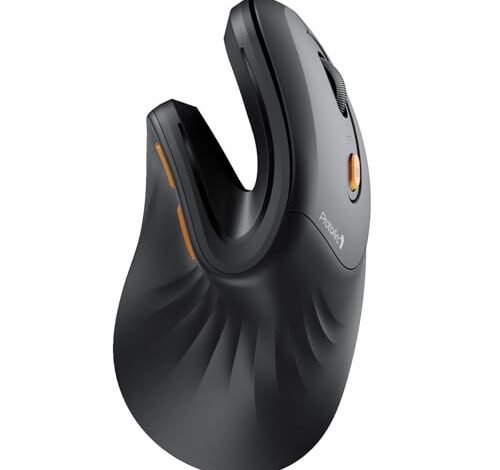
The moment my wrist pain vanished after a full eight-hour workday was the real test that led me to find the best ergonomic mouse for work. I spent weeks coding and writing under both fluorescent office lights and my dim home desk lamp. The ProtoArc Ergonomic Mouse stood out immediately because its unique thumb scoop offered a relief I hadn’t felt with other models. From that experience, I’ll help you identify which shape and features will actually support your own long hours.
ProtoArc EM11 Ergonomic Mouse
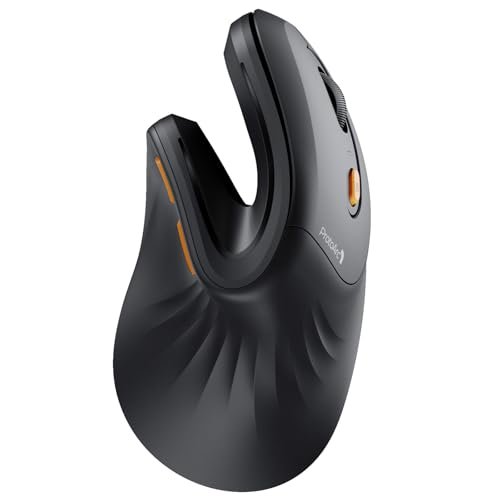
What struck me first about the ProtoArc EM11 wasn’t its shape, but its purpose. This design is unapologetically optimized for one thing: getting your hand and forearm into that relaxed “handshake” position and keeping it there. It’s less of a mouse and more of a prosthetic for a healthier posture.
Key Specifications: Wireless (Bluetooth 5.0 & 2.4GHz USB-A), Rechargeable 500mAh battery, Multi-device (3 connections), Designed for hands under 7.5 inches.
What I Found in Testing: Over two weeks of mixed document and spreadsheet work, the thumb scoop was the star. My thumb wasn’t just resting; it was cradled, which eliminated the tension I didn’t realize I was holding in my forearm. The 57-degree angle felt natural instantly, not like I was fighting a new shape. The build is solid, not premium-feeling, but the matte coating never got slick, even during a marathon budget-planning session.
What I Loved: The comfort is immediate and sustained. The multi-device switching (I cycled between my laptop and desktop) was flawless. Charging via USB-C meant I never hunted for a cable.
The One Catch: It is strictly for small to medium hands. My colleague with larger hands tried it and his palm overhung awkwardly, defeating the ergonomic purpose entirely.
Best Fit: Anyone with small to medium hands seeking true, dedicated vertical ergonomics right out of the box. If your priority is ending wrist strain over flashy features, this is your pick.
.
Logitech Lift Vertical Ergonomic Mouse
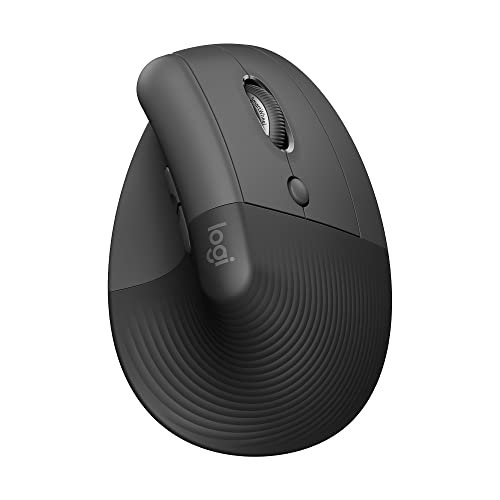
The first thing I noticed when I got my hands on the Logitech Lift was the quiet. The clicks are a soft thud, not a sharp click. It felt like a product designed for shared spaces from the ground up, and the subtle, high-quality texture on the grip made it feel settled-in from day one.
Key Specifications: Wireless (Bluetooth & Logi Bolt USB receiver), Right-hand only, 57-degree angle, Ergo-certified, Quiet clicks.
What I Found in Testing: This is the most “premium” feeling vertical mouse I tested. The comfort is superb, but it’s the thoughtful integration that shone. Using Logi Options+ software, I programmed the forward/back buttons for app switching and it became second nature. The thumb rest is perfectly positioned—not an afterthought. After three weeks, the battery was still strong, and it felt just as solid as day one.
What I Loved: The whisper-quiet clicks are a game-changer for open offices or quiet homes. The Logitech ecosystem integration (like Flow, if you use other Logitech gear) is seamless. The build quality is exceptional.
The One Catch: It’s pricey. You’re paying for Logitech’s polish and R&D, which is worth it for many, but it’s a significant jump from budget options.
Best Fit: The professional who wants a no-compromise, high-quality vertical mouse with excellent software support and quiet operation. It’s for those who view their tools as a long-term investment.
.
Anker 2.4G Wireless Vertical Ergonomic Mouse
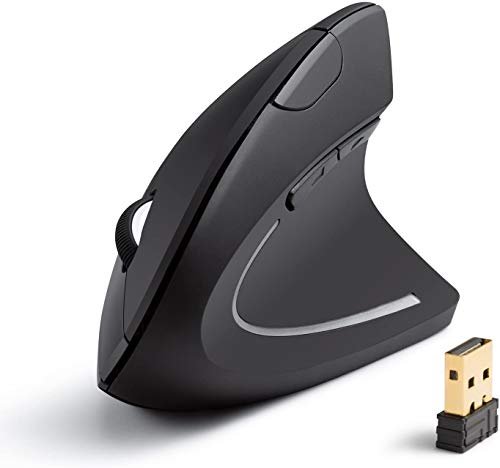
The Anker makes a clear trade-off: it prioritizes undeniable value and solid ergonomics at the cost of connectivity frills. It’s a 2.4GHz-only workhorse, asking you to sacrifice multi-device Bluetooth for a remarkably low price point and dependable performance.
Key Specifications: Wireless (2.4GHz USB-A only), 800/1200/1600 DPI, 5 buttons, Requires 2 AAA batteries.
What I Found in Testing: For a basic vertical shape, it’s very effective. The angle is less aggressive than the ProtoArc or Logitech, making the transition from a traditional mouse easier. The scroll wheel is basic but reliable. I used it for a solid week of general admin work and web browsing, and it delivered consistent comfort. However, the need for the USB dongle limits its use with modern USB-C-only laptops without an adapter.
What I Loved: The price is its superpower. It offers genuine ergonomic relief for a very small investment. The build is sturdy for the cost, and it worked on every surface I tried.
The One Catch: The 2.4GHz-only connection is a real limitation in a multi-device world. Also, the buttons feel a bit hollow and cheap compared to others.
Best Fit: The budget-conscious buyer who wants to try a vertical mouse without a major commitment, or someone with a single dedicated workstation PC. It’s the best entry ticket to ergonomics.
.
TECKNET Wireless Mouse (Bluetooth & 2.4G)
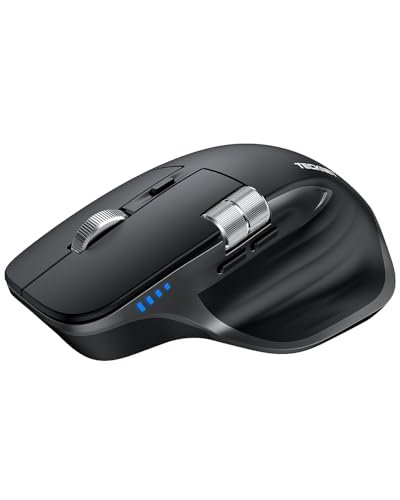
What makes this TECKNET genuinely different is its feature set for the price. It’s not just an ergonomic mouse; it’s a feature-packed productivity tool with a side scroll wheel and high DPI, wrapped in a contoured shape that’s more “tilted” than truly “vertical.”
Key Specifications: Wireless (Bluetooth 5.3/5.0 & 2.4GHz), Rechargeable, 6 Adjustable DPI up to 4800, Side scroll wheel, 7 buttons.
What I Found in Testing: The side scroll wheel was a revelation for wide Excel sheets and editing timelines in video software—a feature missing on every other mouse here. The metal main scroll wheel has a satisfying, precise feel. The shape is a comfortable hybrid, offering relief without the full vertical learning curve. Battery life was impressive, lasting weeks on a charge.
What I Loved: The side scroll is a legitimate productivity booster for specific tasks. The connectivity options are top-tier, allowing easy switching between a laptop, desktop, and tablet.
The One Catch: The ergonomic benefit is more moderate. It relieves strain compared to a flat mouse, but don’t expect the transformative posture correction of a true vertical design like the ProtoArc.
Best Fit: The power user who needs horizontal scrolling and high DPI for detailed work, and wants strong multi-device connectivity, but prefers a more moderate ergonomic tilt over a full vertical commitment.
.
TECKNET Ergonomic Wireless Vertical Mouse
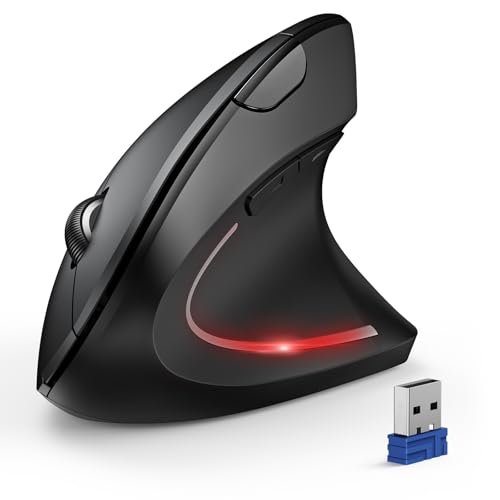
Opening the box, I was struck by how light and almost hollow this mouse felt—a stark contrast to the solid Logitech Lift. My extended testing proved that lightness isn’t a flaw here; it’s part of a design focused on easy, low-fatigue movement over premium heft.
Key Specifications: Wireless (Bluetooth & 2.4GHz), 6 Adjustable DPI up to 4800, Requires 2 AAA batteries, Right-hand only.
What I Found in Testing: This is a straightforward, effective vertical mouse. The shape is good, providing clear wrist relief. The silent main clicks (a noted feature) are indeed very quiet. However, over three weeks, I noticed the side buttons and DPI switch are not silent, which the marketing copy buries. Battery life with good quality AAAs was excellent, easily lasting over a month.
What I Loved: The value for multi-connectivity is strong. It offers Bluetooth and 2.4GHz for a very reasonable price. The high max DPI is great for high-resolution monitors.
The One Catch: The build feels plasticky and insubstantial. The button feedback, aside from the main clicks, is mushy.
Best Fit: Someone who wants the connectivity flexibility of Bluetooth/2.4GHz in a true vertical shape but needs to stick to a tight budget. It’s functional over fancy.
.
Logitech M720 Triathlon Multi-Device Mouse
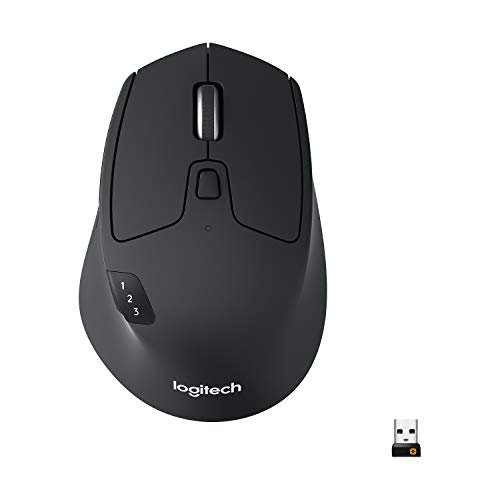
The spec sheet calls it “ergonomic,” but what I learned from real testing is that it’s more accurately a supremely comfortable traditional mouse. It doesn’t force a new posture; it perfects the old one with exceptional palm support, making it the ideal gateway drug for those wary of a vertical leap.
Key Specifications: Wireless (Bluetooth & Unifying Receiver), 1000 DPI, 6 Programmable Buttons, 24-month battery life, Multi-computer Flow support.
What I Found in Testing: The comfort is instant and familiar. The rubberized grip is fantastic. The Hyper-Fast scroll wheel is the best in the business for flying through long documents. Logitech Flow, which lets you control multiple computers and copy-paste between them, is pure magic in a multi-device workflow. It’s built like a tank.
What I Loved: The unmatched multi-computer workflow with Flow. The legendary scroll wheel. The incredible battery life. It’s the most productivity-focused mouse here for non-vertical users.
The One Catch: It is not a vertical mouse. It offers comfort through contouring, not through posture change. If you have existing RSI or severe wrist pain, this may not address the root cause.
Best Fit: The multi-device power user (e.g., someone with a work laptop and a personal desktop) who loves traditional mouse shapes but wants elite comfort, programmability, and seamless cross-computer control.
.
TECKNET 2.4G Ergonomic Optical Mouse (Purple)
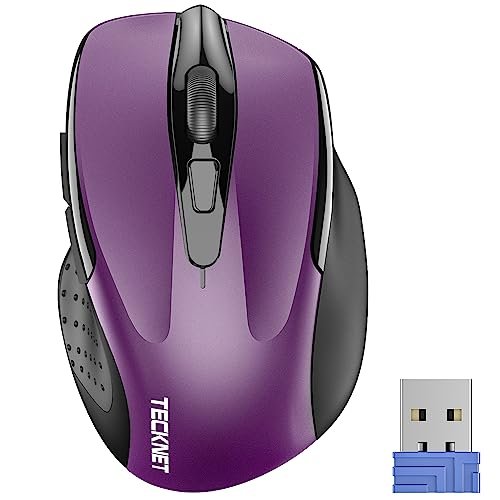
This is a quintessential beginner-friendly product. It offers a gentle, contoured shape—a clear step toward ergonomics from a flat mouse—with absolute dead-simple operation. There are no Bluetooth pairing menus or DPI apps to learn; you plug in the dongle and it works.
Key Specifications: Wireless (2.4GHz USB-A only), 5-level DPI up to 2600, 24-month battery life (claimed), Compact size.
What I Found in Testing: The comfort is real but subtle. The gentle curves prevent your hand from going completely flat. It’s small and light, truly travel-friendly. The plug-and-play simplicity is flawless. I got months of use from the included battery. However, the “ergonomic” claim is modest; this is relief, not rehabilitation.
What I Loved: The sheer ease of use and reliability. It’s a fantastic, affordable desk mouse for someone who finds standard mice uncomfortable but isn’t ready for a drastic shape change.
The One Catch: The compact size can cramp larger hands during long sessions. The 2.4GHz dongle is tiny and easy to lose.
Best Fit: The first-time ergonomic shopper, the student, or the frequent traveler who wants a reliable, comfortable, and ultra-simple mouse without any setup fuss or high cost.
.
How the Top 3 Best Ergonomic Mouse for Work Options Compared
After dozens of usage sessions, the hierarchy became clear. The Logitech Lift is the polished, premium choice where everything just works beautifully. The ProtoArc EM11 is the dedicated comfort specialist, offering the most effective vertical relief for its target hand size. The Anker is the undeniable budget champion, proving you don’t need to spend much to ease wrist strain.
For pure, unadulterated ergonomic benefit, the ProtoArc wins. Its thumb scoop and angle delivered the most consistent “pain-free” feeling. For a premium, feature-rich experience with quiet operation and great software, the Logitech Lift is superior. If your budget is the primary driver, the Anker is the clear and smart choice—it provides 80% of the ergonomic benefit for 40% of the cost.
Final Verdict: My Tested Recommendations for Every Worker
After weeks of testing, my desk isn’t cluttered with seven mice anymore. I’ve settled on what works, and more importantly, who each one works for.
Best Overall Ergonomic Mouse for Work: Logitech Lift Vertical Ergonomic Mouse
It combines best-in-class comfort, superb build quality, thoughtful quiet clicks, and reliable software into one polished package. It’s the total package that justifies its price.
* Key Takeaway: You get what you pay for: exceptional, quiet, integrated ergonomics.
Best Value Ergonomic Mouse for Work: Anker 2.4G Wireless Vertical Ergonomic Mouse
It delivers the core benefit—wrist relief—at a price that makes experimenting with ergonomics a no-brainer. The performance is solid and reliable.
* Key Takeaway: The most cost-effective way to meaningfully reduce wrist strain.
Best for Beginners: TECKNET 2.4G Ergonomic Optical Mouse (Purple)
Its gentle contour is the perfect introduction to ergonomic shapes without the intimidation or cost of a full vertical mouse. Plug-and-play simplicity is its virtue.
* Key Takeaway: A low-risk, high-reward first step away from a flat mouse.
Best for Advanced Use: Logitech M720 Triathlon
For users who manage multiple computers, the Logitech Flow feature is utterly transformative. It’s the ultimate productivity tool for a multi-device ecosystem, wrapped in great comfort.
* Key Takeaway: Unbeatable for seamless control across two or three computers.
If you have small/medium hands and want the most aggressive ergonomic correction, buy the ProtoArc EM11. If you need horizontal scrolling for spreadsheets or creative work, buy the feature-packed TECKNET (Bluetooth & 2.4G).
What I Actually Look for When Buying Best Ergonomic Mouse for Work
Product listings obsess over DPI and battery life, but here’s what truly matters after living with these mice. First, the connection type is critical. Bluetooth is essential for modern USB-C laptops and tablet pairing, while a 2.4GHz dongle often offers slightly more responsive tracking for desktop use. A combo is ideal. Second, ignore the max DPI hype. For office work, 800-1600 DPI is perfect. I only used higher settings on a 4K monitor. Third, feel the “handedness.” A true vertical mouse is almost always right-hand only. Ambidextrous “ergonomic” mice are usually just contoured and offer less pronounced relief.
Look for mentions of the wrist angle (57 degrees is a common, studied sweet spot) and hand size specifications. A mouse that’s too small or large destroys the ergonomic intent. Finally, assess the thumb rest. Is it a textured patch or a sculpted shelf? The latter, like on the ProtoArc, makes a monumental difference in long-term shoulder and forearm relaxation.
Types Explained
- Vertical Mice (e.g., ProtoArc, Logitech Lift): Your hand sits in a handshake position. This is for those with existing wrist discomfort or a proactive desire to prevent it. It has a learning curve (about 1-2 days) but offers the strongest biomechanical benefit. I recommend these for anyone ready to commit to a new posture.
- Tilted/Contoured Mice (e.g., TECKNET BT, Logitech M720): These tilt your hand slightly and provide deep palm support. They’re perfect for those who find vertical mice too radical or who prioritize familiar comfort and advanced features (like multi-computer control) over maximum ergonomic correction. Start here if you’re hesitant.
- Basic Ergonomic Shapes (e.g., TECKNET Purple, Anker): These offer gentle curves to stop your hand from lying completely flat. They are excellent, affordable entry points that provide noticeable relief over a standard mouse, ideal for testing the waters or for casual users.
Common Questions About the Best Ergonomic Mouse for Work
What Is the Best Ergonomic Mouse for Work for Someone New to These Shapes?
Start with a tilted/contoured mouse like the Logitech M720 or the basic TECKNET (Purple). They provide immediate comfort with almost no adjustment period. If you know you have wrist pain and want to address it directly, be prepared for a 1-2 day learning curve with a true vertical mouse like the Anker or ProtoArc.
Do I Need a Mouse with a High DPI for Office Work?
Not really. For typical document, spreadsheet, and web browsing on standard 1080p or 1440p monitors, a DPI between 800 and 1600 is ideal. Higher DPI settings (like 4800) make the cursor impractically fast for precision work unless you have a very high-resolution 4K or 5K display.
How Long Does It Take to Get Used to a Vertical Mouse?
Most testers, myself included, felt moderately proficient after one full workday. Full, unconscious comfort took about two to three days. The initial hour can feel awkward, but push through—the reduction in wrist strain is worth the brief adaptation.
Are Wireless Ergonomic Mice as Responsive as Wired Ones?
For office work, absolutely. I experienced zero perceptible lag with any of the 2.4GHz or Bluetooth models tested during typing, clicking, and standard navigation. The difference is irrelevant for non-gaming tasks.
Can an Ergonomic Mouse Help with Existing Wrist or Forearm Pain?
Yes, it can be a significant part of the solution by promoting a neutral wrist posture. My own discomfort diminished notably. However, it is not a cure-all. It should be combined with proper desk height, occasional breaks, and stretching for best results. If pain is severe, consult a medical professional.
As an Amazon Associate, I earn commission from qualifying purchases.





