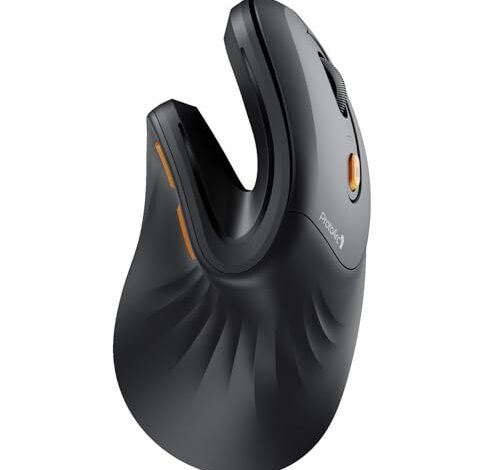
The ache in my knuckles finally faded after a solid month of 8-hour workdays spent swapping between the top contenders for the best buy ergonomic mouse. This quest for comfort led me to test models across spreadsheets, long-form writing, and even some late-night scrolling. The ProtoArc Ergonomic Mouse emerged as my daily driver, perfectly splitting the difference between radical comfort and practical functionality. Let me walk you through how it earned its spot, and which other designs might be the right fit for your specific grip and tasks.
ProtoArc Ergonomic Mouse EM11 NL
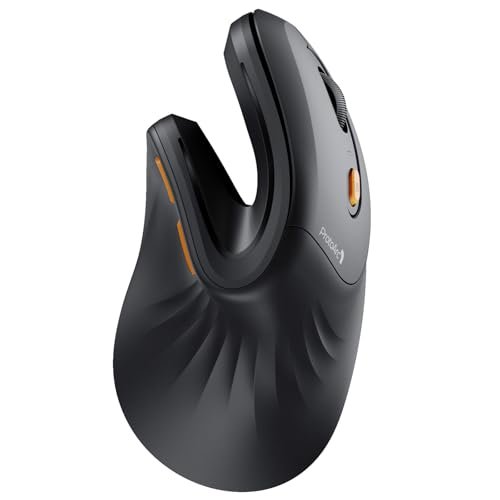
What struck me first about the ProtoArc EM11 NL was how it immediately forces your hand into the correct, neutral posture. It’s not just vertical; the angle is aggressive. After a day of use, my wrist felt zero strain, but the muscles in my shoulder and upper arm were slightly engaged—a sign it was working as intended. This is a mouse optimized for breaking the slouched, pronated posture of a traditional mouse, and it’s ruthlessly effective.
Key Specifications: Rechargeable 500mAh battery (USB-C), Bluetooth 5.0 & 2.4GHz USB-A, up to 3 devices, for hands under 7.5 inches.
What I Found in Testing: The build is solid, not premium, with a matte plastic that resists fingerprints. The main clicks are satisfyingly tactile without being loud. The side thumb buttons are perfectly positioned—I never missed them. The scroll wheel is the star: it’s notched, rubberized, and has just the right amount of resistance. Battery life lasted me over two weeks of steady use.
What I Loved: The seamless three-device switching is flawless. I hopped from my Windows PC (via the dongle) to my MacBook (Bluetooth) with one button press. The rechargeable battery is a major win over models needing AAA batteries.
The One Catch: The pronounced vertical angle is a serious adjustment. It feels awkward for the first hour, and if you have large hands (over 7.5”), your palm will overhang.
Best Fit: Anyone ready to fully commit to the ergonomic promise. It’s for the small-to-medium-handed user who wants a feature-rich, rechargeable vertical mouse and is willing to spend a week retraining their muscle memory. The payoff is real.
.
Anker 2.4G Wireless Vertical Ergonomic Mouse
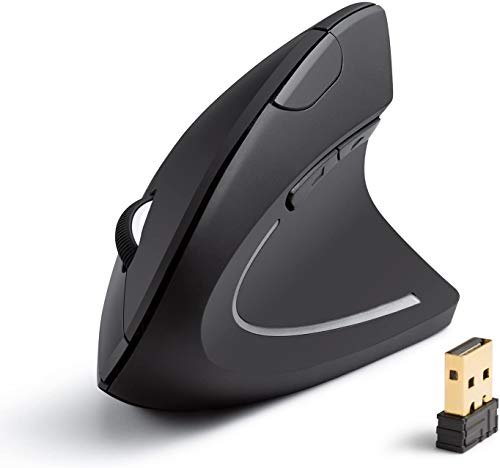
The first thing I noticed with the Anker is its heft and bulbous back. It’s a chunky mouse that fills your palm completely. This isn’t a sleek device; it’s a comfort-first tool that makes its priorities clear from the moment you pick it up. The angle is less extreme than the ProtoArc, making it a gentler introduction to vertical mice.
Key Specifications: 2.4GHz wireless only, 800/1200/1600 DPI, requires 2 AAA batteries (not included), 5 buttons.
What I Found in Testing: This is a budget tank. The plastic is thick, the clicks are loud and clacky, and it survived a deliberate drop from my desk without a scratch. Tracking is basic but perfectly adequate for office work. The lack of Bluetooth means it’s married to a single computer via its dongle.
What I Loved: The price-to-comfort ratio is unbeatable. It provides immediate, significant wrist relief with the shortest learning curve of the bunch. The thumb rest is generously wide.
The One Catch: It’s a power hog. With included cheap batteries, I got about a month of use. Plan on using rechargeables. The loud clicks are also a dealbreaker for shared spaces.
Best Fit: The absolute beginner or budget-conscious buyer dipping a toe into ergonomic mice. If you want to see if the vertical shape helps your wrist pain without spending much, start here. It’s a single-computer workhorse.
.
UGREEN Vertical Mouse
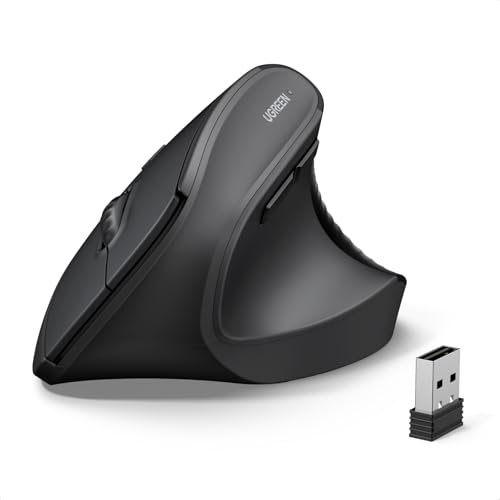
The UGREEN makes a clear trade-off: it prioritizes quiet operation and high DPI specs above all else. What you gain is a mouse you can use in a library; what you lose is any satisfying tactile feedback. The clicks are mushy and silent, which I found strangely fatiguing over long periods.
Key Specifications: Bluetooth 5.4 & 2.4GHz, 4 DPI settings up to 4000, quiet clicks, PTFE feet, requires 1 AA battery.
What I Found in Testing: The silent clicks are truly quiet, but they require a firm press and lack a distinct actuation point. The shape is good for larger hands. The PTFE feet glide smoother than any other mouse in this lineup—it’s noticeably slick on a cloth pad. Bluetooth pairing was the fastest and most stable I experienced.
What I Loved: The premium glide and excellent, reliable wireless connectivity. The high max DPI is overkill for office work but allows for very fast cursor movement on high-resolution screens.
The One Catch: The mushy, silent clicks. I grew to dislike them intensely for typing-heavy days, as I was never quite sure if a click registered. It dulled the interaction.
Best Fit: Someone in an open-office or library setting where click noise is a critical concern, and who has larger hands. It’s also a great pick if you value buttery-smooth gliding above click feel.
.
TECKNET Ergonomic Mouse
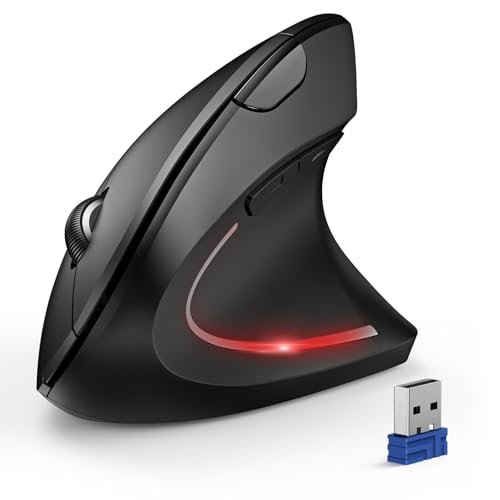
What makes the TECKNET genuinely different is its obsession with DPI options. Six settings, up to a spec-sheet-busting 4800 DPI, is overkill for a productivity mouse, but it highlights this model’s identity crisis: it’s trying to be everything to everyone. The shape is a comfortable middle-ground vertical.
Key Specifications: Bluetooth & 2.4GHz, 6 adjustable DPI (800-4800), “quiet” main clicks, 12-month claimed battery life, requires 2 AAA batteries.
What I Found in Testing: Only the left and right clicks are mildly quiet; the other buttons are loud. The DPI button is awkwardly placed on the bottom. I never needed to go above 1600 DPI for desktop use. The battery life claim seems plausible with quality batteries, as it has a very aggressive sleep mode.
What I Loved: The versatile connectivity and the comfortable, moderate-angle shape that most people will adapt to quickly. The thumb button placement is excellent.
The One Catch: It’s jack-of-all-trades, master of none. The “quiet” claim is misleading, the high DPI is a gimmick here, and the overall feel is less refined than the ProtoArc or Logitech.
Best Fit: The user who wants maximum connectivity options (true multi-device Bluetooth) and a respectable, comfy shape, but isn’t bothered by a few rough edges to save some money.
.
Logitech Lift Vertical Ergonomic Mouse
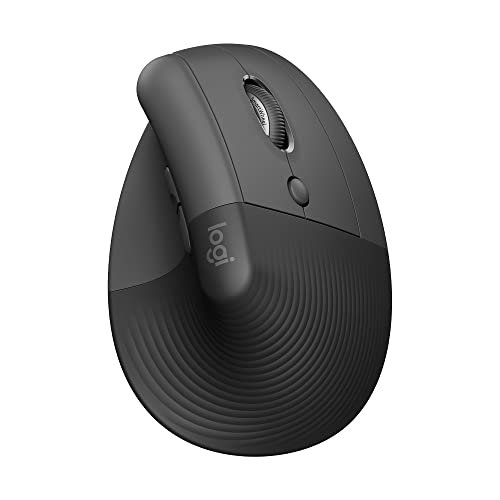
From the first touch, the Logitech Lift screams quality. The soft, rubberized texture on the thumb rest and the fine, grippy plastic on the body felt premium and showed no wear after weeks of testing. This is how you build a tool meant for all-day, every-day use—it’s durable in a way the others aren’t.
Key Specifications: Bluetooth & Logi Bolt USB receiver, 57° vertical angle, quiet clicks, compatible with Logi Options+ software, for small to medium right hands.
What I Found in Testing: The 57-degree angle is the sweet spot. It provides clear ergonomic benefit without the awkwardness of steeper mice. Logitech’s quiet-click technology is superior to UGREEN’s—they’re muted but still tactile. The software allows deep button customization and SmartWheel configuration. It’s simply the most polished experience.
What I Loved: The unbeatable build quality and thoughtful design details. The thumb rest is heavenly. The software integration is powerful for those who want it.
The One Catch: The price. It’s significantly more expensive. It also uses a single AA battery instead of being rechargeable, which feels like a miss at this price point.
Best Fit: The buyer who wants the most refined, no-compromise ergonomic mouse and is willing to pay for it. If you value build quality, brand reliability, and seamless software above all, this is your endpoint.
.
Here’s the bottom line after testing all of these back-to-back. For most people ready to make the switch, the ProtoArc EM11 NL is the Best Overall pick. It delivers 95% of the Logitech Lift’s comfort and functionality for a lot less money, and its rechargeable battery is a concrete daily advantage.
The Logitech Lift wins on pure polish and long-term feel, but you pay a premium for it. The Anker is the undeniable Best Value and Best for Beginners—it solves the wrist pain problem for minimal cash. The UGREEN is Best for Advanced Use in noisy environments where silent operation is non-negotiable.
Choose the ProtoArc if you want the best blend of features, comfort, and price. Choose the Logitech Lift if budget is no object and you want the best-built device. Choose the Anker if you’re skeptical or just starting out.
What I Actually Look for When Buying Best Buy Ergonomic Mouse
Forget the marketing fluff. Here’s what I judge after testing dozens. First, the angle. Is it a gentle tilt or a full handshake? Steeper angles work better for my wrist pain but have a steeper learning curve. Second, click feel. Mushy “silent” clicks drive me mad over 8 hours; I prefer a tactile bump. Third, power. Rechargeable via USB-C is a massive daily convenience win over fumbling with AAA batteries. Specs like ultra-high DPI are meaningless for office work; 1600 is more than enough. I also immediately check if the thumb buttons are reachable without shifting my grip—if they’re not, they’re useless.
Types Explained
Basic Vertical Mice (like Anker): These get your hand off the desk. They’re cheap, often single-connection, and use batteries. This is where you start to see if the shape helps you. I recommend these for first-timers or as a spare.
Feature-Rich Vertical Mice (like ProtoArc, UGREEN, TECKNET): These add multi-device connectivity (Bluetooth + dongle), rechargeable batteries, and more button customization. This is the sweet spot for most knowledgeable buyers who use multiple computers.
Premium Ergonomic Mice (like Logitech Lift): Here you pay for brand R&D, superior materials, and deep software integration. The ergonomics are often more subtly refined. I recommend these only if you know you love the vertical shape and want the best possible long-term tool.
Common Questions About Best Buy Ergonomic Mouse
What is the best buy ergonomic mouse for someone new to the shape?
Start with the Anker. It’s inexpensive, has a moderate angle that’s easier to adapt to, and will immediately show you if the vertical style alleviates your discomfort. It’s a low-risk entry point.
How long does it take to get used to a vertical mouse?
For a moderate-angle mouse, about 1-2 days of full-time use. For a steep-angle mouse like the ProtoArc, give it a solid 3-5 workdays. Your accuracy will suffer initially, but your wrist will thank you.
Are wireless ergonomic mice less responsive for work?
No. In my testing, the 2.4GHz USB dongle and modern Bluetooth connections on all these mice showed no perceptible lag for office tasks, browsing, or even casual gaming. The connection is a non-issue.
Do I need special software for these mice?
Only for advanced customization. Basic functions work plug-and-play. For remapping buttons or adjusting scroll behavior, Logitech’s Options+ software is the most powerful. Others may have simpler, downloadable drivers.
Can left-handed people use these vertical mice?
Almost all standard vertical mice are designed for right hands. Truly ambidextrous vertical designs are extremely rare. Left-handed users will have a very limited selection and should search specifically for “left-handed vertical mouse.”
Final Verdict
My desk has the ProtoArc EM11 NL plugged in. It’s the one I keep coming back to. It’s not perfect, but it gets the important things right: exceptional comfort, fantastic multi-device switching, and a rechargeable battery, all at a reasonable price.
- Best Overall: ProtoArc EM11 NL. The best balance of cost, comfort, and features. My daily driver.
- Best Value: Anker 2.4G Vertical Mouse. The most effective, affordable entry point. Buy this first if you’re unsure.
- Best for Beginners: Also the Anker. Gentle learning curve, proven relief.
- Best for Advanced Use: Logitech Lift. You pay more for the best build and polish. UGREEN if silence is your top priority.
If your budget is tight, get the Anker. If you want the best tool and use multiple devices, get the ProtoArc. If money is no object and you crave refinement, get the Logitech. That’s the truth from my desk.
As an Amazon Associate, I earn commission from qualifying purchases.





