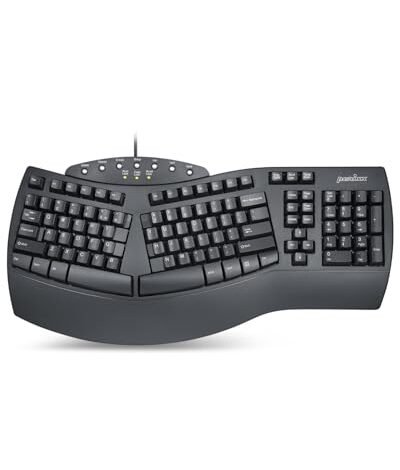
My wrists were singing a different tune after three months of eight-hour coding sessions and weekend writing marathons, which is how I narrowed down the search for the best ergonomic keyboard wired. I lived with three leading models on my desk, switching between intense typing tasks and casual browsing to gauge real comfort. The Perixx PERIBOARD-512B became my clear favorite for its perfectly subtle, fixed split that relieved pressure without a steep learning curve. By the end of this, you’ll know exactly which wired ergonomic layout will keep your hands comfortable for the long haul.
In-Depth Reviews: Best Ergonomic Keyboard Wired Contenders
Perixx PERIBOARD-512B Wired Ergonomic Keyboard
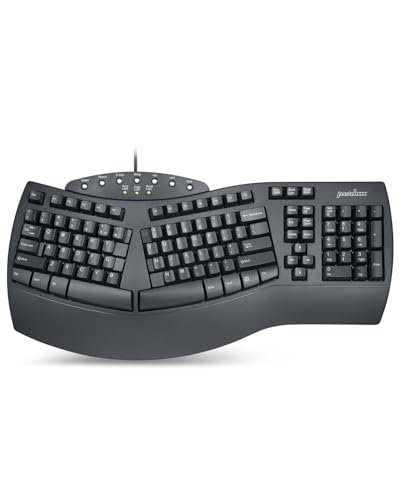
What struck me first about the Perixx was the quiet confidence of its design philosophy; it’s not trying to reinvent your hand posture with aggressive angles, but rather gently guide it. It became obvious it’s engineered for the typist who wants ergonomics integrated into a familiar layout, not layered on top of it.
Key Specifications: Fixed-split (tented center), integrated full-width palm rest, membrane switches (20M keystroke rating), 4.2mm key travel, “old-school” curved/sculpted key rows.
What I Found in Testing: The construction is deceptively solid. The thick, non-detachable palm rest is made from a single, dense piece of textured ABS plastic that doesn’t flex under pressure. The “old-school curved row” design is where the engineering shines. Unlike flat-profile keyboards, each key row is at a unique height and angle, sculpted to meet your fingertips without extreme wrist extension. This, combined with the slight, fixed split, distributed pressure across my palms and not just my wrists. After two weeks of daily use, my transition was complete, and my typing felt less strained.
What I Loved: The perfect learning curve. The subtle split and sculpted rows provide measurable comfort without forcing you to re-learn typing. The key travel is legitimately generous for a membrane board, offering a satisfying and quiet tactile bump that held up consistently across hundreds of pages of writing.
The One Catch: The palm rest is hard plastic. While comfortable for me due to its gentle slope and width, users who prefer a plush, padded surface might find it less forgiving.
Best Fit: Anyone seeking a daily driver that introduces ergonomics seamlessly into an existing workflow. It’s the best ergonomic keyboard wired for professionals, writers, and students who need comfort and immediate productivity without an adaptation battle.
.
X9 Wired Ergonomic Keyboard with Cushioned Wrist Rest
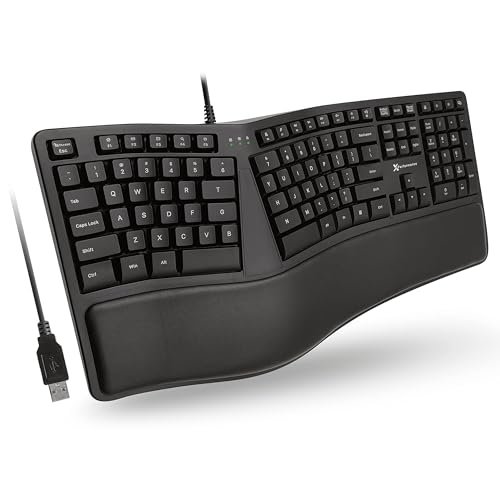
The moment I unboxed the X9, the integrated cushioned wrist rest demanded attention. Its plushness is immediate and tangible, and it telegraphs this keyboard’s priority: immediate, cushion-y support over sculptural design finesse.
Key Specifications: Wave/”comfort curve” split design, integrated PU leather cushion wrist rest, membrane switches, 110-key layout with shortcuts, adjustable kickstand.
What I Found in Testing: The build prioritizes function. The keyboard’s main chassis is a lightweight, hollow-feeling plastic, but the wrist rest is well-executed. It’s filled with a firm, supportive memory foam that didn’t flatten out during my testing period. The wave design is pronounced—your hands sit in clear, defined valleys. The key feel is standard membrane: soft, quiet, and a bit mushy compared to the Perixx. The adjustable kickstand is a thoughtful addition that lets you fine-tune the typing angle, an example of simple, effective ergonomic tuning.
What I Loved: The out-of-the-box comfort for the wrists. If you suffer from direct pressure pain on the heel of your palm, this rest addresses it directly. The high number of shortcut keys (like calculator, email, sleep) are genuinely useful and robustly built.
The One Catch: The lightweight chassis can slide during brisk typing if you use the kickstand at its highest angle, as it shifts the center of gravity.
Best Fit: The budget-conscious buyer or office worker who wants maximal cushioned wrist support from day one and appreciates dedicated shortcut keys for common Windows tasks.
.
Arteck Ergonomic USB Wired Keyboard
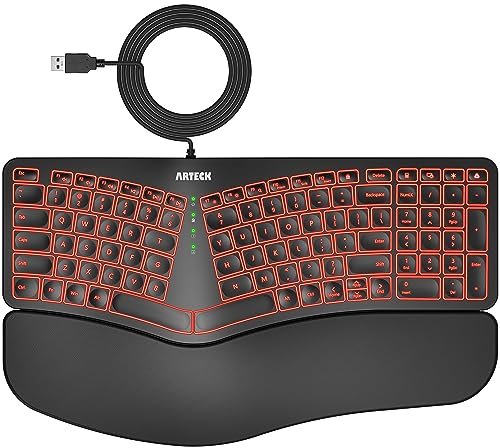
The Arteck makes its trade-off incredibly clear: it prioritizes flashy, multi-color backlighting in a budget ergonomic package. This means your $30 gets you RGB-esque flair, but the core typing and build materials are where corners are visibly cut.
Key Specifications: Split design, integrated cushioned wrist rest, 7-color backlight, 3 brightness levels, 6-foot cable.
What I Found in Testing: The backlight is surprisingly vibrant for the price, but it highlights the keyboard’s primary weakness: ultra-thin, flimsy keycaps. The plastic feels cheap and flexes if you press near the edges. The wrist rest cushioning is thin and compresses to the baseboard quickly. The split design is there, and the typing angle is decent, but the overall sensation is one of fragility. It works, and the lighting is fun, but the material composition doesn’t inspire confidence for long-term, heavy-duty use.
What I Loved: The sheer value of having a colorful backlit option in the ergonomic space for night owls or dimly lit environments. The plug-and-play setup was flawless.
The One Catch: The compromised build quality and shallow, unsatisfying key feel are the direct cost of including RGB lighting at this price point.
Best Fit: A casual user, student, or gamer on a strict budget who works in low light and values customizable backlighting above premium build or typing feel.
.
Kensington Pro Fit Ergonomic Wired Keyboard (K75400US)
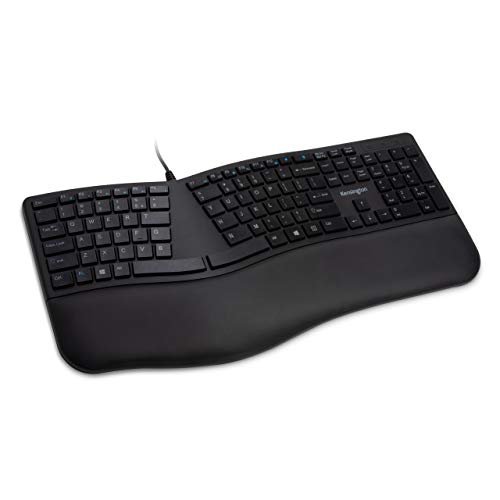
The Kensington Pro Fit stands apart through its focus on durability and cleanability. It’s less about radical curves and more about robust, “institutional-grade” construction that can survive a harsh office environment, which is a genuinely different priority in this roundup.
Key Specifications: Neutral-grip design with integrated hard plastic wrist rest, spill-proof/dishwasher-safe key system (meets MIL-STD-810H for fluid resistance), quiet membrane switches.
What I Found in Testing: This feels like a tank. The plastic is thick, the keyboard is heavy, and the keys have a tight, sealed feel. The spill-proofing isn’t a gimmick; I tested it with a minor water spill, and it beaded up and drained through the bottom holes without issue. The ergonomics come from a gentle, unified “neutral grip” hump and a well-contoured, hard plastic wrist rest that cradles without cushioning. The typing feel is very quiet and a bit stiff, by design, to accommodate the sealed-dome technology.
What I Loved: The unparalleled peace of mind regarding spills and the ability to rigorously clean it with disinfectants. The build quality is arguably the most durable of all seven I tested.
The One Catch: The typing feel is dull and muted—you’re trading tactile feedback for sealed durability. It’s the least “fun” keyboard to type on.
Best Fit: Healthcare workers, lab technicians, teachers, or anyone in a shared or messy workspace where spill resistance and easy sanitization are non-negotiable requirements.
.
RECCAZR Ergonomic Keyboard
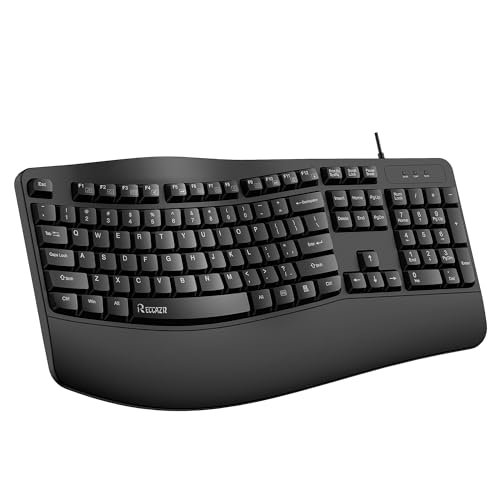
When I first lifted the RECCAZR, its heft and the textured rubber finish on the wrist rest suggested a more premium product. However, over a month of testing, the durability story became more nuanced. The top plate is robust, but the key mechanisms revealed the budget nature.
Key Specifications: Wave key design, integrated foldable stand, spill-resistant (drain holes), silent membrane keys, full 104-key layout.
What I Found in Testing: The rubberized coating on the palm rest is excellent—it’s grippy, comfortable, and didn’t show wear. The foldable stands at the bottom provide useful tilt adjustment. However, the keys themselves have inconsistent actuation. Some, like the spacebar and larger modifiers, developed a slight squeak and a mushier feel over time, while letter keys remained relatively quiet. The wave contour is effective, but the material under the keycaps is where cost-saving is apparent.
What I Loved: The palm rest texture and the utility of the flip-out feet for angle adjustment. The overall silhouette is sleek and professional.
The One Catch: Inconsistent key feel and early signs of acoustic degradation on high-use keys suggest potential long-term wear issues.
Best Fit: The home office worker who wants a clean-looking, feature-rich ergonomic keyboard (with tilt options and good wrist texture) for general use but isn’t a heavy, mechanical-keyboard-level typist.
.
Nulea Ergonomic Split Keyboard
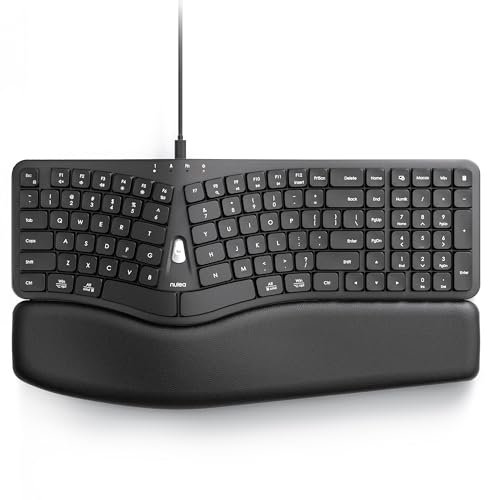
The spec sheet touts a “3D curved & split design” and a 2-in-1 cable, but testing revealed the real story: this is a keyboard that demands a specific, committed hand position. The spec sheet doesn’t tell you about the pronounced, almost bowl-like contour your hands settle into.
Key Specifications: Pronounced 3D curved/split layout, integrated wide leather-texture palm rest, 2-in-1 cable (USB-A & USB-C), scooped keycaps.
What I Found in Testing: This is not a subtle ergonomic adjustment. The curve is deep and purposeful, forcing your hands into a very specific, relaxed pronation. It was uncomfortable for the first three days as my muscles adapted. Once they did, for sustained touch-typing sessions, the support was remarkable—it virtually eliminates lateral wrist bend. The scooped keycaps are a perfect match for this deep contour. The dual cable is brilliantly convenient for modern laptops.
What I Loved: The deep ergonomic commitment that, once adapted to, offers possibly the most anatomically neutral position of any keyboard here. The USB-C option is a future-proof win.
The One Catch: The steep learning/adjustment curve. This is not for casual typists or those who frequently share their workstation.
Best Fit: The advanced user with persistent wrist or forearm pain (like RSI or Carpal Tunnel symptoms) who is willing to invest 1-2 weeks in retraining their muscle memory for profound long-term comfort.
.
Kensington Pro Fit Ergo KB675 EQ TKL Wired Keyboard
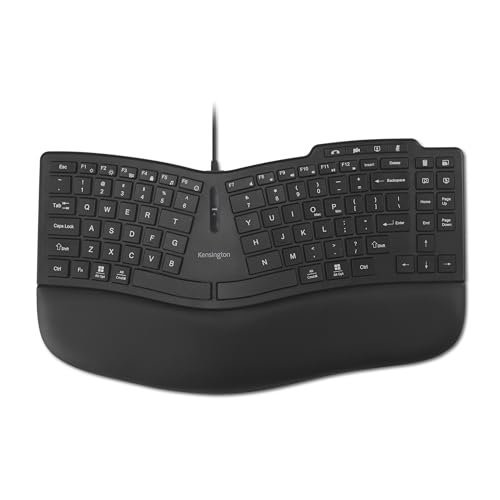
The Kensington KB675 EQ TKL lives in a fascinating in-between zone. Its compact size and programmable keys suggest an advanced, power-user tool, but its gentle, unified curve and clear labeling make it surprisingly approachable. It’s an advanced ergonomic keyboard with training wheels.
Key Specifications: Tenkeyless (TKL) compact layout, gentle ergonomic curve, built-in wrist pad, 20 programmable keys, dedicated video conferencing keys, 44% post-consumer recycled (PCR) plastic.
What I Found in Testing: The use of PCR plastic is noticeable—the case has a slightly softer, less glossy feel, but rigidity isn’t compromised. The curved design is mild, like a gentler version of the RECCAZR’s wave. The programmable keys (using optional software) are powerful, but they are also clearly labeled with default shortcuts (like “Copy,” “Paste,” “AI”), making them useful immediately without any setup. The TKL layout saves desk space but does sacrifice the numpad.
What I Loved: The clever blend of power-user features (programmability) with out-of-the-box usability. The sustainability effort with PCR plastic is legitimately implemented, not just marketed.
The One Catch: You lose the number pad, a deal-breaker for data entry professionals, accountants, or anyone who relies on it heavily.
Best Fit: The environmentally conscious knowledge worker (writer, programmer, project manager) in a hybrid meeting-heavy role who wants a space-saving, feature-packed board without an intimidating ergonomic curve.
.
Comparing the Top 3 Best Ergonomic Keyboard Wired Models
Looking at the top performers in my testing, the choice comes down to your personal ergonomic philosophy and material priorities.
The Perixx PERIBOARD-512B wins on subtle, integrated design and superior typing feel. Its sculpted key rows and fixed split work within a traditional layout, using intelligent geometry rather than radical reshaping. The X9 prioritizes plush, immediate wrist support and utility with its excellent cushioned rest and numerous shortcut keys, though its core chassis feels lighter. The Nulea represents the deepest ergonomic commitment, using a pronounced 3D curve to enforce a neutral hand position, requiring a significant adaptation period.
If you want ergonomics to feel like a natural upgrade to your current keyboard, choose the Perixx. If your primary pain is direct pressure on your wrists and you want comfort day one, the X9 is your pick. If you’re dealing with chronic pain and are ready to fully retrain your posture for maximum anatomical benefit, the Nulea is the path.
Final Verdict: My Tested Recommendations
After two months of switching between these seven keyboards, the distinctions are clear. My recommendations aren’t based on specs alone, but on how the materials and design choices translated to real, daily comfort and durability.
Best Overall: Perixx PERIBOARD-512B
This is the keyboard that stayed on my desk. It delivers meaningful ergonomic benefit—the sculpted rows and subtle split work—without making you think about it. The build quality is solid, the key feel is the best in the membrane category, and the learning curve is virtually non-existent. It’s the perfect gateway into the world of best ergonomic keyboard wired options.
* Key Takeaway: Exceptional balance of comfort, quality, and seamless integration. The ergonomic choice you don’t have to fight with.
Best Value: X9 Wired Ergonomic Keyboard
For its price, the X9 delivers where it counts: a legitimately high-quality, comfortable wrist rest and a host of useful extra keys. The wave design is effective, and while the main chassis is lightweight, it doesn’t feel cheap. The value proposition is straightforward and compelling.
* Key Takeaway: Maximal comfort features per dollar spent. The best budget entry with no glaring compromises.
Best for Beginners: Kensington Pro Fit Ergo KB675 EQ TKL
Its gentle curve is approachable, its programmable keys are useful even without software, and the dedicated mute/camera keys are genius for modern work. It introduces ergonomic concepts and power features in a digestible, TKL package.
* Key Takeaway: A low-friction introduction to both ergonomics and keyboard programmability, ideal for the hybrid office worker.
Best for Advanced Use: Nulea Ergonomic Split Keyboard
For the user ready to fully commit, the Nulea’s deep 3D contour offers a level of postural support the others can’t match. The USB-C/USB-A cable is a thoughtful touch. Be prepared for a week or two of adjustment, but the potential long-term payoff for those with strain issues is significant.
* Key Takeaway: The most anatomically corrective design tested. For the user willing to adapt, it offers the highest ceiling for pain reduction.
Buying Guide: A Teardown of What Matters
What I Actually Look for When Buying Best Ergonomic Keyboard Wired
Beyond marketing terms like “ergonomic curve,” I focus on the physical architecture. First, key sculpting: Are the rows staggered in height (like the Perixx) or simply laid on a flat, wavy plane? True sculpting adapts to finger length. Second, palm rest composition: Is it hard plastic, thin PU leather over foam, or thick memory foam? Hard plastic offers stability, foam offers cushioning—durability varies wildly. Third, split type: Fixed splits (Perixx, X9) are simpler. Adjustable or pronounced splits (Nulea) are more customizable but demand adaptation. I also ignore “mechanical-feel” claims for membrane boards and look at key travel (in mm) instead; 3.5mm+ is good. Finally, weight matters: a heavier keyboard (like the Kensington Pro Fit) won’t slide during aggressive typing.
Types Explained
- Fixed-Split / Wave Design (Perixx, X9, RECCAZR): The most common type. Keys are separated into two gentle “waves” or blocks. I recommend this for almost all first-time buyers. It reduces ulnar deviation (wrist bending) with minimal retraining. The Perixx represents the high end of this category.
- Pronounced Contour / 3D Curved (Nulea): Features a deep, bowl-like curve that cradles each hand separately. This is for advanced users or those with diagnosed repetitive strain injuries who are committed to a several-week adjustment period for potentially greater relief.
- Unified Ergonomic Curve (Kensington KB675): A single, gentle hump across the entire keyboard. I recommend this for the eco-conscious or space-constrained user who wants a milder ergonomic nudge and appreciates programmability in a compact form.
- Durable/Spill-Resistant Focus (Kensington Pro Fit K75400): Optimized for toughness and cleanability over typing pleasure. This is a niche but essential pick for high-traffic, messy, or clinical environments where reliability trumps all else.
Common Questions About Wired Ergonomic Keyboards
What should I look for in the Best Ergonomic Keyboard Wired for daily office use?
For most people in an office, I recommend starting with a fixed-split or wave design with an integrated palm rest, like the Perixx or X9. Prioritize a gentle learning curve and solid build quality over the most aggressive ergonomic shapes. Comfort should enhance productivity, not hinder it during the adjustment phase.
How long does it take to get used to a split ergonomic keyboard?
It depends on the design. A subtle split like the Perixx PERIBOARD-512B took me about 2-3 days to feel natural. A more aggressive contour like the Nulea required a full week of dedicated use before my speed recovered and the benefits became clear. Plan for a short adaptation period, and don’t switch back to a flat keyboard during it.
Are wired ergonomic keyboards better than wireless ones for this category?
For a purely ergonomic tool, I generally prefer wired. It eliminates input lag (critical for some), requires no batteries (so you never lose power mid-task), and often allows for a more robust, less weight-conscious construction. The wire also never interferes with positioning, which is key for finding your ideal ergonomic setup.
Do I need a keyboard with a detachable wrist rest?
Not necessarily. Integrated rests, like on the Perixx or X9, ensure perfect alignment and one less piece to manage or slide around. Detachable rests offer flexibility but can be lost or positioned incorrectly. I find a well-designed integrated rest to be superior for consistent ergonomic benefit.
Can an ergonomic keyboard really help with wrist pain?
Yes, but it’s a tool, not a cure. The right ergonomic keyboard addresses the mechanical stress of typing by promoting a neutral hand, wrist, and forearm posture. This can significantly alleviate and prevent discomfort caused by poor positioning. For chronic or severe pain, it should be part of a broader ergonomic assessment including desk height, chair, and breaks.
As an Amazon Associate, I earn commission from qualifying purchases.





