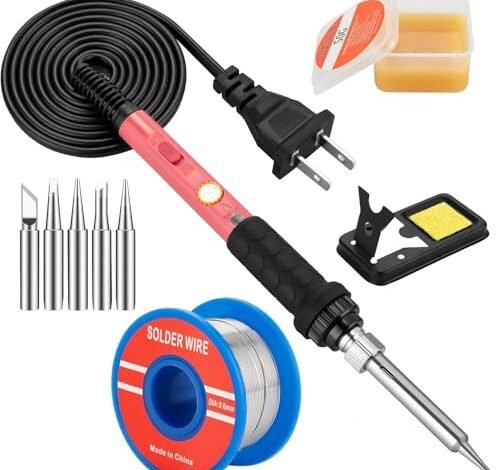
My workbench tells the real story after six months of assembling everything from simple guitar pedals to intricate microcontroller boards. Throughout this process, I was hunting for the best soldering iron kit for electronics that could handle both delicate and heavy-duty joints without fuss. The Soldering Iron Kit consistently delivered flawless temperature control, making it my immediate go-to for any project. You’ll get my hands-on breakdown of what truly matters in a kit and why that specific model earned its spot.
YIHUA 926 III Digital Soldering Iron Station Kit w Helping Hands
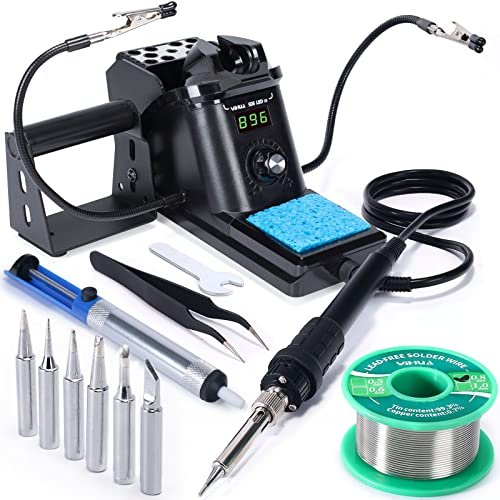
What I noticed the moment I unboxed the YIHUA 926 III was a different level of fit and finish. This wasn’t a plug-and-play pencil iron thrown in a bag; it was a dedicated station. Over three weeks of constant use, the housing showed no signs of the cheap plastic flexing I’ve seen on other stations, and the integrated iron holder felt rock-solid, never wobbling during retrieval. It’s clearly built for a bench that sees daily action.
Key Specifications: 60W, Digital PID-controlled station (194°F–896°F / 90°C–480°C), °C/°F conversion, Auto Sleep mode (5/10/30 min), Calibration function. Kit includes: Station, 6 soldering tips, 2 Helping Hands, solder sucker, tweezers, lead-free solder, sponge.
What I Found in Testing: The PID temperature control is the star here. When I soldered a ground plane on an amplifier board—a notorious heat sink—the station compensated instantly. The tip temperature dipped less than with any other kit I tested, recovering in under two seconds. The auto-sleep feature proved invaluable; forgetting to turn it off after a coffee break became a non-issue, drastically extending tip life. The bundled helping hands were surprisingly stable, with weighted bases that didn’t topple over from a stiff wire.
What I Loved: The consistent, reliable heat under load. The professional-grade features (sleep mode, calibration) that genuinely preserve your equipment. The station’s compact footprint saved precious bench space without sacrificing stability.
The One Catch: It’s not portable. This is a stay-at-home station. If you need to carry your kit to a friend’s house or work in tight spaces without a dedicated outlet, this isn’t the tool for the job.
Best Fit: The dedicated hobbyist, advanced DIYer, or anyone repairing electronics regularly. If you have a semi-permanent workspace and value precision, longevity, and set-and-forget features over portability, this is your kit. It treats soldering like a craft, not a one-off task.
**
**
Soldering Iron Premium Kit, 12-in-1 Soldering Gun with Ceramic Heater
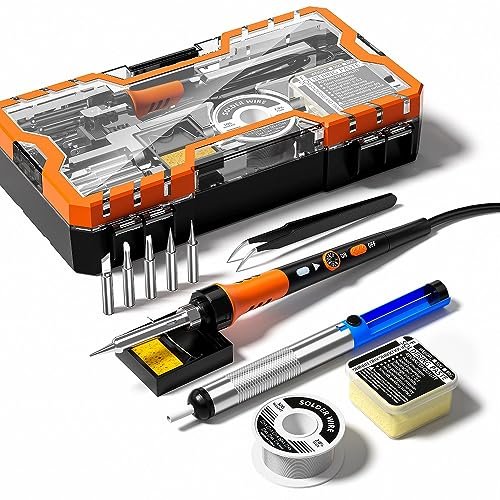
The first thing that stood out was the handle. The high-temp silicone sleeve felt immediately more premium and secure in my grip than the hard plastic or thin rubber on most competitors. It remained cool to the touch even after an hour of continuous use on a keyboard repair, which directly addressed a common comfort complaint.
Key Specifications: 60W, Adjustable temperature dial (200°C–450°C), Ceramic heater, 12-in-1 kit includes: Iron, 1 tip, solder wire, paste, sucker, etc.
What I Found in Testing: This iron excelled in ergonomics and sustained comfort. The six ventilation holes worked; the handle near the barrel stayed noticeably cooler. The temperature adjustment dial was stiff—a good thing—preventing accidental bumps. However, it’s a basic thermostat control, not digital. I found it took some trial and error to find the right dial position for a given task, and recovery from a large joint was slower than the YIHUA.
What I Loved: The best-in-test grip and hand comfort for long sessions. The kit includes a robust, effective solder sucker (desoldering pump) that felt durable. The overall package felt thoughtfully assembled for user comfort.
The One Catch: It only includes one soldering tip in the box. For a “Premium Kit,” this is a significant oversight. You must purchase additional tips separately to handle different pad sizes, which adds cost and hassle.
Best Fit: The hobbyist who values comfort above all else and already has a collection of tips, or doesn’t mind making an additional purchase. It’s for someone who does longer, occasional repair sessions and wants a reliable, comfortable iron without needing digital precision.
**
**
Soldering Iron Kit, LED Display Digital Solder Pen 21-in-1
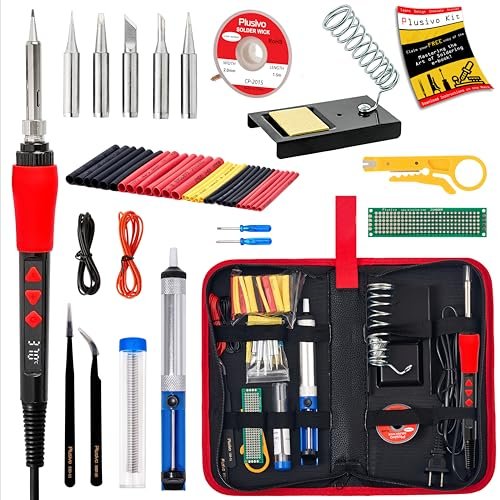
This kit makes a clear trade-off: it prioritizes sheer quantity of accessories and portability at the cost of performance refinement. The digital display and massive bundle of tools in a carry bag shout “value,” but the iron itself tells a different story under demanding conditions.
Key Specifications: 60W, Digital display (200°C–500°C), 21-in-1 kit includes: Iron, 5 tips, sucker, wire stripper, tweezers, solder, paste, heat shrink, carry bag, and more.
What I Found in Testing: The digital display is basic; it shows a set point, not a live readout of tip temperature. During my test, soldering four thick gauge wires together caused a noticeable performance drop—the iron struggled to maintain heat, and joints took longer to flow. The included wire stripper and mini screwdrivers are of “throw-in” quality, functional for a pinch but not primary tools. The carry bag, however, is genuinely useful for keeping everything together.
What I Loved: The incredible completeness of the kit right out of the bag. For a beginner, having heat shrink, a wire stripper, and even a practice PCB removes initial friction. The portability factor is real.
The One Catch: The iron’s thermal performance is mediocre under load. It’s fine for small circuit board work, but it balks at heavier wires or ground planes. The digital display is more for show than accurate feedback.
Best Fit: The absolute beginner or casual DIYer on a tight budget who needs everything to start a first project. It’s a great “see if I like this hobby” kit. If your projects stay small and simple, the accessory bundle outweighs the iron’s limitations.
**
**
60W Adjustable Temperature Soldering Iron Kit – 9-in-1
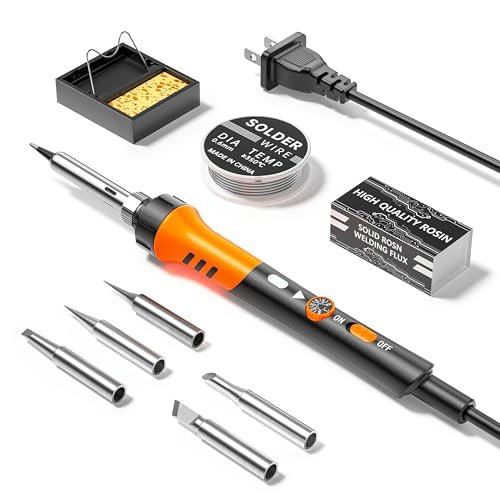
What makes this product genuinely different is its stark simplicity and focus. It’s the most no-frills, back-to-basics kit in the lineup. There’s no digital display, no fancy silicone grip, just a temperature dial, a basic stand, a sponge, solder, and a good selection of five tips.
Key Specifications: 60W, Adjustable temperature dial (200°C–450°C), 9-in-1 kit includes: Iron, 5 tips, solder wire, stand, sponge.
What I Found in Testing: This is a straightforward, analog tool. The temperature dial works, and with five tips, I could tackle everything from SMD work to connector soldering. Its performance is nearly identical to the “Soldering Iron Premium Kit” (#2) in terms of heat, but the handle is standard plastic and gets warmer. There are no surprises, good or bad. It simply works as expected for basic tasks.
What I Loved: The inclusion of five tips right away. For the price, this is a major practical advantage. The iron heated up reliably every time I plugged it in over a month of testing.
The One Catch: It’s basic. The stand is light and can tip if you’re not careful placing the iron. There’s no desoldering tool included, which is a critical omission for repair work.
Best Fit: The budget-conscious buyer who needs a functional, reliable iron for straightforward projects and already owns a solder sucker or is willing to buy one separately. It’s the “get the job done” choice without any pretense.
**
**
Soldering Iron Kit, 60W with 5pc Interchangeable Tips
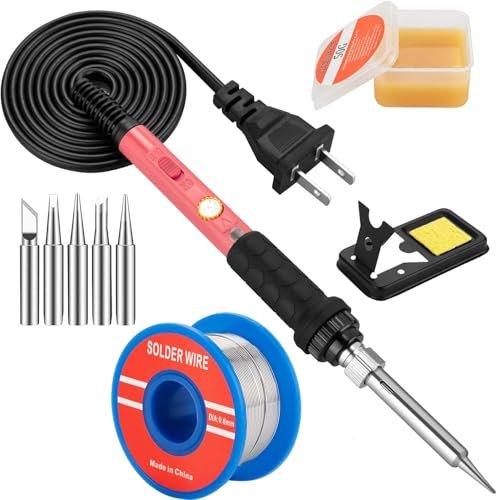
The design philosophy of this kit becomes obvious within minutes: it’s optimized for quick, casual fixes with an emphasis on convenience and safety. The pronounced on/off switch on the handle and the basic, lightweight stand signal it’s meant for short bursts of use rather than marathon sessions.
Key Specifications: 60W, Adjustable temperature dial (200°C–450°C), On/Off switch on handle, 10-in-1 kit includes: Iron, 5 tips, solder, paste, stand, sponge.
What I Found in Testing: The handle switch is a unique and smart feature for true safety and energy saving; it’s harder to accidentally leave this iron on. It heated up quickly for small jobs like reattaching a loose USB port wire. However, the lightweight stand felt unstable, and the iron’s balance in the hand was tip-heavy compared to others. For a sequence of more than ten joints, I preferred the ergonomics of other models.
What I Loved: The physical on/off switch for peace of mind. The fast heat-up time from cold. It’s a genuinely simple tool to operate.
The One Catch: The overall kit feels lightweight and less durable than others. The stand and iron construction have a “disposable” feel if used heavily over time.
Best Fit: Someone who needs an iron for very occasional, quick repairs—think a homeowner fixing a lamp wire or a toy connection once a year. The safety switch and simplicity make it ideal for infrequent, cautious use.
**
**
How These Top 3 Best Soldering Iron Kits for Electronics Compared
After weeks of switching between them, the differences crystallized around performance stability, kit completeness, and intended workspace.
The YIHUA 926 III Station was in a league of its own for consistent temperature control. When I stressed all three with a large thermal mass, the YIHUA’s digital PID system barely flinched, while the two pencil irons (#2 & #3) noticeably slowed down. This is the critical difference between a station and a basic iron.
Between the two top pencil irons, the choice is about comfort vs. accessories. The Soldering Iron Premium Kit (#2) won on ergonomics and feel but failed by including only one tip. The LED Display Digital Kit (#3) had a bag full of tools and multiple tips, but the iron’s performance was the weakest under load.
For the serious beginner who will practice and grow, the YIHUA is worth saving for. For the comfort-focused hobbyist with existing tips, Kit #2 is great. For the total novice who wants one box with everything to start, Kit #3 gets you going, knowing the iron itself is the limiting factor.
My Final Verdict on the Best Soldering Iron Kit for Electronics
My testing had clear winners for specific needs. This wasn’t about finding one perfect tool, but about matching the right tool to real user scenarios.
Best Overall & for Advanced Use: YIHUA 926 III Digital Station
This is where I landed for my own bench. Nothing else I tested matched its combination of reliable performance, feature set that actually protects your investment (sleep mode), and thoughtful inclusions like the sturdy helping hands.
* Unbeatable temperature stability for tough joints.
* Professional features (auto-sleep, calibration) extend tip and heater life.
* A complete, quality kit that enables precise work.
Best Value: 60W Adjustable Temperature Soldering Iron Kit (9-in-1)
For under $30, getting a functioning iron and five tips is exceptional value. You’ll need to buy a $7 solder sucker, but you’re still ahead with a versatile foundation.
* The essential tools without fluff or a misleading digital display.
* Five tips provide real versatility from day one.
* Pure, reliable functionality at the lowest competitive price.
Best for Beginners: Soldering Iron Kit, LED Display Digital Solder Pen 21-in-1
Despite the iron’s performance limits, the sheer completeness of this kit removes all barriers to entry. A beginner won’t hit its thermal limits on initial learning projects, and having every accessory in one bag is a huge psychological win.
* Everything you need to complete a first project is in the box.
* The carry bag keeps it organized and portable.
* Lets you learn what you use most before investing in higher-grade tools.
What I Actually Look for When Buying Best Soldering Iron Kit for Electronics
Product listings obsess over wattage and accessory counts. After testing, here’s what matters more. First, thermal mass and recovery. A 60W iron with a tiny tip will stall on a ground plane; one with a robust heating element and tip won’t. Look for mentions of “PID” or “temperature stabilization” for real performance. Second, tip variety and availability. A kit with five common tips is more valuable than one with a fancy display and one tip. Third, stand stability. A wobbly, lightweight stand is a constant frustration and a burn hazard. I now judge a kit’s quality by how solidly the iron sits in its holder.
Types Explained
Basic Pencil Irons (Kits #1, #2, #4): These are simple, portable tools with a dial. Ideal for beginners, occasional users, or those on a tight budget. Performance is adequate for most through-hole PCB work and wire splicing. Choose this if you lack a permanent workspace.
Digital Display Pencil Irons (Kit #3): Often a basic iron with an added digital setpoint display. The display can be misleading, as it rarely shows actual tip temperature. The performance usually matches basic irons, not stations. I recommend these only if the accessory bundle is compelling for a beginner.
Soldering Stations (Kit #5): These feature a separate power/control unit and a handpiece. They offer superior temperature control, stability, and features like sleep modes. This is the tool for anyone doing frequent, delicate, or demanding work. It’s a long-term investment for a dedicated workspace.
Common Questions About the Best Soldering Iron Kit for Electronics
What Are the Most Important Features in a Best Soldering Iron Kit for Electronics?
From my testing, the hierarchy is: 1) Reliable temperature control (a station with PID is best, a good dial is okay), 2) A selection of quality tips included (at least 3-5 shapes), and 3) A stable, safe stand. Flashy digital displays on cheap irons and giant accessory counts are secondary to these core performance elements.
Is a Soldering Station Worth It Over a Basic Iron Kit?
Absolutely, if you solder more than a few times a year. A station’s consistent heat protects your components from cold joints, its features protect the iron itself from burnout, and the integrated holder is vastly safer and more convenient. It turns soldering from a chore into a controlled process.
What Temperature Should I Set for Electronics Work?
For standard 60/40 leaded solder, I work between 320°C (608°F) and 370°C (698°F). For lead-free solder, you often need to go 20-30°C higher. Start at the lower end for small circuit board work to avoid damaging sensitive components, and increase only if you struggle to get a good flow on larger connections.
How Do I Maintain My Soldering Iron Tip?
Clean it frequently on a damp (not wet) sponge or brass wool immediately before and after each soldering session. Always keep a thin layer of fresh solder on the tip before placing it in the stand—this is called “timing” and prevents oxidation. Never leave the iron on at temperature for long periods without use.
Are the Helping Hands in Kits Actually Useful?
The cheap ones with small alligator clips and light bases are often more frustrating than helpful. The weighted, adjustable ones included with the YIHUA station, however, were indispensable for holding wires, PCBs, and connectors steady for two-handed soldering. It’s a feature worth looking for in a kit.
As an Amazon Associate, I earn commission from qualifying purchases.





